



AppBrain's verdict
- Last updated
- September 21, 2026
- Size
- 4.50 MB
User feedback
Ratings and reviews on the App StoreComments on Your Working Hours for iOS
We don't have enough comments to show example comments. Please check back later.
Store listing
By Malte Rosenbjerg Andersen, from the App StoreDescription by Malte Rosenbjerg Andersen Written by the developer, not by AppBrain. Click to read.
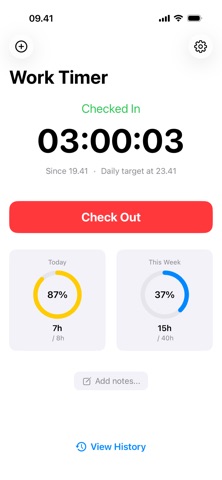
It's fast, native, and private. No account, no sign-up, no subscription. Tap once to check in, tap again to check out.
WHY WORKTIMER
• Built around targets — track progress toward daily and weekly hour goals, not just a running clock
• Automatic break merging — a quick coffee break won't split your session in two
• Live timer with today and this-week totals at a glance
• Add or edit past sessions whenever you forget to check in
• Full session history, grouped by week
• Syncs across your iPhone and iPad through your private iCloud
• Available in 11 languages
WORKTIMER PRO
WorkTimer is free to use. A single one-time purchase unlocks the power features — no subscription, ever:
• Apple Watch app — check in and out from your wrist, fully synced
• Smart daily targets that rebalance your remaining hours across the week
• Time off — log sick days, vacation, and paid leave toward your targets
• Banked overtime — carry extra hours from last week into the new one
• Target notifications — get alerted the moment you reach your goal
• Siri Shortcuts & WiFi automations — check in hands-free when you arrive at work
• CSV export — send your data anywhere for invoicing or analysis
• Keep your complete history (the free plan keeps your most recent two months)
Already bought WorkTimer when it was a paid app? You keep every Pro feature for free — automatically.
PRIVATE BY DESIGN
WorkTimer collects nothing. There are no analytics, no ads, and no third-party trackers. Your sessions live on your device and sync only through your own iCloud account — no one else can see them, including us.
Safety and technology
Found in the app by AppBrain- Price
- Free
- App size
- 4.50 MB
- Content rating
- Everyone
Technologies used by Your Working Hours
Releases
Updates seen on the App Store- Version
- 1.23
- Launched
- November 2025
No changelog data
Alternatives
Similar apps and more from Malte Rosenbjerg AndersenMore from Malte Rosenbjerg Andersen


Rankings
App Store top chartsApp Store Rankings for Your Working Hours
About the app and developer
About Your Working Hours
Your Working Hours is an utilities app developed by Malte Rosenbjerg Andersen.
What is the rating of Your Working Hours?
Your Working Hours has no ratings yet.
Is Your Working Hours free?
Your Working Hours is free. The app size is 4.50 MB. The latest version available is 1.23. The last update was on September 21, 2026.
What are the requirements for Your Working Hours?
The app has a content rating of Everyone. The app has been available on the App Store since November 2025.
Your Working Hours is made and published by Malte Rosenbjerg Andersen. AppBrain is an independent app data site and isn't affiliated with Malte Rosenbjerg Andersen. The app name, icon, screenshots and description belong to Malte Rosenbjerg Andersen and are shown as published on the App Store.
Developer information for Malte Rosenbjerg Andersen
Address: