

ZARO KSA
ZARO KSA is made and published by Creative Solutions Company. AppBrain is an independent app data site and isn't affiliated with Creative Solutions Company. The app name, icon, screenshots and description belong to Creative Solutions Company and are shown as published on the App Store.
AppBrain's verdict
- Last updated
- July 27, 2026
Rankings
App Store top chartsApp Store Rankings for ZARO KSA
Competitors
Similar apps and more from Creative Solutions CompanyAlternatives to ZARO KSA


More from Creative Solutions Company


Releases
Updates seen on the App Store- Version
- 1.0.3
- Launched
- May 2026
No changelog data
User feedback
Ratings and reviews on the App StoreComments on ZARO KSA for iOS
We don't have enough comments to show example comments. Please check back later.
Technology
Found in the app by AppBrain- Price
- Free
- App size
- 72.9 MB
- Content rating
- Everyone
Technologies used by ZARO KSA
About the app and developer
About ZARO KSA
ZARO KSA is a food & drink app developed by Creative Solutions Company.
User Ratings
The app has no ratings yet.
App Information
ZARO KSA is freely available from the App Store. The app size is 72.91 MB. The latest version available is 1.0.3. The last update was on July 27, 2026.
Technical Requirements
The app has a content rating of Everyone. The app has been available on the App Store since May 2026.
Developer information for Creative Solutions Company
Address:
Frequently asked questions about ZARO KSA
Is ZARO KSA free?
Yes. ZARO KSA is free on the App Store.
Is ZARO KSA still available?
Yes. ZARO KSA is on the App Store, and the last update we saw was on July 27, 2026.
How large is ZARO KSA?
ZARO KSA is 72.91 MB.
Is ZARO KSA suitable for children?
App Store rates the content of ZARO KSA as suitable for everyone.
Who made ZARO KSA?
ZARO KSA was developed by Creative Solutions Company. It is listed in the food & drink category on the App Store.
What are the best alternatives to ZARO KSA?
People looking at ZARO KSA also look at these food & drink apps: iHealthy, Carpdiem.lounge, The Drip Café, CupTaster, Village Diet.
Store listing
By Creative Solutions Company, from the App Store


Description by Creative Solutions Company Written by the developer, not by AppBrain. Click to read.
Key Innovations in the Zaro® Mobile App:
Discover New Products & Offers: Stay ahead of the curve by discovering upcoming products and exclusive offers tailored to your preferences. This feature allows you to be the first to know about special deals and menu additions.
Exclusive Offers & Deals: The app brings you personalized promotions, offering a range of exciting deals and savings that are customized just for you.
Live Order Tracking: Keep tabs on your order with real-time notifications. From the moment you place your order to the moment it arrives at your door, the app ensures you're updated every step of the way.
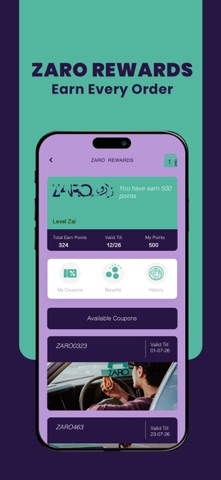
Reward Program: With every purchase, earn points and redeem them for exciting rewards. The more you order, the more you benefit—unlocking exclusive offers, rewards, and experiences through a simple and rewarding loyalty system.
Top Sellers & New Launches: Explore the best of Zaro by browsing the top-selling items or discovering the latest additions to the menu. This feature ensures you never miss out on the hottest products.
How the Zaro® Mobile App Ordering Process Works:
1.Download the App & Select Your Language: Begin by downloading the Zaro® mobile app from your app store. Once installed, you can easily select your preferred language for a tailored user experience.
2.Choose Your Dining Option: On the main screen, select the “Pickup or CurbSide” option. This simple step allows you to decide whether you'd prefer to enjoy your meal at a Zaro® location or take it home.
3.Select Your Nearest Store: The app uses advanced location services to present you with a list of nearby Zaro® stores. Choose the store that’s most convenient for you, ensuring a smooth ordering process.
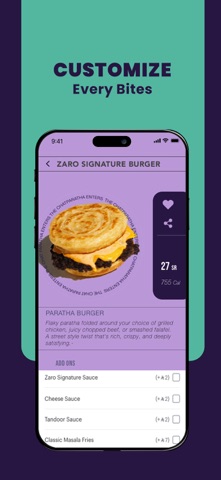
4.Explore the Menu: Browse through the app’s menu, showcasing the best-selling items and a wide variety of Zaro® offerings. Whether you're craving something familiar or looking to try something new, the menu is just as comprehensive as it is in-store.
5.Add Items to Your Cart: Once you've selected your desired food products, simply tap the “Add” button to place them in your cart. You can review your order anytime by clicking “View Cart,” where you’ll see a detailed summary, including prices and quantities, to ensure everything is perfect before proceeding.
6.Proceed to Checkout: After reviewing your cart, tap “Checkout” to confirm the details of your order. The system will display a comprehensive overview, including estimated pickup, dine-in, or delivery times, your delivery address, and any available time slots. You’ll have the flexibility to adjust these details before finalizing the order.
7.Select Payment & Confirm Your Order: Choose your preferred payment method and click “Confirm Order.” Once confirmed, you’ll receive an email with a summary of your order and all the necessary details for pickup, dine-in, or delivery.
With just a few taps, the Zaro® app ensures a seamless and enjoyable ordering experience, giving you control, convenience, and confidence at every step of the way.