

ZenClock: Minimal Clock
ZenClock: Minimal Clock is made and published by Socially Conscious Software LLC. AppBrain is an independent app data site and isn't affiliated with Socially Conscious Software LLC. The app name, icon, screenshots and description belong to Socially Conscious Software LLC and are shown as published on the App Store.
AppBrain's verdict
Established- Rating on App Store
- 3.00
- 2 ratings
- Last updated
- August 14, 2026
It doesn't have enough ratings yet to judge what users think.
Rankings
App Store top chartsApp Store Rankings for ZenClock: Minimal Clock
Competitors
Similar apps and more from Socially Conscious Software LLCAlternatives to ZenClock: Minimal Clock



More from Socially Conscious Software LLC


Releases
Updates seen on the App Store- Version
- 26.4
- Launched
- July 2015
No changelog data
User feedback
Ratings and reviews on the App StoreComments on ZenClock: Minimal Clock for iOS
We don't have enough comments to show example comments. Please check back later.
Technology
Found in the app by AppBrain- Price
- Free
- App size
- 8.19 MB
- Content rating
- Everyone
Technologies used by ZenClock: Minimal Clock
About the app and developer
About ZenClock: Minimal Clock
ZenClock: Minimal Clock is an utilities app developed by Socially Conscious Software LLC.
User Ratings
ZenClock: Minimal Clock is rated 3.00 out of 5 stars. The rating is based on 2 ratings.
App Information
ZenClock: Minimal Clock is freely available from the App Store. The app size is 8.19 MB. The latest version available is 26.4. The last update was on August 14, 2026.
Technical Requirements
The app has a content rating of Everyone. The app has been available on the App Store since July 2015.
Developer information for Socially Conscious Software LLC
Socially Conscious Software LLC
Address:
Frequently asked questions about ZenClock: Minimal Clock
Is ZenClock: Minimal Clock free?
Yes. ZenClock: Minimal Clock is free on the App Store.
Is ZenClock: Minimal Clock still available?
Yes. ZenClock: Minimal Clock is on the App Store, and the last update we saw was on August 14, 2026.
How large is ZenClock: Minimal Clock?
ZenClock: Minimal Clock is 8.19 MB.
Is ZenClock: Minimal Clock suitable for children?
App Store rates the content of ZenClock: Minimal Clock as suitable for everyone.
How do people rate ZenClock: Minimal Clock?
ZenClock: Minimal Clock scores 3.00 out of 5 stars, from 2 ratings on the App Store.
Who made ZenClock: Minimal Clock?
ZenClock: Minimal Clock was developed by Socially Conscious Software LLC. It is listed in the utilities category on the App Store.
What are the best alternatives to ZenClock: Minimal Clock?
People looking at ZenClock: Minimal Clock also look at these utilities apps: S3 Clock, Redo Calculator, My Table Clock, A Book of Colors, Grafo for Zabbix.
Store listing
By Socially Conscious Software LLC, from the App Store

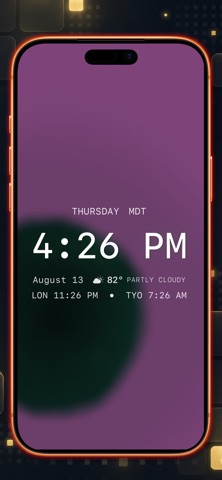


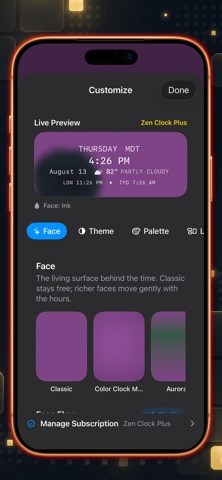
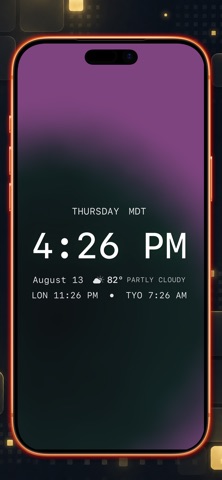
Description by Socially Conscious Software LLC Written by the developer, not by AppBrain. Click to read.
We intentionally avoided building a generic alarm, timer, or productivity app. Instead, Zen Clock’s promise is simple: make checking the time feel quiet, polished, and visually intentional.
Signature Color Clock Modes
Experience time as a living color, not just digits. Our signature Color Clock modes transform the current time into a shifting, live background gradient.
Full Spectrum: Maps Unix time across the entire color spectrum.
Day Mode: Maps the current day from midnight to night.
Hour Mode: Maps the current hour from the top to the end of the hour.
Curated Visual Themes & Typography
Choose from seven striking visual themes, including White on Black, Black on White, White on Blue, Red on Black, and our signature Color Clock modes. Pair your theme with four distinct typographic styles (Zen, Rounded, Mono, and Serif) to make your clock feel airy, friendly, precise, or editorial.
Composed for Your Space
With our preview-first settings, you aren't just toggling options—you are composing a timepiece. Choose the layout that fits your environment:
Pure: The ultimate minimalist experience. Time only.
Calendar: Elegantly integrates the weekday and date.
Editorial: A beautiful, designed asymmetric composition.
Board: A restrained status surface that gracefully holds supporting information without overpowering the time.
Supporting Context (Premium)
For those who want a bit more at a glance, Zen Clock gracefully integrates extra details without the clutter. Add a curated World Clock rail to display up to two global cities (such as Los Angeles, New York, London, Paris, Tokyo, or Sydney). Access live local weather conditions and temperatures seamlessly integrated into your composed layout while the app is open.
Home Screen Widget
Bring a touch of Zen Clock to your Home Screen with our included minimal clock widget, featuring a stark black background, crisp white text, and our signature aesthetic.
Terms of Use: https://www.apple.com/legal/internet-services/itunes/dev/stdeula/
Privacy Policy: https://sociallycs.com/privacy.html