




AppBrain's verdict
- Rating on App Store
- 4.78
- 18 ratings
- Last updated
- November 11, 2026
- Size
- 9.30 MB
It doesn't have enough ratings yet to judge what users think.
User feedback
Ratings and reviews on the App StoreComments on ZeroAds: DNS Ad Blocker for iOS
We don't have enough comments to show example comments. Please check back later.
Store listing
By Aifinity Solutions, from the App StoreDescription by Aifinity Solutions Written by the developer, not by AppBrain. Click to read.
That is all it does.
Pick a filter list and ZeroAds points your iPhone at the public encrypted-DNS
resolver that publishes it. That operator declines to resolve advertising and
tracking domains, so those domains never load — in apps and in Safari, not just
in the browser. Filtering happens on the operator's servers, using their own
published list.
AD BLOCKING IN SAFARI
ZeroAds includes a Safari content blocker: a rule list Safari compiles and
enforces itself. It is free and does not need Pro. Switch it on under
Settings › Apps › Safari › Extensions › ZeroAds.
It covers what a DNS resolver cannot reach:
• Ad slots left behind in the page, so a blocked ad leaves no gap.
• Cookie-consent pop-ups — OneTrust, Cookiebot, CookieYes, Quantcast, TrustArc
and others. These are part of the site's own HTML, so no DNS filter can
touch them.
• Ad and tracker requests matched by path, not only by domain.
All 93 rules are hand-written for this app.
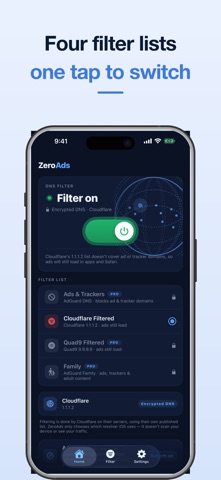
FOUR FILTER LISTS — ONE FREE, THREE WITH PRO
• Cloudflare Filtered — Cloudflare 1.1.1.2. Free. Cloudflare's own
flagged-domain list. Advertising domains are not on it, so ads still load.
• Ads & Trackers — AdGuard DNS Default. Requires Pro. Declines to resolve
advertising and tracking domains.
• Quad9 Filtered — Quad9 9.9.9.9. Requires Pro. A non-profit resolver applying
its published block list. Advertising domains are not on it, so ads still
load.
• Family — AdGuard Family. Requires Pro. Advertising and tracking domains plus
adult-content domains.
Switch lists whenever you like. Changing list is instant, and so is turning
filtering on and off.
NO VPN
ZeroAds does not use a VPN or a packet tunnel. There is no VPN icon in your
status bar, nothing runs in the background, and there is no battery cost from
a tunnel. iOS sends DNS queries straight to the resolver you chose.
WHAT ZEROADS DOES NOT DO
• It does not block ads inside YouTube. YouTube serves video ads from the same
hostnames as the video itself, so no DNS-based blocker can separate the two —
blocking those hosts would stop playback. The same applies to any app serving
ads from its own domains.
• It does not scan your device, check it for viruses or malware, or look for
security or privacy problems.
• It does not inspect your traffic.
• It runs no server of its own and never receives your DNS queries.
• It shows no count of what was blocked. iOS gives the app no visibility into
what the resolver did, so any number here would be invented.
HOW iOS HANDLES THIS
iOS keeps the choice of DNS resolver with you. When you turn the filter on, iOS
may ask you to allow it — tap Allow and you are done. If it does not ask, the
choice lives in Settings and ZeroAds walks you there. You can switch back to
Automatic at any time under Settings › General › VPN, DNS & Device Management.
Filter lists are operated by AdGuard, Cloudflare and Quad9. Each operator's
privacy policy is linked inside the app.
———
ZeroAds Pro unlocks the AdGuard DNS Default, Quad9 and AdGuard Family lists.
Cloudflare Filtered and the Safari rule list stay free. If you installed
ZeroAds before this version, all four lists remain available on your install.
ZeroAds Pro is offered as a monthly or yearly subscription, or as a one-time
Lifetime purchase. The yearly plan includes a 3-day free trial; any unused
portion of that trial is forfeited when you buy a subscription. Payment is
charged to your Apple Account at confirmation of purchase. A subscription
renews automatically unless auto-renew is switched off at least 24 hours before
the end of the current period, and your account is charged for renewal within
24 hours of the end of that period. Manage or cancel subscriptions in
Settings › Apple Account › Subscriptions.
Terms of Use (EULA): https://www.apple.com/legal/internet-services/itunes/dev/stdeula/
Privacy Policy: https://aifinitysolutions.com/zero-ads-privacy-policy/
Safety and technology
Found in the app by AppBrain- Price
- Free
- App size
- 9.30 MB
- Content rating
- Everyone
Technologies used by ZeroAds: DNS Ad Blocker
Releases
Updates seen on the App Store- Version
- 1.2.0
- Launched
- August 2026
No changelog data
Alternatives
Similar apps and more from Aifinity Solutions


Rankings
App Store top chartsApp Store Rankings for ZeroAds: DNS Ad Blocker
About the app and developer
About ZeroAds: DNS Ad Blocker
ZeroAds: DNS Ad Blocker is an utilities app developed by Aifinity Solutions.
User Ratings
ZeroAds: DNS Ad Blocker is rated 4.78 out of 5 stars. The rating is based on 18 ratings.
App Information
ZeroAds: DNS Ad Blocker is freely available from the App Store. The app size is 9.30 MB. The latest version available is 1.2.0. The last update was on November 11, 2026.
Technical Requirements
The app has a content rating of Everyone. The app has been available on the App Store since August 2026.
ZeroAds: DNS Ad Blocker is made and published by Aifinity Solutions. AppBrain is an independent app data site and isn't affiliated with Aifinity Solutions. The app name, icon, screenshots and description belong to Aifinity Solutions and are shown as published on the App Store.
Developer information for Aifinity Solutions
Address: