

Zip, 7Z, RAR File Extractor
Zip, 7Z, RAR File Extractor is made and published by TGAPPS GlOBAL. AppBrain is an independent app data site and isn't affiliated with TGAPPS GlOBAL. The app name, icon, screenshots and description belong to TGAPPS GlOBAL and are shown as published on the App Store.
AppBrain's verdict
- Last updated
- February 28, 2026
Rankings
App Store top chartsApp Store Rankings for Zip, 7Z, RAR File Extractor
Competitors
Similar apps and more from TGAPPS GlOBALMore from TGAPPS GlOBAL


Releases
Updates seen on the App Store- Version
- 1.5
- Launched
- August 2025
No changelog data
User feedback
Ratings and reviews on the App StoreComments on Zip, 7Z, RAR File Extractor for iOS
We don't have enough comments to show example comments. Please check back later.
Technology
Found in the app by AppBrain- Price
- Free
- App size
- 132.1 MB
- Content rating
- Everyone
Technologies used by Zip, 7Z, RAR File Extractor
About the app and developer
About Zip, 7Z, RAR File Extractor
Zip, 7Z, RAR File Extractor is an utilities app developed by TGAPPS GlOBAL.
What is the rating of Zip, 7Z, RAR File Extractor?
Zip, 7Z, RAR File Extractor has no ratings yet.
Is Zip, 7Z, RAR File Extractor free?
Zip, 7Z, RAR File Extractor is free. The app size is 132.13 MB. The latest version available is 1.5. The last update was on February 28, 2026.
What are the requirements for Zip, 7Z, RAR File Extractor?
The app has a content rating of Everyone. The app has been available on the App Store since August 2025.
Developer information for TGAPPS GlOBAL
Address:
Frequently asked questions about Zip, 7Z, RAR File Extractor
Is Zip, 7Z, RAR File Extractor free?
Yes. Zip, 7Z, RAR File Extractor is free on the App Store.
Is Zip, 7Z, RAR File Extractor still available?
Yes. Zip, 7Z, RAR File Extractor is on the App Store, and the last update we saw was on February 28, 2026.
How large is Zip, 7Z, RAR File Extractor?
Zip, 7Z, RAR File Extractor is 132.13 MB.
Is Zip, 7Z, RAR File Extractor suitable for children?
App Store rates the content of Zip, 7Z, RAR File Extractor as suitable for everyone.
Who made Zip, 7Z, RAR File Extractor?
Zip, 7Z, RAR File Extractor was developed by TGAPPS GlOBAL. It is listed in the utilities category on the App Store.
Store listing
By TGAPPS GlOBAL, from the App Store


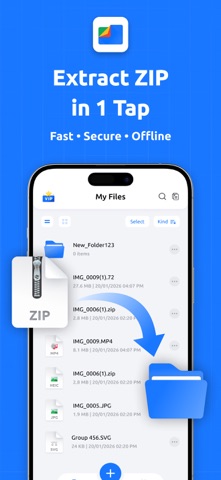


Description by TGAPPS GlOBAL Written by the developer, not by AppBrain. Click to read.
With Zip & RAR Extractor Pro, you get a powerful yet simple way to open, create, and protect your files. Supporting all major formats — ZIP, dZip, RAR, TAR, and 7z — this app makes file management faster, easier, and more secure.
Manage your files like a pro on iPhone & iPad!
This app is the ultimate file extractor, compressor, and archive manager for ZIP, RAR, 7z, Tar, DZip and more. Whether you’re unzipping an email attachment, compressing photos before sharing, or protecting confidential documents, this all-in-one tool has you covered.
Key Features – Explained in Detail
► Extract & Compress Archives
Open any file in popular formats like ZIP, RAR, 7z, TAR, or dZip. You can also create your own compressed files to save space on your device. For example, instead of sending 20 photos one by one, you can put them all in one ZIP file and share them together.
► Convert Archive Formats
Some apps or devices only support certain file types. With this app, you can convert one archive into another — for example, turn a RAR file into a ZIP file. This makes it easier to share with friends, coworkers, or apps that only open ZIP files.
► Decompress Fast
No more waiting. The app can quickly unzip and open large archives in seconds, so you can get to your photos, videos, or documents right away.
► Smart Search (Inside Archives)
Search inside your ZIP, RAR, or 7z files without extracting them first. Just type the name of the file you’re looking for, and the app will find it instantly inside the archive. This saves time and avoids unnecessary extractions.
► Set Passwords
If you want to keep your files private, you can add a password before compressing them. Only people with the password can open the file. This is perfect for sensitive work documents or personal files.
► Secure Lock
Besides password-protecting your archives, you can also set a secure lock inside the app itself. This means even if someone opens the app, they won’t be able to see your private files without entering your lock code.
► Import from Anywhere
Bring in files from almost anywhere: iCloud Drive, Files app, Google Drive, Dropbox, OneDrive, Photos, or your device’s storage. You don’t have to worry about where your files are saved — you can open them directly here.
► Home Screen Quick Access Widget
The Home Screen widget shows your most recent files, so you don’t even need to open the app. Just tap the widget and instantly access your last opened or created file.
► Built-in Media & Document Viewer
Preview extracting stuff! The built-in media viewer lets you check photos, play videos or music, and open PDFs or text files without leaving the app.
► Easy File Sharing
Once your file is ready, you can share it in seconds. Send via Mail, Messages, AirDrop, or any app you already use. For example, compress your photos into a ZIP and send them to a friend, or unzip a RAR file from an email and forward the documents right away.
Why Choose Our App?
• Works with all major archive formats (ZIP, RAR, 7z, Tar, DZip, and more).
• Saves storage space with smart compression.
• Keeps files private with passwords & secure lock.
• Clean, professional design — easy for anyone to use.
• Lightweight, fast, and designed for smooth iOS performance.
• Trusted by students, professionals, and everyday users worldwide.
Subscription Info
• Unlock all premium features and remove ads with a subscription.
• Payment charged to iTunes at purchase.
• Auto-renews unless turned off 24h before renewal.
• Manage anytime in iTunes settings.
Privacy Policy: https://tgappsglobal.com/privacy.html
Terms of Use: https://tgappsglobal.com/terms.html
For any questions or requests, contact us at : info@tgappsglobal.com