

Zip Extractor - Zip Unzip File
Zip Extractor - Zip Unzip File is made and published by Haresh Purbiya. AppBrain is an independent app data site and isn't affiliated with Haresh Purbiya. The app name, icon, screenshots and description belong to Haresh Purbiya and are shown as published on the App Store.
AppBrain's verdict
- Rating on App Store
- 5.00
- 5 ratings
- Last updated
- January 8, 2026
It doesn't have enough ratings yet to judge what users think.
Rankings
App Store top chartsApp Store Rankings for Zip Extractor - Zip Unzip File
Competitors
Similar apps and more from Haresh PurbiyaAlternatives to Zip Extractor - Zip Unzip File





More from Haresh Purbiya


Releases
Updates seen on the App Store- Version
- 1.2.5
- Launched
- December 2022
No changelog data
User feedback
Ratings and reviews on the App StoreComments on Zip Extractor - Zip Unzip File for iOS
We don't have enough comments to show example comments. Please check back later.
Technology
Found in the app by AppBrain- Price
- Free
- App size
- 46.0 MB
- Content rating
- Everyone
Technologies used by Zip Extractor - Zip Unzip File
About the app and developer
About Zip Extractor - Zip Unzip File
Zip Extractor - Zip Unzip File is an utilities app developed by Haresh Purbiya.
User Ratings
Zip Extractor - Zip Unzip File is rated 5.00 out of 5 stars. The rating is based on 5 ratings.
App Information
Zip Extractor - Zip Unzip File is freely available from the App Store. The app size is 45.98 MB. The latest version available is 1.2.5. The last update was on January 8, 2026.
Technical Requirements
The app has a content rating of Everyone. The app has been available on the App Store since December 2022.
Developer information for Haresh Purbiya
Address:
Frequently asked questions about Zip Extractor - Zip Unzip File
Is Zip Extractor - Zip Unzip File free?
Yes. Zip Extractor - Zip Unzip File is free on the App Store.
Is Zip Extractor - Zip Unzip File still available?
Yes. Zip Extractor - Zip Unzip File is on the App Store, and the last update we saw was on January 8, 2026.
How large is Zip Extractor - Zip Unzip File?
Zip Extractor - Zip Unzip File is 45.98 MB.
Is Zip Extractor - Zip Unzip File suitable for children?
App Store rates the content of Zip Extractor - Zip Unzip File as suitable for everyone.
How do people rate Zip Extractor - Zip Unzip File?
Zip Extractor - Zip Unzip File scores 5.00 out of 5 stars, from 5 ratings on the App Store.
Who made Zip Extractor - Zip Unzip File?
Zip Extractor - Zip Unzip File was developed by Haresh Purbiya. It is listed in the utilities category on the App Store.
What are the best alternatives to Zip Extractor - Zip Unzip File?
People looking at Zip Extractor - Zip Unzip File also look at these utilities apps: UnZipper - Unzip & File Opener, RAR & Zip File Extractor, AZIP Master: ZIP, RAR & Unzip, RAR Opener, Zarchiver, ZIP Extractor - Unzip, Unrar.
Store listing
By Haresh Purbiya, from the App Store


Description by Haresh Purbiya Written by the developer, not by AppBrain. Click to read.
Zip Extractor app comes with a full-featured file management system that makes it easy to manage multiple files at once. You can perform Zip Files/Folders and can perform Rename, delete, share, Copy/Move actions.
Zip Extractor has the following features:
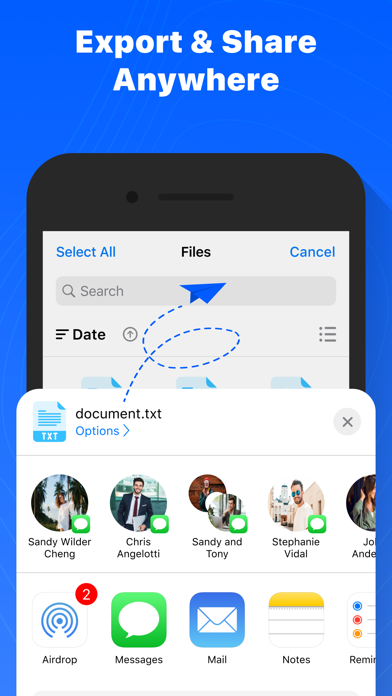
• Connect directly to your Dropbox, Google Drive, OneDrive and iCloud accounts to zip, unzip and share files
• Zip your cloud storage files, unzip files to your accounts, and create and save .zip and .zipx files to your accounts
• Send or copy links to your files in your cloud storage accounts
• Copy files from your cloud storage accounts and save them on your device
• Unzip major compressed file types, including .ZIP, .ZIPX, .RAR, .7z, LHA, TAR, GZIP, JAR, and more with just a tap.
• Secure your zip file with AES encrypted password and Unzip files from ZIP format, including password-protected and AES encrypted ZIP files.
• Choose Zip or Zipx format to compress and email large files, photos and videos with ease
• Zip and share photos and videos from your Camera Roll, iCloud & other apps
• Use Zip app to access music files on your device and save them to your cloud accounts
• Send files to other iOS users with integrated support for AirDrop
• Protect your files before you save and share with powerful 128- or 256-bit AES encryption
• Open and save email attachments to your connected cloud storage accounts or My Documents folder on your iPhone or iPad
• Easily view all images in a Zip file with the enhanced image viewer
• Browse your Photo Album and easily multi-select, zip and share photo collections
• Share photos in your zip files to Facebook and Twitter
• Download or upload files from/to Zip Extractor app through iTunes/iTools
• Unzip and view most common file types, including: .doc, .docx, .xls, .xlsx, .ppt, .pptx, .pages (including new iWork 13), .numbers (including new iWork 13), .key, .rtf, .pdf, .jpg, .png, .bmp, .gif, .tif, and more
• Scan any document with Scanner feature
• Security Support: Passcode lock with Touch ID & Face ID.
SUBSCRIPTIONS:
- You can subscribe for a premium account with unlimited scans products info, Open "Zip Extractor App" with all features unlock and no ads
1) $4.99 per month
2) $19.99 per year
3) One-time purchase at $29.99
Payment will be charged to iTunes Account at confirmation of purchase
– Subscription automatically renews unless auto-renew is turned off at least 24-hours before the end of the current period
– Account will be charged for renewal within 24-hours prior to the end of the current period, and identify the cost of the renewal
– Subscriptions may be managed by the user and auto-renewal may be turned off by going to the user's Account Settings after purchase
– Any unused portion of a free trial period, if offered, will be forfeited when the user purchases a subscription to that publication, where applicable
Terms of use: https://zipnrar.com/terms-of-use.html
Privacy policy: https://zipnrar.com/privacy-policy.html
With its simple interfaces, Zip Extractor provides the easiest way to manage ZIP files on iPhones and iPad. If you find this app useful, please take the time to write us a review. We would love to hear from you!