

Zone: World Clock
Zone: World Clock is made and published by Vlad Zhila. AppBrain is an independent app data site and isn't affiliated with Vlad Zhila. The app name, icon, screenshots and description belong to Vlad Zhila and are shown as published on the App Store.
AppBrain's verdict
- Last updated
- April 3, 2026
Rankings
App Store top chartsApp Store Rankings for Zone: World Clock
Competitors
Similar apps and more from Vlad ZhilaMore from Vlad Zhila


Releases
Updates seen on the App Store- Version
- 1.2
- Launched
- March 2026
No changelog data
User feedback
Ratings and reviews on the App StoreComments on Zone: World Clock for iOS
We don't have enough comments to show example comments. Please check back later.
Technology
Found in the app by AppBrain- Price
- $4.99
- App size
- 7.38 MB
- Content rating
- Everyone
Technologies used by Zone: World Clock
About the app and developer
About Zone: World Clock
Zone: World Clock is an utilities app developed by Vlad Zhila.
User Ratings
The app has no ratings yet.
App Information
Zone: World Clock costs $4.99. The app size is 7.38 MB. The latest version available is 1.2. The last update was on April 3, 2026.
Technical Requirements
The app has a content rating of Everyone. The app has been available on the App Store since March 2026.
Developer information for Vlad Zhila
Address:
Store listing
By Vlad Zhila, from the App Store


Description by Vlad Zhila Written by the developer, not by AppBrain. Click to read.
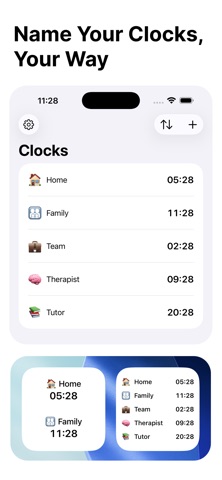
Add any city or timezone, give it a custom name and emoji, then see all your clocks at a glance — always up to date, always on your Home Screen.
EVERY TIME ZONE AT A GLANCE
Search for any city, country, or region. Zone automatically detects the timezone and adds a flag emoji. Rename clocks to anything — "Mom", "London Office", "Tokyo HQ" — and pick a custom emoji to make each one yours.
TIME TRAVEL
Slide through time to plan ahead. Preview what all your clocks will show up to 12 hours in the past or future. Perfect for scheduling calls across continents without mental math.
HOME SCREEN WIDGETS
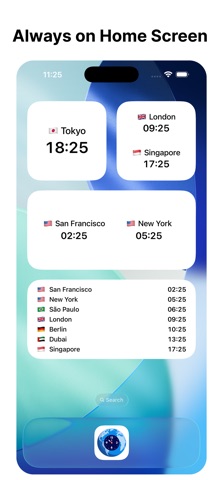
Keep your most important clocks visible without opening the app. Small and medium widgets let you choose exactly which clocks to display, and they update automatically with your settings.
MAKE IT YOURS
• 12-hour or 24-hour format
• Show or hide emoji icons
• Day offset badges (+1/−1) for clocks on a different day
• Light, Dark, or System appearance
• Sort clocks by earliest or latest timezone first, or drag to reorder manually
PRIVATE BY DESIGN
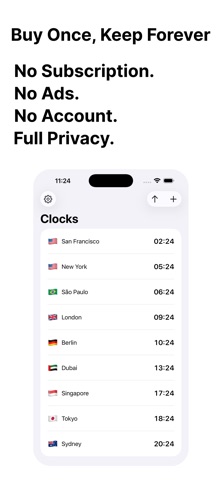
Zone works entirely offline. No accounts, no cloud sync, no tracking, no ads. Your data stays on your device — period.
Whether you're a remote worker, frequent traveler, or just keeping up with family abroad — Zone gives you the world's time in the simplest way possible.