

ZZikZZa
by seungchan moon
· Photo & Video
· Free
On the App Store since November 2025
· Data updated
ZZikZZa is made and published by seungchan moon. AppBrain is an independent app data site and isn't affiliated with seungchan moon. The app name, icon, screenshots and description belong to seungchan moon and are shown as published on the App Store.
AppBrain's verdict
- Last updated
- October 21, 2026
- Size
- 49.3 MB
User feedback
Ratings and reviews on the App StoreComments on ZZikZZa for iOS
We don't have enough comments to show example comments. Please check back later.
Store listing
By seungchan moon, from the App Store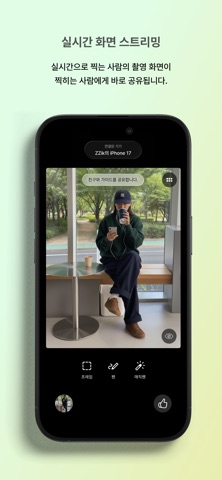

Screenshots by seungchan moon, from the the App Store listing
Description by seungchan moon Written by the developer, not by AppBrain. Click to read.
Have you ever asked a friend to take your photo but felt disappointed with how it turned out?
Or have you ended up retaking photos over and over because neither of you was satisfied with the result?
From now on, ZZikZZa is here to solve those problems for you!
- Live screen streaming
The photographer’s live camera view is instantly shared with the person being photographed. You can see yourself in real time, strike the right pose, and give immediate feedback.
- Instant access to photos with no extra sharing
Photos taken on your friend’s phone are saved to your phone right away. No more hassle with AirDrop or sending photos one by one in chat apps – check your photos instantly.
- Upload the reference Image
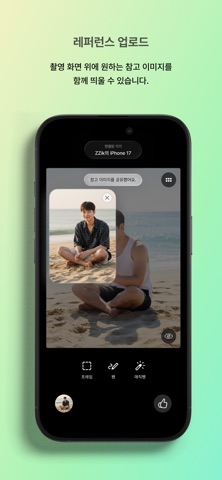
Overlay a reference image on the camera screen to guide the composition and mood. Easily convey the specific vibe you want without needing complex explanations.
- Guide tools
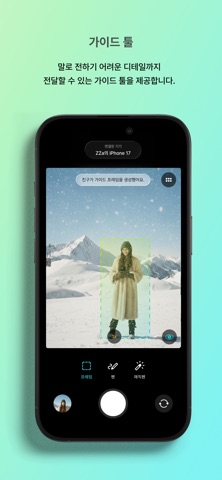
Use guide tools to communicate detailed directions that are hard to explain verbally while shooting. Try markup with a pen, an auto-disappearing magic pen, and frames that help set up the overall composition.
- Other camera features
Zoom, front/rear camera switch, flash, LIVE, grid, and guide toggle features are also available to support your photos.
- Pairing and Connection
Connect your devices to start communicating. If it’s your first time connecting with a friend, simply follow the in-app instructions to pair.
- Supported Devices
iPhone 12, iPhone 12 mini, iPhone 12 Pro, iPhone 12 Pro Max, iPhone SE (3rd generation), and all iPhone models released after the iPhone 12.
(Although iPhone SE (2nd generation), iPhone 11, iPhone 11 Pro, and iPhone 11 Pro Max can be updated to iOS 26 or later, these models lack the built-in hardware required for the technology used in ZZikZZa and are therefore not supported.)
Let’s take photos with ZZikZZa!
Or have you ended up retaking photos over and over because neither of you was satisfied with the result?
From now on, ZZikZZa is here to solve those problems for you!
- Live screen streaming
The photographer’s live camera view is instantly shared with the person being photographed. You can see yourself in real time, strike the right pose, and give immediate feedback.
- Instant access to photos with no extra sharing
Photos taken on your friend’s phone are saved to your phone right away. No more hassle with AirDrop or sending photos one by one in chat apps – check your photos instantly.
- Upload the reference Image
Overlay a reference image on the camera screen to guide the composition and mood. Easily convey the specific vibe you want without needing complex explanations.
- Guide tools
Use guide tools to communicate detailed directions that are hard to explain verbally while shooting. Try markup with a pen, an auto-disappearing magic pen, and frames that help set up the overall composition.
- Other camera features
Zoom, front/rear camera switch, flash, LIVE, grid, and guide toggle features are also available to support your photos.
- Pairing and Connection
Connect your devices to start communicating. If it’s your first time connecting with a friend, simply follow the in-app instructions to pair.
- Supported Devices
iPhone 12, iPhone 12 mini, iPhone 12 Pro, iPhone 12 Pro Max, iPhone SE (3rd generation), and all iPhone models released after the iPhone 12.
(Although iPhone SE (2nd generation), iPhone 11, iPhone 11 Pro, and iPhone 11 Pro Max can be updated to iOS 26 or later, these models lack the built-in hardware required for the technology used in ZZikZZa and are therefore not supported.)
Let’s take photos with ZZikZZa!
Safety and technology
Found in the app by AppBrain- Price
- Free
- App size
- 49.3 MB
- Content rating
- Everyone
Technologies used by ZZikZZa
Releases
Updates seen on the App Store- Version
- 1.2.1
- Launched
- November 2025
No changelog data
Alternatives
Similar apps and more from seungchan moonAlternatives to ZZikZZa


Rankings
App Store top chartsApp Store Rankings for ZZikZZa
This app is not ranked
About the app and developer
About ZZikZZa
ZZikZZa is a photo & video app developed by seungchan moon.
What is the rating of ZZikZZa?
ZZikZZa has no ratings yet.
Is ZZikZZa free?
ZZikZZa is free. The app size is 49.33 MB. The latest version available is 1.2.1. The last update was on October 21, 2026.
What are the requirements for ZZikZZa?
The app has a content rating of Everyone. The app has been available on the App Store since November 2025.
Developer information for seungchan moon
Address: