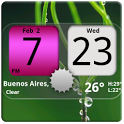
We kept the screenshots from before it was removed. Subscribe to see them.
About Flip Clock NicePink Widget 4x2
Flip Clock NicePink Widget 4x2 was a weather app developed by Factory Widgets. It was removed from Google Play Oct 4, 2014.
Download Statistics
Flip Clock NicePink Widget 4x2 had been downloaded 71 thousand times before it became unavailable.
User Ratings
Flip Clock NicePink Widget 4x2 was rated 3.86 out of 5 stars, based on 670 ratings.
App Information
Flip Clock NicePink Widget 4x2 was free. The APK size was 2.24 MB. The last available APK version was 4.2. The last update was on August 30, 2014.
Technical Requirements
Flip Clock NicePink Widget 4x2 required Android 1.5+ or higher. The app had a content rating of Everyone. The APK had been available on Google Play since May 2010.
Flip Clock NicePink Widget 4x2 was made and published by
Factory Widgets.
AppBrain is an independent app data site and isn't affiliated with Factory Widgets.
The app name, icon and description belong to Factory Widgets and are shown as last published on Google Play.
Description by Factory Widgets(from Google Play)
Android Digital clock widget with Calendar, Time, System info,weather & forecast
A Digital Clock widget with size 4x2 It features: ============ ★ 212 skins to choose from ★ 12 or 24 hour mode ★ Portrait or Landscape mode ★ Color choice for all information displayed on the widget ★ System Information on the widget front or as a pop-up window ★ Shows battery level on the widget ★ Shows Moon phase on the widget thats is calculated automatically each day. ★ Current Weather conditions which include: +Current temperature in Fahrenheit or Celsius +Feels like Temperature +Humidity +Wind speed in Km or miles per hour ★ 2 Weather layouts on clock widget(user selected from configuration screen) ★ 2 Forecast layouts(user selected from configuration screen) ★ 4 Day weather forecast that includes for each day: +High and Low temperature +Precipitation percentage +Weather description ★ Sunrise/Sunset times in either Forecast screens ★ 37 unique weather condition icons ★ Widget hotspots for interaction +tap bottom right widget corner->return to configuration screen +tap bottom left widget corner->popup system information window +tap weather icon->launch forecast screen +tap Hours tab->launch anything!(user selected from configuration screen) +tap Minutes tab->launch anything!(user selected from configuration screen)
STEPS HOW TO ADD A WIDGET ========================== 1.On your Android home screen, tap any blank or “empty” area with size 4x2 and hold down your finger. 2.An “Add to Home screen” window will pop up. From that window, tap “Widgets”. 3.You’ll be presented with a list of all the installed Widgets on your Android device. 4.Select the clock to add to your home screen by tapping it.
Icecream Sandwich ================= On ICS ,you can find the widget in the application drawer, under the tab widgets.Drag and drop the widget on a screen with empty space of 4x2. If not, restart your phone, and the widget will be in the application drawer,under the tab widgets. Drag and drop the widget on a screen with empty space of 4x2.
Notes ===== "Time frozen/not updating"-> taskiller killed the clock(exclude it from taskillers) When phone starts, clock starts in less than a min too.
ROM users-> make sure the clock is NOT moved on SD card. Widgets are not supposed to be on SD card. Move it back to the phone storage.
Weather hint: For world destinations with two words in the name, type in the box the words with a plus sign. For example "Buenos Aires" type "Buenos+Aires",remember the "+" sign -no spaces, don't include the quotes.
Skins: Check our website for help, and send to us your creations.
Email problems/suggestions Check our website for more help.
EXCLUDE IT FROM TASKILLERS!!! Be polite, this is a free app :-)
VIDEO HOW TO ADD WIDGETS http://www.youtube.com/watch?v=DpMLF9b2aTQ
Recent changes: 4.2 * support for more devices * code improvements * fixed weather location problems * added moon phases in the forecast screen. Launch by pressing the moon icon in weather forecast screens for detailed views on moon-phases for the current day, current month and the years half and full phases. * added battery option on the clock * added Sunrise/Sunset times, Day length and hours left in the forecast screen ! -->Please remove and add widget again
Get a detailed PDF report for Flip Clock NicePink Widget 4x2 with download trends, rating history,
and key performance statistics — useful for competitive research or tracking your own app.
Learn more
Comments on Flip Clock NicePink Widget 4x2 for Android
★★★★★
Love the updates to the clock showing weather and such. Looks awesome! Please update other clock designs like this! I love switching them around!
★★★★★
Nice; would be nice if tapping on the widget opened the clock application.
★★★★★
This is a great app. Only problem us it drains the battery super fast. UnInstalled.
★★★★★
I like it a lot and I'm not a girly girl. That being said, the pink doesn't match a lot of what I use so uninstalling til I feel girly again!
★★☆☆☆
Wont let me open it n I have the lg optimus
★★☆☆☆
Nice for a while, then a battery eater This clock was quite nice, offered some good features like showing the battery charge percentage under the time. After three months of operation, it seems to have pulled in some other advertising app which eats the battery within about 26 hours, where normally I would have my phone on for about 3 days before having to charge again. As such I am uninstalling this app, and advise against installing it until the rogue app can be found.
★★☆☆☆
won't even let me open it after i install it on g1, uninstaaaaall
Technologies used by Flip Clock NicePink Widget 4x2
4 permissions·2 libraries
Subscribe to see full permission and library details
Each subscription will automatically renew 3 days before the expiration date for
the same time period. Subscriptions can be cancelled at any time before the renewal.