
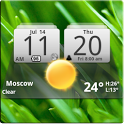
MIUI Digital Weather Clock
MIUI Digital Weather Clock is made and published by Factory Widgets. AppBrain is an independent app data site and isn't affiliated with Factory Widgets. The app name, icon, screenshots and description belong to Factory Widgets and are shown as published on Google Play.
AppBrain's verdict
Removed- Rating on Google Play
- 3.97
- 11,054 ratings
- Installs
- 2.2 million
- Last updated
- March 15, 2015
- Ads
- Contains ads
- Size
- 2.76 MB
MIUI Digital Weather Clock is no longer on Google Play. It was there for 6 years, until November 2017. It was popular, with 2.2 million installs. Users were divided: 4.0 stars from 11,054 ratings.
User feedback
Ratings and reviews on Google PlayComments on MIUI Digital Weather Clock for Android
Google Play Rating history and histogram
The year before it was removed from Google Play, up to November 2017
Store listing
By Factory Widgets, from Google PlaySimilar apps


“MIUI Digital clock widget with Calendar, Time, System info, weather & forecast”
Description by Factory Widgets Written by the developer, not by AppBrain. Click to read.
It features:
12/24 hr+Color on all info displayed
System Stats Info + pop-up
Weather & Forecast
2 Forecast layouts(user choice)
+tap bottom right->preferences
+tap bottom left->system information dialog
+tap weather icon->forecast
+tap Hour->launch anything!(more coming)
+tap Minutes->launch anything!
WIDGETS GENERAL
===============
Widgets on Android work a bit differently than a normal application. Unlike regular programs they don't just install themselves in the application tray so you have to add them manually. They will not open or launch.
Here's how to add a widget on your Android home screen.
STEPS HOW TO ADD A WIDGET
==========================
1.On your Android home screen, tap any blank or “empty” area with size 4x2 and hold down your finger.
2.An “Add to Home screen” window will pop up. From that window, tap “Widgets”.
3.You’ll be presented with a list of all the installed Widgets on your Android device.
4.Select the clock to add to your home screen by tapping it.
Notes
=====
"Time frozen/not updating"-> taskiller killed the clock(exclude it from taskillers)
When phone starts, clock starts in less than a min too.
ROM users-> make sure the clock is NOT moved on SD card.
Widgets are not supposed to be on SD card. Move it back to the phone storage.
Weather hint: For world destinations with two words in the name, type in the box the words with a plus sign.
For example "Buenos Aires" type "Buenos+Aires",remember the "+" sign -no spaces, don't include the quotes.
Email problems/suggestions
Check our website for more help.
EXCLUDE IT FROM TASKILLERS!!!
Be polite, this is a free app :-)
VIDEO HOW TO ADD WIDGETS
http://www.youtube.com/watch?v=DpMLF9b2aTQ
Recent changes:
4.2.4
* weather fixes
4.2
* support for more devices
* many code improvements
* added moon phases in the forecast screen.
Launch by pressing the moon icon in weather forecast screens
for detailed views on moon-phases for the current day, current
month and the years half and full phases.
* added battery option on the clock
* added Sunrise/Sunset times, Day length and hours left in the forecast screen
! -->PLEASE REMOVE AND ADD WIDGET AGAIN
Safety and technology
Found in the app by AppBrain- Ads
- Contains ads
- Price
- Free
- Libraries
- 1
- App size
- 2.76 MB
- Needs Android
- 2.3+
- Content rating
- Unrated
Technologies used by MIUI Digital Weather Clock
Releases
Updates seen on Google Play- Version
- 4.2.4
- Launched
- January 2011
Installs
Tracked by AppBrain- Play install range
- 1+ million
- Launched
- January 2011
About the app and developer
About MIUI Digital Weather Clock
MIUI Digital Weather Clock was a weather app developed by Factory Widgets. It was removed from Google Play Nov 26, 2017.
Install Statistics
MIUI Digital Weather Clock had been installed 2.2 million times before it became unavailable.
User Ratings
MIUI Digital Weather Clock was rated 3.97 out of 5 stars, based on 11 thousand ratings.
App Information
MIUI Digital Weather Clock was free. The app size was 2.76 MB. The last available version was 4.2.4. The last update was on March 15, 2015.
Technical Requirements
MIUI Digital Weather Clock required Android 2.3+ or higher. The app had a content rating of Unrated Maturity. The app had been available on Google Play since January 2011.
App Performance Report
Get a detailed PDF report for MIUI Digital Weather Clock with download trends, rating history, and key performance statistics — useful for competitive research or tracking your own app. Learn more
Get PDF Report — $29Developer information for Factory Widgets
Frequently asked questions about MIUI Digital Weather Clock
Is MIUI Digital Weather Clock free?
Yes. MIUI Digital Weather Clock was free on Google Play.
Is MIUI Digital Weather Clock still available?
No. MIUI Digital Weather Clock was removed from Google Play. We last saw it there Nov 26, 2017.
Does MIUI Digital Weather Clock contain ads?
Yes. Google Play listed MIUI Digital Weather Clock as containing ads.
What Android version does MIUI Digital Weather Clock require?
MIUI Digital Weather Clock ran on Android 2.3 and higher.
How large is MIUI Digital Weather Clock?
MIUI Digital Weather Clock is 2.76 MB.
How many times has MIUI Digital Weather Clock been installed?
Google Play listed 1,000,000+ installs for MIUI Digital Weather Clock.
How do people rate MIUI Digital Weather Clock?
MIUI Digital Weather Clock scored 3.97 out of 5 stars, from 11,054 ratings on Google Play.
Who made MIUI Digital Weather Clock?
MIUI Digital Weather Clock was developed by Factory Widgets. It was listed in the weather category on Google Play.
What are the best alternatives to MIUI Digital Weather Clock?
People looking at MIUI Digital Weather Clock also look at these weather apps: All Weather, 3D Flip Clock & Weather, 3D Flip Clock & Weather Pro, Digital Clock & World Weather, Clock, Date and Weather Widget.