

AppLocker: App Lock & Privacy
AppLocker: App Lock & Privacy is made and published by Appire. AppBrain is an independent app data site and isn't affiliated with Appire. The app name, icon, screenshots and description belong to Appire and are shown as published on Google Play.
AppBrain's verdict
EstablishedWell rated- Rating on Google Play
- 4.45
- 1,180 ratings
- Installs
- 220 thousand
- Last updated
- August 11, 2026
- Ads
- Contains ads
- Size
- 5.60 MB
AppLocker: App Lock & Privacy has 220 thousand installs. Users rate it well: 4.4 stars from 1,180 ratings.
User feedback
Ratings and reviews on Google PlayComments on AppLocker: App Lock & Privacy for Android
Google Play Rating history and histogram
Store listing
By Appire, from Google Play“App lock with fingerprint, PIN & pattern. Intruder selfie catches snoopers.”


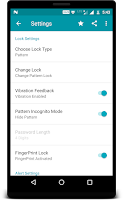
Description by Appire Written by the developer, not by AppBrain. Click to read.
🔒 LOCK ANY APP
Protect WhatsApp, Instagram, Facebook, Messenger, Snapchat, Telegram, Gallery, Photos, Messages, Gmail, Chrome, YouTube, Google Pay, your banking apps — anything installed. You can also lock the recent-apps screen, Android Settings and the Play Store, so nobody can quietly switch protection off or uninstall AppLocker. Install something new and AppLocker offers to lock it on the spot.
👆 THREE WAYS TO UNLOCK
• Fingerprint or face — whichever biometric your phone already uses
• PIN — 4 to 8 digits, your choice of length
• Pattern — draw to unlock
Switch method any time, straight from the lock screen.
📸 INTRUDER SELFIE
Get the lock wrong and AppLocker silently takes a photo with the front camera. No shutter sound, no preview, nothing on screen. You decide whether it fires after 1, 2, 3 or 4 wrong tries. Captures land in a gallery grouped by day, each one labelled with the app they tried to open, the time, and the lock they failed. Open, share or delete them. They stay on your phone.
🚨 IT ESCALATES
AppLocker doesn't just say "wrong password" forever:
• A quiet warning first — one more try before this attempt is logged
• Then the silent capture
• Then an alarm siren, at the volume and for the length you choose, from 15 seconds to 5 minutes
• Then a lockout that grows with every failure — 30 seconds, then a minute, up to five — and survives a reboot
🕶️ NOBODY CAN PEEK
• Pattern incognito — the line stays invisible as you draw it
• Shuffle keypad — the digits move every time, so nobody learns your PIN by watching your fingers
⏱️ RE-LOCK ON YOUR TERMS
Choose when a locked app asks again: immediately, the moment the screen turns off, or after 15 seconds, 30 seconds, 1, 2, 5 or 10 minutes.
🔑 YOU WILL NEVER BE LOCKED OUT
Forgotten your code? Unlock with the same PIN, pattern or biometric you use for the phone itself. No screen lock set? Answer a security question — pick one of ours, or write your own.
🌙 CLEAN AND MODERN
Material 3 throughout, a real dark mode that follows your system setting, a lock screen that shows the icon of the app it's guarding, right-to-left layouts, and around 60 languages.
🎁 FREE, WITH NOTHING TO PAY FOR
AppLocker is ad-supported and has no paid tier. Watch one short video and you get 7 days with no banner ads, plus intruder video clips instead of stills, your own alert sound, and Google Drive backup of your captures. Do it again whenever you like.
⚙️ PERMISSIONS, AND EXACTLY WHY
• Usage access — to see which app just opened, so the lock can appear
• Display over other apps — to draw the lock on top of it
• Camera — only for intruder captures, only if you switch them on
• Notifications — Android needs a permanent notification, or the system kills protection
AppLocker asks for nothing else. Your PIN, pattern, captures and settings stay on your device unless you turn on Drive backup yourself.
🔐 HONEST ABOUT WHAT THIS IS
AppLocker blocks the person holding your phone. It is not protection against someone with your Google account or a computer.
❓ FAQ
I forgot my lock → tap "Forgot" on the lock screen and use your device credential or security question.
Why is there a notification I can't swipe away? → Android stops background apps that don't have one, and your protection stops with it.
Fingerprint isn't offered → enrol one in Android Settings first.
Lock apps with a fingerprint, PIN, pattern or password. Free, private, and it stays out of your way.
Recent changes:
- Capture photo on invalid lock attempt
- Backup of photos
- Ads free option
Safety and technology
Found in the app by AppBrain- Ads
- Contains ads
- Price
- Free
- Libraries
- 13
- App size
- 5.60 MB
- Needs Android
- 4.1+
- Content rating
- Everyone
Technologies used by AppLocker: App Lock & Privacy
Releases
Updates seen on Google Play- Version
- 3.50
- Launched
- September 2017
Alternatives
Similar apps and more from AppireAlternatives to AppLocker: App Lock & Privacy


More from Appire


Installs
Tracked by AppBrain- Last 30 days
- 440
- Per day
- 15
- 30-day average
- Play install range
- 100+ thousand
- Launched
- September 2017
Installs over time
AppLocker: App Lock & Privacy has been installed 220 thousand times. Over the past 30 days, it averaged 15 installs per day.
Rankings
Google Play top chartsGoogle Play Rankings for AppLocker: App Lock & Privacy
About the app and developer
About AppLocker: App Lock & Privacy
AppLocker: App Lock & Privacy is a tools app developed by Appire.
How many times has AppLocker: App Lock & Privacy been installed?
AppLocker: App Lock & Privacy has been installed 220 thousand times. In the last 30 days, the app was installed 440 times.
What is the rating of AppLocker: App Lock & Privacy?
AppLocker: App Lock & Privacy is rated 4.45 out of 5 stars, based on 1.2 thousand ratings.
Is AppLocker: App Lock & Privacy free?
AppLocker: App Lock & Privacy is free. The app size is 5.60 MB. The latest version available is 3.50. The last update was on August 11, 2026.
What are the requirements for AppLocker: App Lock & Privacy?
AppLocker: App Lock & Privacy requires Android 4.1+ or higher. The app has a content rating of Everyone. The app has been available on Google Play since September 2017.
App Performance Report
Get a detailed PDF report for AppLocker: App Lock & Privacy with download trends, rating history, and key performance statistics — useful for competitive research or tracking your own app. Learn more
Get PDF Report — $29