

Gear Fit Navigation
Gear Fit Navigation is made and published by SmartWatch Studios. AppBrain is an independent app data site and isn't affiliated with SmartWatch Studios. The app name, icon, screenshots and description belong to SmartWatch Studios and are shown as published on Google Play.
AppBrain's verdict
EstablishedPoorly rated- Total installs
- 27 thousand
- Rating on Google Play
- 2.33
- 536 ratings
- Last updated
- June 14, 2018
Gear Fit Navigation has 27 thousand installs. Users are critical: 2.3 stars from 536 ratings.
Installs
Tracked by AppBrain- Last 30 days
- 0
- Play install range
- 10+ thousand
- Launched
- October 2014
Installs over time
Gear Fit Navigation has been installed 27 thousand times. Over the past 30 days, it has been installed 0 times.
Rankings
Google Play top chartsGoogle Play Rankings for Gear Fit Navigation
Competitors
Similar apps and more from SmartWatch StudiosAlternatives to Gear Fit Navigation


More from SmartWatch Studios


Releases
Updates seen on Google Play- Version
- 9.34
- Launched
- October 2014
User feedback
Ratings and reviews on Google PlayGoogle Play Rating history and histogram
Comments on Gear Fit Navigation for Android
Technology
Found in the app by AppBrain- Ads
- No ads
- Price
- $1.99
- Libraries
- 4
- App size
- 2.90 MB
- Needs Android
- 4.3+
- Content rating
- Everyone
Technologies used by Gear Fit Navigation
About the app and developer
About Gear Fit Navigation
Gear Fit Navigation is a maps & navigation app developed by SmartWatch Studios.
Install Statistics
Gear Fit Navigation has been installed 27 thousand times. In the last 30 days, the app was installed 0 times.
User Ratings
Gear Fit Navigation is rated 2.33 out of 5 stars. The rating is based on 540 ratings.
App Information
Gear Fit Navigation costs $1.99. The app size is 2.90 MB. The latest version available is 9.34. The last update was on June 14, 2018.
Technical Requirements
Gear Fit Navigation requires Android 4.3+ or higher. The app has a content rating of Everyone. The app has been available on Google Play since October 2014.
App Performance Report
Get a detailed PDF report for Gear Fit Navigation with download trends, rating history, and key performance statistics — useful for competitive research or tracking your own app. Learn more
Get PDF Report — $29Developer information for SmartWatch Studios
Frequently asked questions about Gear Fit Navigation
Is Gear Fit Navigation free?
No. Gear Fit Navigation costs $1.99 on Google Play.
Is Gear Fit Navigation still available?
Yes. Gear Fit Navigation is on Google Play, and the last update we saw was on June 14, 2018.
Does Gear Fit Navigation contain ads?
No. Google Play does not list Gear Fit Navigation as containing ads.
What Android version does Gear Fit Navigation require?
Gear Fit Navigation runs on Android 4.3 and higher.
How large is Gear Fit Navigation?
Gear Fit Navigation is 2.90 MB.
Is Gear Fit Navigation suitable for children?
Google Play rates the content of Gear Fit Navigation as suitable for everyone.
How many times has Gear Fit Navigation been installed?
Google Play lists 10,000+ installs for Gear Fit Navigation.
How do people rate Gear Fit Navigation?
Gear Fit Navigation scores 2.33 out of 5 stars, from 536 ratings on Google Play.
Who made Gear Fit Navigation?
Gear Fit Navigation was developed by SmartWatch Studios. It is listed in the maps & navigation category on Google Play.
What are the best alternatives to Gear Fit Navigation?
People looking at Gear Fit Navigation also look at these maps & navigation apps: Navigation Pro: Maps on Watch, Samsung Gear Fit 2 Pro Guide, Samsung Gear S3 App Guide, Navigation for watch, Animated Gears Watchfaces.
Store listing
By SmartWatch Studios, from Google Play“See Google Navigation instructions on your Samsung Gear Fit 1 smartwatch.”


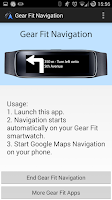


Description by SmartWatch Studios Written by the developer, not by AppBrain. Click to read.
Note:
- Supports horizontal and vertical layout
- Additional to the text it shows icons for left, right, continue, highway exit and u-turn.
- Option to vibrate
- This application only works on devices which have Gear Fit Manager.
How to use:
- Install Gear Fit Manager and connect with your Gear Fit device.
- Download and install this Gear Fit Navigation app.
- Start Gear Fit Navigation app on your phone.
- Allow the app to read notifications. (Go to: Settings > Security > Notification Access and enable Gear Fit Navigation). Then restart the app.
- Start Google Maps Navigation and messages and direction icon will be pushed to your smartwatch.
Troubleshooting
- If the app still only shows the "waiting" message, please ensure that maps notifications are activated and displayed on your phone (Go to: Settings > More > Applications > Maps and enable "Show notifications").
- Restart smartphone AND Gear Fit
- Uninstall and reinstall the app
For non-samsung smartphone users: Gear Fit officially only works with Samsung smartphones. However GearFitManager version 1.108 works as well on phones as with this app, so we recommend to use version 1.108 if you have problems.
For Gear Fit2 please use this app: https://play.google.com/store/apps/details?id=smartwatchstudios.app.gearfit20navigation
SAMSUNG_CUP_ENABLED
Recent changes:
Support for public transport
More energy efficient
Better performance
Improved compatibility