

Recorder Screen Video
Recorder Screen Video is made and published by TPH Software BD. AppBrain is an independent app data site and isn't affiliated with TPH Software BD. The app name, icon, screenshots and description belong to TPH Software BD and are shown as published on Google Play.
AppBrain's verdict
NewNiche- Installs
- 14
- Last updated
- September 18, 2026
- Ads
- Contains ads
- Size
- 9.73 MB
Recorder Screen Video came out 44 days ago. It is a niche app, with 14 installs. It doesn't have enough ratings yet to judge what users think.
User feedback
Ratings and reviews on Google PlayComments on Recorder Screen Video for Android
We don't have enough comments to show example comments. Please check back later.
Store listing
By TPH Software BD, from Google Play“Recorder Screen Video - screen capture with mic, pause, tools, and local saves”




Description by TPH Software BD Written by the developer, not by AppBrain. Click to read.
Recorder Screen Video gives you practical controls before you begin: choose resolution options such as 720p, 1080p, and higher values when your device supports them, pick frame rates like 24, 30, or 60 FPS, and select video quality that matches your lesson, demo, or gameplay clip. You can record with microphone audio, use device audio where Android supports AudioPlaybackCapture, combine both sources, or keep the track muted. Countdown timers, orientation choices, and keep-screen-on settings help you prepare the session the way you want.
While capture is active, Recorder Screen Video runs with a visible recording notification so you can pause, resume, or stop at any time. A floating video icon can stay on screen for quick access to record actions, tools, Home, and Settings. Optional tools include brush markup for on-screen notes, show-touches indicators when the system allows them, screenshots during an active session, and a facecam overlay that uses the front camera only when you turn it on. Closing facecam stops the camera right away.
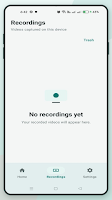
After you stop, Recorder Screen Video saves the file locally, usually under Movies / Screen Recordings or your chosen folder. Open Recordings to play videos in the built-in player, rename files, share through other apps, open in Gallery, or move items to Trash where you can restore them later or delete forever. Light mode, dark mode, and system default appearance are available in Settings.
How to use Recorder Screen Video
1. Connect to Wi-Fi or mobile data, then open the app.
2. Review resolution, frame rate, quality, audio, and tools.
3. Tap Start Recording and approve Android’s official screen-capture prompt.
4. Allow microphone permission only if you need mic or device audio.
5. Allow camera permission only if you want facecam.
6. Use pause, stop, brush, screenshot, or facecam while you work in other apps.
7. When you stop, open Recordings to manage, play, or share the video.
What you can do with Recorder Screen Video
• Capture tutorials, app walkthroughs, study notes, and gameplay moments
• Narrate with microphone audio when you enable it
• Capture device audio on supported Android versions and devices
• Annotate with brush while recording
• Keep a simple library of videos on this phone or tablet
• Restore deleted clips from Trash when you change your mind
Important use guidelines
Only record your own screen and content you have the right to capture. Do not record other people, private conversations, passwords, payment details, or confidential information without a lawful basis and required notice. Some apps and the Android system can block capture of protected or secure content; that content may appear black. The app cannot and does not bypass those protections. Recordings remain on your device unless you choose to share them. The app does not upload your videos to a developer server. A persistent notification is required by Android while capture is active.
Advertising and network
An internet connection is required for normal operation. Recorder Screen Video uses Google AdMob for advertising. An App Open ad may appear after a fresh launch when Home is visible. An Interstitial ad may appear after a recording has been saved. Ads are not shown during recording or during permission dialogs. If an ad fails to load, the app continues to work as usual.
Privacy summary
Preferences such as resolution and theme are stored locally. Microphone, camera, notification, and display-over-other-apps permissions are requested only for the features you enable. Read the in-app Privacy Policy for full details.
Support for Recorder Screen Video
For support or inquiries, please contact us through the Google Play Store listing. Thank you for choosing this screen recording utility for your everyday capture needs.
Recent changes:
Welcome to Recorder Screen Video. Thanks for installing. Start capturing your screen and manage your videos with simple controls.
Safety and technology
Found in the app by AppBrain- Ads
- Contains ads
- Price
- Free
- Libraries
- ?
- App size
- 9.73 MB
- Content rating
- Everyone
Technologies used by Recorder Screen Video
Releases
Updates seen on Google Play- Version
- 1.4.1
- Launched
- September 2026
Alternatives
Similar apps and more from TPH Software BDAlternatives to Recorder Screen Video


More from TPH Software BD


Installs
Tracked by AppBrain- Last 30 days
- 14
- Play install range
- 10+
- Launched
- September 2026
Installs over time
Recorder Screen Video has been installed 14 times. Over the past 30 days, it has been installed 14 times.
Rankings
Google Play top chartsGoogle Play Rankings for Recorder Screen Video
About the app and developer
About Recorder Screen Video
Recorder Screen Video is a video players & editors app developed by TPH Software BD.
Install Statistics
Recorder Screen Video has been installed 14 times. In the last 30 days, the app was installed 14 times.
User Ratings
The app has no ratings yet.
App Information
Recorder Screen Video is freely available from Google Play. The app size is 9.73 MB. The latest version available is 1.4.1. The last update was on September 18, 2026.
Technical Requirements
The app has a content rating of Everyone. The app has been available on Google Play since September 2026.
App Performance Report
Get a detailed PDF report for Recorder Screen Video with download trends, rating history, and key performance statistics — useful for competitive research or tracking your own app. Learn more
Get PDF Report — $29