

100 Notes Studio: Pen & Paper
100 Notes Studio: Pen & Paper is made and published by Guan Feng Lai. AppBrain is an independent app data site and isn't affiliated with Guan Feng Lai. The app name, icon, screenshots and description belong to Guan Feng Lai and are shown as published on the App Store.
AppBrain's verdict
- Last updated
- October 26, 2026
- Size
- 18.6 MB
User feedback
Ratings and reviews on the App StoreComments on 100 Notes Studio: Pen & Paper for iOS
We don't have enough comments to show example comments. Please check back later.
Store listing
By Guan Feng Lai, from the App Store




Description by Guan Feng Lai Written by the developer, not by AppBrain. Click to read.
Handwrite notes that feel like pen on paper: 29 pens and brushes, from fountain pen and pencil to fude brush and watercolor, and your handwriting is searchable later.
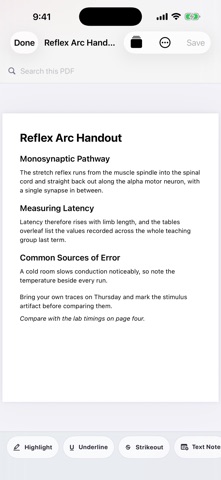
Mark up lecture PDFs, record audio right on the page you are writing, then review with flashcards and spaced repetition.
Choose from 100 notebook styles. Core editing works offline.
WRITE WITH CHARACTER
29 distinct pens and brushes — fountain pen, calligraphy, fude brush, technical pen, watercolor wash, charcoal, mechanical pencil (2B/4B/6B) and more — each with its own texture and stroke response. Pressure and tilt shape supported strokes, while palm rejection helps prevent stray marks. Pixel, whole-stroke, and precision erasers handle corrections. Use the lasso to move, scale, copy, or delete strokes, plus a ruler, eight shape tools, and a laser pointer for presentations.
100 DISTINCT NOTEBOOK STYLES
Each Studio Style has its own cover, paper structure, color palette, dividers, stamps or stickers, toolbar accent, and widget appearance. The collection includes minimal, linen, Japanese grid, academic, engineering, music, meeting, research, planner, travel, wellness, recipe, creative, and dark-paper systems. Browse and preview all 100 styles before choosing one.
MORE THAN A CANVAS
Fixed pages or an infinite canvas, with A4, A5, Letter, screen, and custom sizes in portrait or landscape
Formatted text with bold, italic, underline, fonts, colors, lists, checklists, tables, and links
PDF import and markup with highlights, underlines, strike-through, text notes, handwriting, rotation, cropping, page insertion, extraction, merging, and export
Audio recordings attached to the page you choose
On-device handwriting and PDF text recognition, with search across titles, body text, handwriting, and attachments
Study tools with linked flashcards, cloze cards, and FSRS spaced repetition
Stickers, washi tape, and an auto-numbered table of contents
Nested folders, tags, pins, favorites, archives, recoverable trash, and restorable page history
Ink layers with opacity, visibility, and locking, plus a reference view that keeps a PDF or image beside the page
Widgets and quick capture for faster access
PRIVATE BY DESIGN
No account, ads, third-party tracking or analytics, and no external AI. Editing, search, and study work offline. Notes stay on your device unless you choose to export or back them up. Lock the workspace or an individual notebook with device authentication.
FREE CORE, OPTIONAL ONE-TIME UPGRADE
The free version includes the core editor, 29 writing tools, PDF markup, page audio attachments, handwriting search, and study tools, with 1 active notebook of up to 5 pages and 2 of the 100 styles. An optional one-time upgrade adds unlimited notebooks and pages, all 100 styles, vector-ink PDF export, restorable page history, and encrypted backup.
A focused home for handwriting, documents, and study.
Privacy Policy
https://alice51849.github.io/100notes-support/privacy.html
Terms of Use
https://www.apple.com/legal/internet-services/itunes/dev/stdeula/
Safety and technology
Found in the app by AppBrain- Price
- Free
- App size
- 18.6 MB
- Content rating
- Everyone
Technologies used by 100 Notes Studio: Pen & Paper
Releases
Updates seen on the App Store- Version
- 1.0.9
- Launched
- August 2026
No changelog data
Alternatives
Similar apps and more from Guan Feng Lai


Rankings
App Store top chartsApp Store Rankings for 100 Notes Studio: Pen & Paper
About the app and developer
About 100 Notes Studio: Pen & Paper
100 Notes Studio: Pen & Paper is a productivity app developed by Guan Feng Lai.
What is the rating of 100 Notes Studio: Pen & Paper?
100 Notes Studio: Pen & Paper has no ratings yet.
Is 100 Notes Studio: Pen & Paper free?
100 Notes Studio: Pen & Paper is free. The app size is 18.57 MB. The latest version available is 1.0.9. The last update was on October 26, 2026.
What are the requirements for 100 Notes Studio: Pen & Paper?
The app has a content rating of Everyone. The app has been available on the App Store since August 2026.
Developer information for Guan Feng Lai
Address: