

1874 Sakura: Koto Studio
1874 Sakura: Koto Studio is made and published by Soft Brew Mobile. AppBrain is an independent app data site and isn't affiliated with Soft Brew Mobile. The app name, icon, screenshots and description belong to Soft Brew Mobile and are shown as published on the App Store.
AppBrain's verdict
New- Rating on App Store
- 5.00
- 2 ratings
- Last updated
- October 20, 2026
1874 Sakura: Koto Studio came out 33 days ago. It doesn't have enough ratings yet to judge what users think.
Rankings
App Store top chartsApp Store Rankings for 1874 Sakura: Koto Studio
Competitors
Similar apps and more from Soft Brew MobileAlternatives to 1874 Sakura: Koto Studio


More from Soft Brew Mobile


Releases
Updates seen on the App Store- Version
- 1.0.1
- Launched
- September 2026
No changelog data
User feedback
Ratings and reviews on the App StoreComments on 1874 Sakura: Koto Studio for iOS
We don't have enough comments to show example comments. Please check back later.
Technology
Found in the app by AppBrain- Price
- Free
- App size
- 17.3 MB
- Content rating
- Everyone
Technologies used by 1874 Sakura: Koto Studio
About the app and developer
About 1874 Sakura: Koto Studio
1874 Sakura: Koto Studio is a music app developed by Soft Brew Mobile.
User Ratings
1874 Sakura: Koto Studio is rated 5.00 out of 5 stars. The rating is based on 2 ratings.
App Information
1874 Sakura: Koto Studio is freely available from the App Store. The app size is 17.26 MB. The latest version available is 1.0.1. The last update was on October 20, 2026.
Technical Requirements
The app has a content rating of Everyone. The app has been available on the App Store since September 2026.
Developer information for Soft Brew Mobile
Address:
Store listing
By Soft Brew Mobile, from the App Store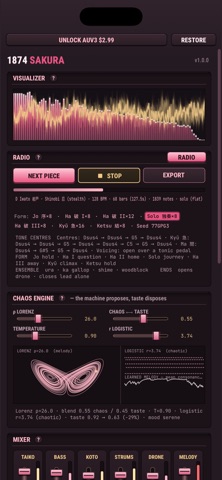


Description by Soft Brew Mobile Written by the developer, not by AppBrain. Click to read.
them on koto, guzheng, shakuhachi, erhu and a taiko ensemble. Press generate and
you get a whole piece in jo-ha-kyū form, the shape of nearly every Japanese
performing art: a slow opening called by a temple bell or a pair of wooden
clappers, a development, a still centre where a flute plays alone over the shō,
a rapid finish where the whole ensemble converges on the melody, and a closing
that thins back to nothing.
One melody carries each piece. It is previewed, stated, slowed down alone over
the drone, and lifted an octave for the finish — so you can hum it back after one
listen. The harmony works the way this music does: no chord changes, but a tone
centre that moves by fourth or fifth over a tonic the shō never leaves.
Every instrument is synthesised from how it makes sound. Plucked strings — koto,
guzheng, shamisen, biwa, pipa — are modelled as vibrating strings, with the koto's
pressed-string bend. Flutes — shakuhachi, dizi, xiao, hichiriki — are mostly air,
with the pitch arriving from underneath. The erhu slides and sings. Temple bowls
and bells ring from inharmonic partials. The taiko ensemble plays from real
recordings, or switch them off and every drum is modelled.
The pieces come from chaos maths. A Lorenz attractor picks the melody's rhythm and
shape and then its notes; a logistic map drives the percussion, so no two bars
need be alike. A small model learns as it writes, rewarded for the fourths,
fifths and steps this music is built on. The CHAOS / TASTE slider decides how much
say each one gets.
Twelve styles. Eight traditional — Sakura folk, Gagaku court music, Guzheng, a
Taiko ensemble, Zen meditation, Silk Road, Kabuki theatre and Neo-Tokyo fusion —
and four fast action styles built for games: Samurai, Shinobi, Wuxia and Cyber
Edo. Twelve pentatonic and Chinese scales, from hirajōshi and in-sen to gong and
yu. Choosing a style loads its melody instrument and its ensemble.
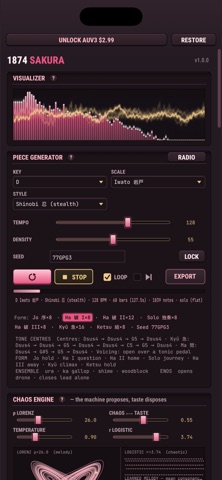
Every piece is built from its seed. Write the seed down and you can have that
exact piece again, note for note. A seed from the browser version rebuilds the
same piece here.
You can play over it, too. The pads are the notes of the piece's scale rather
than a piano keyboard, so nothing you touch is wrong, and the sixteen-step lane
follows the piece and your host. Both play the melody or any part of the ensemble.
Turn on RADIO and it keeps playing, picking a new style, key, scale and tempo for
every piece.
You also get:
• 12 styles, 12 scales, 12 keys, tempo and density
• 24 instruments and 13 one-click ensembles
• A full instrument editor: string, breath, bell, vibrato, filter and envelopes
• Sampled or synthesised taiko, switchable
• Six-part mixer with a meter on every part
• Temple reverb, tempo-synced echo, ensemble width and a filter sweep
• MIDI in, so your keyboard plays whichever part you have selected
• Export a MIDI file, a WAV mix, or stems — one WAV per part (in the app; in a
host you record the audio there)
• A note and a MIDI channel for every drum
• UI scale, so the panel is not tiny on a big iPad
• Live spectrum and waveform, and the chaos engine drawn as it runs
Two Audio Units, an instrument and a MIDI processor. Each part sends on its own
MIDI channel and every drum has a note and a channel of its own, so one instance
can drive a rack of your own sounds. The MIDI version passes your keyboard
through. Both follow your host's tempo and transport, and one install registers
both.
The app is free and nothing in it is held back. Using the Audio Units inside
other apps is a one-time purchase, and each AUv3 session plays for two minutes
first so you can try them properly.
No account, no ads, no subscription. Works offline.