

2FA Authenticator: OTP Codes
2FA Authenticator: OTP Codes is made and published by AdSpark OU. AppBrain is an independent app data site and isn't affiliated with AdSpark OU. The app name, icon, screenshots and description belong to AdSpark OU and are shown as published on the App Store.
AppBrain's verdict
Well rated- Rating on App Store
- 4.48
- 163 ratings
- Last updated
- June 1, 2026
Users rate it well: 4.5 stars from 163 ratings.
Rankings
App Store top chartsApp Store Rankings for 2FA Authenticator: OTP Codes
Competitors
Similar apps and more from AdSpark OUMore from AdSpark OU




Releases
Updates seen on the App Store- Version
- 2.3
- Launched
- February 2024
No changelog data
User feedback
Ratings and reviews on the App StoreComments on 2FA Authenticator: OTP Codes for iOS
We don't have enough comments to show example comments. Please check back later.
Technology
Found in the app by AppBrain- Price
- Free
- App size
- 71.1 MB
- Content rating
- Everyone
Technologies used by 2FA Authenticator: OTP Codes
About the app and developer
About 2FA Authenticator: OTP Codes
2FA Authenticator: OTP Codes is an utilities app developed by AdSpark OU.
User Ratings
2FA Authenticator: OTP Codes is rated 4.48 out of 5 stars. The rating is based on 160 ratings.
App Information
2FA Authenticator: OTP Codes is freely available from the App Store. The app size is 71.11 MB. The latest version available is 2.3. The last update was on June 1, 2026.
Technical Requirements
The app has a content rating of Everyone. The app has been available on the App Store since February 2024.
Developer information for AdSpark OU
Address:
Store listing
By AdSpark OU, from the App Store


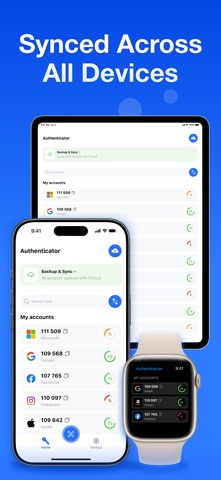

Description by AdSpark OU Written by the developer, not by AppBrain. Click to read.
Generate secure two-factor authentication codes for Google, Microsoft, Apple, Facebook, Instagram, GitHub, Coinbase and 1000+ other services — backed up through your private iCloud and ready the moment you sign in on a new device.
WHY AUTHENTICKEY
Most authenticator apps trap your 2FA codes on a single device. Lose the phone, factory reset, or upgrade to a new iPhone — and you're locked out of every account, hunting for recovery codes you never saved. AuthenticKey fixes this with end-to-end encrypted iCloud sync. Your codes follow your Apple ID, not your hardware.
KEY FEATURES
• One-tap setup — scan any 2FA QR code in seconds
• Encrypted iCloud sync across iPhone and iPad
• Apple Watch app — generate codes from your wrist (Premium)
• Home Screen widget for instant code access (Premium)
• Face ID, Touch ID and passcode lock for the app itself
• Auto-clearing clipboard — copied codes wipe after 30 seconds
• Works offline — TOTP and HOTP codes generate without internet
• Supports SHA-1, SHA-256 and SHA-512 algorithms
• Full RFC 6238 (TOTP) and RFC 4226 (HOTP) standard compliance
• 11 languages: English, Spanish, French, German, Italian, Portuguese, Dutch, Korean, Japanese, Norwegian, Swedish
MOVE TO A NEW IPHONE WITHOUT LOSING ACCESS
Sign into iCloud on your new device, open AuthenticKey, and every account is exactly where you left it. No screenshots of recovery codes. No 30-minute account recovery flows. No emails to support teams. Migration that actually works.
WORKS WITH 1000+ SERVICES
Google · Microsoft · Apple · Amazon · Facebook · Instagram · X (Twitter) · Snapchat · TikTok · Discord · GitHub · Slack · Zoom · Dropbox · Coinbase · Binance · Kraken · KuCoin · Crypto.com · PayPal · Stripe · AWS · Azure · Salesforce · Okta · Duo · Cloudflare · Twitch · PlayStation · Xbox · Steam · Epic Games · LinkedIn · Reddit · Shopify · Notion · 1Password · LastPass · Bitwarden · ProtonMail · Tutanota · Fastmail — and any service supporting standard TOTP or HOTP.
PERFECT FOR
→ Crypto traders securing Coinbase, Binance and Kraken accounts
→ Developers managing AWS, GitHub and Cloudflare access
→ Remote teams using Microsoft 365, Google Workspace and Slack
→ Anyone who's lost 2FA codes during an iPhone upgrade
→ Privacy-conscious users who want their secrets to stay on Apple's hardware
HOW WE PROTECT YOUR DATA
Your 2FA secrets are encrypted on your device with AES-256-GCM and stored in the iOS Keychain. Sync uses your private iCloud — Apple can't read your codes and neither can we. We never see, store, or transmit your 2FA secrets in any form.
For app improvement and crash diagnostics we collect anonymous usage statistics. Your 2FA secrets are never part of that data and never leave your device unencrypted.
FREE VS PREMIUM
Free: Core 2FA authenticator with iCloud backup, biometric lock and QR scanning.
Premium unlocks:
• Unlimited accounts
• Custom sorting and reordering
• Apple Watch sync
• Home Screen widget code display
• Priority support
SUPPORT
Email: info@authentickey.app
Privacy Policy & Terms: https://authentickey.app/privacy