

360toSpatial
360toSpatial is made and published by JUNJI IKEDA. AppBrain is an independent app data site and isn't affiliated with JUNJI IKEDA. The app name, icon, screenshots and description belong to JUNJI IKEDA and are shown as published on the App Store.
AppBrain's verdict
- Last updated
- June 21, 2024
- Size
- 36.9 MB
User feedback
Ratings and reviews on the App StoreComments on 360toSpatial for iOS
We don't have enough comments to show example comments. Please check back later.
Store listing
By JUNJI IKEDA, from the App Store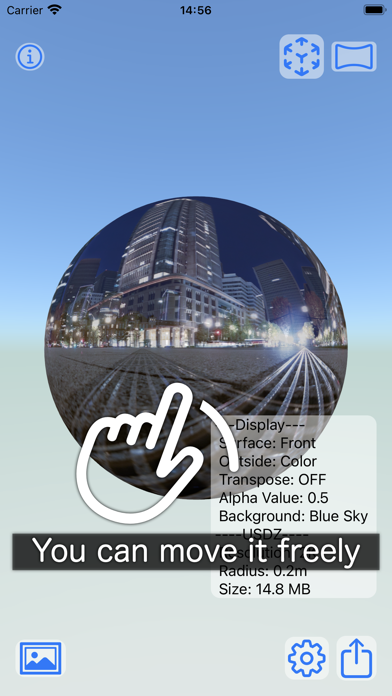


Description by JUNJI IKEDA Written by the developer, not by AppBrain. Click to read.
Within this app, you can take photos or videos, and experience it in AR. The app turns photos, illustrations, textures, and more, regardless of aspect ratio, into semi-transparent 3D spherical objects.
Specifically, images taken with a 360 camera (horizontal panorama: equirectangular format) will become a complete 3D spherical panorama.
Features
* Versatile Image Compatibility: Converts photos, illustrations, and other images of any aspect ratio into 3D spheres. This is particularly effective for full spherical panoramas from 360 images (equirectangular format). An option to rotate the upload by 90 degrees is available, which can be effective for portrait-oriented images.
* Customizable: You can adjust the orientation, opacity, color or black and white, size, and resolution of the object's surface, creating unique pieces. There's also an option to rotate the uploaded image by 90 degrees to optimize portrait images for spherical transformation.
* AR Compatible: Objects created can be experienced in AR within the app's AR QuickLook mode. It's also possible to take photos or videos of the object appearing in real space. Objects made in this app can be saved and shared in the AR standard format, USDZ, allowing AR experiences on other users' iPhone/iPad.
* Video and Still Image: The object's background can be one of the seven built-in types or the image itself loaded for the sphere. In VIEW mode, you can take photos or videos against these backgrounds. Videos can capture the object moving, either manually or through eight types of autopilot actions (horizontal, one-side up, vertical, cross) for 30 seconds. You can choose from three types of camera approach actions for the object. These combinations allow you to create movements suited to the object.
* Save and Share: The object can be exported, saved, and shared in USDZ format. The share button is located at the bottom right in EDIT mode.
About Settings (GEAR button)
* Surface Inversion (Halves the size of the USDZ): The object is created to look correct from the inside, making the outside appear inverted (mirrored). This option allows the outside to appear similar to the inside, reducing the object's size by half.
* Black and White Surface (Interior remains unchanged): Making the exterior black and white.
* Swap Width and Height (Portrait Photo Option): This app adapts images to the sphere regardless of aspect ratio, compressing portrait images vertically. This option compresses horizontally instead.
* Surface Opacity: Adjusts the exterior's opacity from fully opaque to fully transparent.
* Background: Choose from 7 built-in 360 images or the image loaded for the object itself as the background.
* USDZ Menu: Options for the USDZ file to be saved and shared.
* Resolution: Choose from 2K, 3K, 4K.
* Sphere Radius: The radius of the sphere when saved, shared, and displayed in AR. It does not apply to the in-app AR QuickLook mode and has a radius of 20 cm.
Simple Usage
The app starts in EDIT mode.
* Open the album with the PHOTO button on the bottom left and select an image.
* The object is created and can be freely moved. Double-tap to reset.
* Save and share the object with the SHARE button on the bottom right.
* Switch to AR mode or VIEW mode with the button on the top right.
In VIEW mode
* AR button: Enjoy AR experiences in AR QuickLook mode. Recording photos and videos is possible.
* VIEW button: Record photos and videos against built-in images as backgrounds.
* In VIEW mode, switch between play/recording with the mode button on the bottom left.
* Double-tap in view mode to reset (stop recording, stop animation).
* Switch back to VIEW mode with the button on the top right.
Safety and technology
Found in the app by AppBrain- Price
- $6.99
- App size
- 36.9 MB
- Content rating
- Everyone
Technologies used by 360toSpatial
Releases
Updates seen on the App Store- Version
- 1.1
- Launched
- February 2024
No changelog data
Alternatives
Similar apps and more from JUNJI IKEDAMore from JUNJI IKEDA



Rankings
App Store top chartsApp Store Rankings for 360toSpatial
About the app and developer
About 360toSpatial
360toSpatial is a photo & video app developed by JUNJI IKEDA.
User Ratings
The app has no ratings yet.
App Information
360toSpatial costs $6.99. The app size is 36.89 MB. The latest version available is 1.1. The last update was on June 21, 2024.
Technical Requirements
The app has a content rating of Everyone. The app has been available on the App Store since February 2024.
Developer information for JUNJI IKEDA
Address:
Frequently asked questions about 360toSpatial
Is 360toSpatial free?
No. 360toSpatial costs $6.99 on the App Store.
Is 360toSpatial still available?
Yes. 360toSpatial is on the App Store, and the last update we saw was on June 21, 2024.
How large is 360toSpatial?
360toSpatial is 36.89 MB.
Is 360toSpatial suitable for children?
App Store rates the content of 360toSpatial as suitable for everyone.
Who made 360toSpatial?
360toSpatial was developed by JUNJI IKEDA. It is listed in the photo & video category on the App Store.