AppBrain
AppBrain
  • Apps
  • Apps being viewed right now Trending apps today Most popular apps All-time most installed apps Top rated apps iPhone and iPad apps
  • Intelligence ▾
    Intelligence overview → Track any Android app or your whole market
    Track & analyze
    Keyword Tracker & OptimizerTrack & improve Play rankings App Performance ReportOne-off PDF for any app StatisticsFree Android & Play market stats
    Promote your app
    Featured Apps App Links
  • Intelligence
  • Pricing
  • Dashboard
  • Sign up
  • Log in
App Store Apps > Photo & Video > 3D PrintCam
App profile & analytics · Photo & Video · Data updated 2026-10-29
3D PrintCam icon

3D PrintCam

by Kamaljit Kaur · Free · Version 1.0.8
Availability On the App Store since October 2026 ↗
Rating on App Store
–
Rating
–
0 reviews
Best rank
–
not in the top lists
Last updated
October 24, 2026
1.0.8

3D PrintCam is made and published by Kamaljit Kaur. AppBrain is an independent app data site and isn't affiliated with Kamaljit Kaur. The app name, icon, screenshots and description belong to Kamaljit Kaur and are shown as published on the App Store.

About 3D PrintCam

3D PrintCam is a photo & video app developed by Kamaljit Kaur.

User Ratings

The app has no ratings yet.

App Information

3D PrintCam is freely available from the App Store. The app size is 77.66 MB. The latest version available is 1.0.8. The last update was on October 24, 2026.

Technical Requirements

The app has a content rating of Everyone. The app has been available on the App Store since October 2026.

Description by Kamaljit Kaur (from the App Store)
Turn your iPhone into an automatic timelapse camera for your 3D printer. No Bluetooth button, no Raspberry Pi, no OctoPrint and no slicer setup.

3D PrintCam watches the spot where your print head parks. Each time the head arrives and comes to rest, it takes a photo. Because every frame is shot with the head in the same place, your print appears to grow out of the bed in one smooth, clean motion.

HOW IT WORKS
1. Mount your phone facing the printer.
2. Draw a box over the place where the print head parks after each layer.
3. Tap Start. 3D PrintCam takes a photo every time the head stops in the box.
4. Open the editor, fine-tune your timelapse and export the video to Photos.

SMART CAPTURE
• On-device motion detection triggers each photo for you, hands-free
• Live motion meter shows exactly what the camera sees
• Adjustable sensitivity, wait-before-capture and cooldown to match your printer
• Lock exposure and focus to stop flicker between frames
• Choose the camera lens that frames your printer best
• Optional shot limit, and a screen that dims while recording to save battery

BUILT-IN TIMELAPSE EDITOR
• Scrub through every frame and pick the ones you want
• Change speed and frame rate (24, 30 or 60 FPS), or play the print in reverse
• Crop for any platform: square, widescreen 16:9, vertical 9:16 or 4:3
• Zoom, pan and rotate
• Filters, plus brightness, contrast and saturation
• Combine sessions or import photos from your library

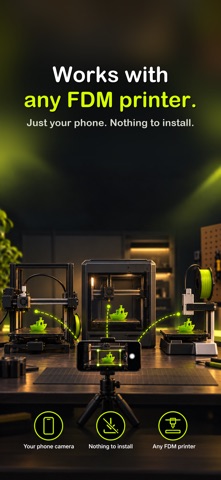
WORKS WITH ANY FDM PRINTER
If your print head parks, pauses or moves aside between layers, 3D PrintCam can capture it. Nothing to install on the printer and nothing to plug in.

PRIVATE BY DESIGN
Motion detection and video creation run entirely on your device. Your photos and videos stay with you.

FREE TO USE
Capture, edit and export timelapses for free. You can try higher-resolution export before you buy.

3D PRINTCAM PRO
Upgrade to unlock HD, Full HD and 4K capture and export for full-length timelapses. Available as a yearly subscription or a one-time lifetime purchase. Payment is charged to your Apple Account. Subscriptions renew automatically unless cancelled at least 24 hours before the end of the current period; manage or cancel any time in your Apple Account settings.

Privacy Policy: https://3dprintcam.anmule.com/privacy
Terms of Use (EULA): https://www.apple.com/legal/internet-services/itunes/dev/stdeula/
Show more Show less

Screenshots

3D PrintCam Screenshot 1 of 5
3D PrintCam Screenshot 2 of 5
3D PrintCam Screenshot 3 of 5
3D PrintCam Screenshot 4 of 5
3D PrintCam Screenshot 5 of 5
Screenshots by Kamaljit Kaur, from the the App Store listing
Official page on the App Store

Alternatives to 3D PrintCam

Snippie: Moving Sticker Maker icon Snippie: Moving Sticker Maker
Alvin Wong
5.0
Free
3 ratings
Progress Timelapse Photos icon Progress Timelapse Photos
Karla Matosic
0.0
Free
Photographer's Friend icon Photographer's Friend
Martin Bailey Photography K.K.
3.7
$9.99
6 ratings
Sidecam – Work Camera icon Sidecam – Work Camera
Francisco Nunes de Abreu
5.0
Free
4 ratings
picmi: Group Doodle Album icon picmi: Group Doodle Album
VAULT, LIMITED LIABILITY CO.
0.0
Free
FaceLapse: Face Timelapse icon FaceLapse: Face Timelapse
辰巳家有限公司
3.0
Free
4 ratings
Swyp: Photo Cleaner icon Swyp: Photo Cleaner
Mukesh Khatri
4.7
Free
18 ratings
ImageSpace icon ImageSpace
ImageSpace LLC
4.0
Free
11 ratings

More from Kamaljit Kaur

Shot Bridge icon Shot Bridge
Kamaljit Kaur
5.0
Free
1 ratings
Tapasaurus icon Tapasaurus
Kamaljit Kaur
0.0
$0.99
Cooklie icon Cooklie
Kamaljit Kaur
0.0
Free

Changelog of 3D PrintCam

No changelog data

Developer information for Kamaljit Kaur

Kamaljit Kaur

Address:

Share 3D PrintCam

Comments on 3D PrintCam for iOS

We don't have enough comments to show example comments. Please check back later.

App Store Rankings for 3D PrintCam

This app is not ranked

Technologies used by 3D PrintCam

Apps other people are watching Price drops on Google Play Today's trending apps Top new apps Popular Photo & Video Apps
Snippie: Moving Sticker Maker icon Snippie: Moving Sticker Maker
Progress Timelapse Photos icon Progress Timelapse Photos
Photographer's Friend icon Photographer's Friend
Sidecam – Work Camera icon Sidecam – Work Camera
picmi: Group Doodle Album icon picmi: Group Doodle Album
FaceLapse: Face Timelapse icon FaceLapse: Face Timelapse
Swyp: Photo Cleaner icon Swyp: Photo Cleaner
ImageSpace icon ImageSpace
Overview Alternatives Reviews Rankings Technology
AppBrain Intelligence premium content

Subscribe now to get full and unlimited access to AppBrain Intelligence. You'll have access to:

  • App Intelligence dashboard (performance timeline, competitor comparison, country rankings, insight cards)
  • Detailed ranking data per app
  • Full timeline per developer
  • Device market shares data per country
  • Unlimited keyword tracking
1 Month

$75/mo
(billed every month)

SAVE 0%
Subscribe
3 Months

$65/mo
($195 billed every 3 months)

SAVE 13%
Subscribe
1 Year

$57.50/mo
($690 billed every year)

SAVE 23%
Subscribe
Each subscription will automatically renew 3 days before the expiration date for the same time period. Subscriptions can be cancelled at any time before the renewal.

AppBrain is an app data site, we track rankings, ratings, installs for all apps and games on Google Play and the App Store. AppBrain doesn't host app files or APKs, all install links go directly to the official store. All trademarks are owned by their respective owners.

More apps

  • Top Android apps being viewed
  • Hit Fortune Casino Slots
  • Kopykitab eReader & Test Prep
  • Intuit QuickBooks for Business

App statistics

  • Android statistics
  • Google Play Developer stats
  • Trending Android Apps
  • Trending iOS apps
  • Top popular Apps
  • Buy the best Android phone
  • Buy & sell app businesses

About AppBrain

  • Contact
  • Privacy
  • Documentation
  • DMCA takedowns
  • Blog
  • Android app Install tracking and attribution options for the AppBrain ad network
© 2010-2026 - AppBrain