

Snippie: Moving Sticker Maker
Snippie: Moving Sticker Maker is made and published by Alvin Wong. AppBrain is an independent app data site and isn't affiliated with Alvin Wong. The app name, icon, screenshots and description belong to Alvin Wong and are shown as published on the App Store.
AppBrain's verdict
- Rating on App Store
- 5.00
- 3 ratings
- Last updated
- October 26, 2026
It doesn't have enough ratings yet to judge what users think.
Rankings
App Store top chartsApp Store Rankings for Snippie: Moving Sticker Maker
Competitors
Similar apps and more from Alvin WongAlternatives to Snippie: Moving Sticker Maker


More from Alvin Wong


Releases
Updates seen on the App Store- Version
- 1.3.1
- Launched
- July 2026
No changelog data
User feedback
Ratings and reviews on the App StoreComments on Snippie: Moving Sticker Maker for iOS
We don't have enough comments to show example comments. Please check back later.
Technology
Found in the app by AppBrain- Price
- Free
- App size
- 9.21 MB
- Content rating
- Everyone
Technologies used by Snippie: Moving Sticker Maker
About the app and developer
About Snippie: Moving Sticker Maker
Snippie: Moving Sticker Maker is a photo & video app developed by Alvin Wong.
What is the rating of Snippie: Moving Sticker Maker?
Snippie: Moving Sticker Maker is rated 5.00 out of 5 stars, based on 3 ratings.
Is Snippie: Moving Sticker Maker free?
Snippie: Moving Sticker Maker is free. The app size is 9.21 MB. The latest version available is 1.3.1. The last update was on October 26, 2026.
What are the requirements for Snippie: Moving Sticker Maker?
The app has a content rating of Everyone. The app has been available on the App Store since July 2026.
Developer information for Alvin Wong
Address:
Store listing
By Alvin Wong, from the App Store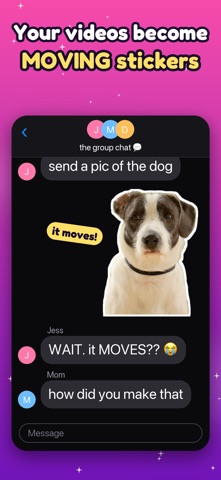


Description by Alvin Wong Written by the developer, not by AppBrain. Click to read.
Pick a clip, pause on a good frame, then press and hold a person, pet, or object. Snippie lifts it out with a glow, follows it across every frame, and finds a clean loop automatically. Preview it, style it, and share it as an animated sticker.
HOW IT WORKS
• Pick a video, a Live Photo, or a still photo and scrub to the moment you want
• Or share a video from Photos and choose Snippie to start right away
• Press and hold the subject — it lifts out with a glow
• Snippie tracks it, cleans up the edges, and finds the perfect loop
• Style it, then share or save
CRISP EDGES, NO HALOS
• A second high-resolution pass sharpens hair, fur, and fine edges
• Edge colors are cleaned so no background tint bleeds into your sticker
• Smooth, flicker-free masks even on fast-moving subjects
• Follow mode keeps a roaming subject centered and large
• Fix Cutout: erase stray bits or paint back missed parts, on every frame at once
MAKE IT YOURS
• Sticker outline + drop shadow for that real-sticker look
• Backgrounds: transparent, solid color, or a dreamy blurred subject
• Meme-style captions in four fonts and four colors, placed top or bottom
• Loop it, ping-pong it, or play it in reverse
• Speed it up or slow it to a smooth slow-mo
• Change a saved sticker's caption, style or background any time
SHARE ANYWHERE
• Send straight from the Messages app drawer with the Snippie sticker extension
• Start a new sticker right from Messages: tap New Sticker in the Snippie drawer
• Add them to WhatsApp as your own sticker pack (3 to 30 stickers)
• Export as APNG — full transparency, behaves like a real animated sticker
• Export as GIF for everything else
• Copy a sticker and paste it straight into any chat
• Save straight to Photos
• Every sticker is auto-saved to your in-app gallery to re-share or delete
PRIVATE BY DESIGN
Everything runs on your device using Apple's Vision framework. Your videos, photos, and stickers never leave your phone. No account, no cloud, no ads, no tracking — only anonymous usage statistics that help improve the app.
SNIPPIE PRO — one-time purchase, yours forever
• Remove the "Made with Snippie" watermark
• Unlock all backgrounds (colors + blurred subject)
• Speed control (slow-mo and speed-up)
• Save stickers as Live Photos and add them to your iPhone's own sticker drawer
Free to use: free stickers carry a "Made with Snippie" watermark. Snippie Pro is a one-time purchase, no subscription: it removes the watermark and unlocks all backgrounds and speed control.
Requires iOS 17 or later.