

UnderCover Photo
UnderCover Photo is made and published by Zack McTee. AppBrain is an independent app data site and isn't affiliated with Zack McTee. The app name, icon, screenshots and description belong to Zack McTee and are shown as published on the App Store.
AppBrain's verdict
New- Rating on App Store
- 5.00
- 1 ratings
- Last updated
- October 5, 2026
UnderCover Photo came out 46 days ago. It doesn't have enough ratings yet to judge what users think.
Rankings
App Store top chartsApp Store Rankings for UnderCover Photo
Competitors
Similar apps and more from Zack McTeeAlternatives to UnderCover Photo


Releases
Updates seen on the App Store- Version
- 1.0.3
- Launched
- September 2026
No changelog data
User feedback
Ratings and reviews on the App StoreComments on UnderCover Photo for iOS
We don't have enough comments to show example comments. Please check back later.
Technology
Found in the app by AppBrain- Price
- Free
- App size
- 3.22 MB
- Content rating
- Everyone
Technologies used by UnderCover Photo
About the app and developer
About UnderCover Photo
UnderCover Photo is a photo & video app developed by Zack McTee.
What is the rating of UnderCover Photo?
UnderCover Photo is rated 5.00 out of 5 stars, based on one rating ratings.
Is UnderCover Photo free?
UnderCover Photo is free. The app size is 3.22 MB. The latest version available is 1.0.3. The last update was on October 5, 2026.
What are the requirements for UnderCover Photo?
The app has a content rating of Everyone. The app has been available on the App Store since September 2026.
Developer information for Zack McTee
Address:
Store listing
By Zack McTee, from the App Store



Description by Zack McTee Written by the developer, not by AppBrain. Click to read.
UnderCover Photo does two tricks, and it does them properly.
TRICK ONE: THE UNDERCOVER PHOTO
Hide a tiny video inside any picture and it becomes a real Live Photo, so it works everywhere Live Photos do. They see a normal photo in the thread. The moment they press and hold, your hidden clip plays. A meme, a message, a moment.
• Pick any video, shoot one right in the app, or start from your favorite gif
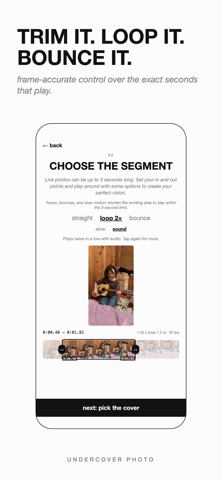
• Choose the exact seconds with a frame accurate trimmer
• Use any photo as the cover. It does not have to match the clip. That is the fun part.
• Or keep it simple and use a frame from the actual video clip.
TRICK TWO: CUSTOM MOTION STICKERS
The perfect sticker starts as the perfect Live Photo. Shape any video or gif here, save it, then add it as a sticker straight from Photos with Apple's own touch and hold gesture. The app walks you through that last step. iOS cuts out the subject, and it moves exactly the way you designed it.
• Straight, loop, or bounce the playback. Bounce is the good one.
• Slow it to half or quarter speed
• Trim it to the perfect beat before it ever becomes a sticker
• Add text that can appear, change, and vanish mid clip
MEME STUDIO
Put words on anything. Drag, resize, rotate. Meme, clean, and sticker styles with full color control. On video, every text layer has its own in and out points on a timeline.
IT IS A REAL LIVE PHOTO
Saves straight to your library and verifies the pairing before it saves. Works in Messages, AirDrop, and Photos on iPhone and iPad. Long press to play, exactly like a Live Photo, because it is one.
PAY ONCE
Free: 2 creations a day with a watermark.
Pro: everything, unlimited, watermark free, for a single launch price. No weekly subscription. Ever.