

3D Printer Toolkit
3D Printer Toolkit is made and published by Paul Matthew. AppBrain is an independent app data site and isn't affiliated with Paul Matthew. The app name, icon, screenshots and description belong to Paul Matthew and are shown as published on the App Store.
AppBrain's verdict
- Last updated
- July 21, 2026
- Size
- 3.33 MB
User feedback
Ratings and reviews on the App StoreComments on 3D Printer Toolkit for iOS
We don't have enough comments to show example comments. Please check back later.
Store listing
By Paul Matthew, from the App Store


Description by Paul Matthew Written by the developer, not by AppBrain. Click to read.
Design better-fitting 3D printed parts with powerful calculators built specifically for makers, hobbyists, engineers, and machine shops.
3D Print Toolkit helps eliminate guesswork when creating functional printed parts by providing tools for hole sizing, thread compensation, and thread reference calculations—all in one easy-to-use app.
Whether you're printing bolt holes, threaded adapters, enclosures, or precision mechanical parts, these tools can help reduce trial-and-error and improve first-print success.
Features
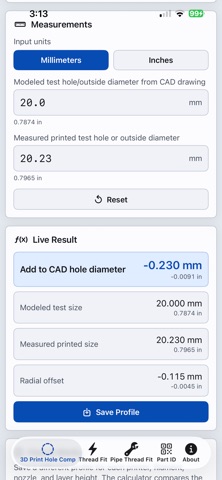
Hole Compensation Calculator
• Calculate the diameter adjustment needed for holes that print undersized.
• Improve bolt, pin, shaft, and bearing fits.
• Supports both inch and metric measurements.
• Displays recommended compensation instantly.
Thread Compensation Calculator
• Adjust internal and external thread sizes for your specific 3D printer.
• Fine-tune thread clearance based on real printed measurements.
• Save calibration values for different printers, materials, and nozzle sizes.
• Reduce repeated test prints and improve thread fit.
Thread Reference Calculator
• Quickly look up common thread dimensions.
• Supports both Metric and Unified (UNC/UNF) thread standards.
• Displays major diameter, pitch, tap drill size, and other useful machining references.
• Great for designing printable threaded parts or preparing CAD models.
Printer Profiles
• Save calibration settings for multiple printers.
• Store different offsets for PLA, PETG, ABS, TPU, and other materials.
• Keep notes on successful print settings.
Designed for Real-World Printing
Perfect for:
Functional parts
Threaded adapters
Replacement parts
CNC and CAD projects
Mechanical assemblies
Workshop fabrication
Engineering prototypes
Privacy
• No account required.
• No subscriptions.
• No internet connection required.
• No ads.
• All calculations and saved data remain on your device.
Spend less time printing test parts and more time creating parts that fit the first time.
Safety and technology
Found in the app by AppBrain- Price
- Free
- App size
- 3.33 MB
- Content rating
- Everyone
Technologies used by 3D Printer Toolkit
Releases
Updates seen on the App Store- Version
- 4.2
- Launched
- July 2026
No changelog data
Alternatives
Similar apps and more from Paul MatthewAlternatives to 3D Printer Toolkit


More from Paul Matthew


Rankings
App Store top chartsApp Store Rankings for 3D Printer Toolkit
About the app and developer
About 3D Printer Toolkit
3D Printer Toolkit is an utilities app developed by Paul Matthew.
What is the rating of 3D Printer Toolkit?
3D Printer Toolkit has no ratings yet.
Is 3D Printer Toolkit free?
3D Printer Toolkit is free. The app size is 3.33 MB. The latest version available is 4.2. The last update was on July 21, 2026.
What are the requirements for 3D Printer Toolkit?
The app has a content rating of Everyone. The app has been available on the App Store since July 2026.
Developer information for Paul Matthew
Address:
Frequently asked questions about 3D Printer Toolkit
Is 3D Printer Toolkit free?
Yes. 3D Printer Toolkit is free on the App Store.
Is 3D Printer Toolkit still available?
Yes. 3D Printer Toolkit is on the App Store, and the last update we saw was on July 21, 2026.
How large is 3D Printer Toolkit?
3D Printer Toolkit is 3.33 MB.
Is 3D Printer Toolkit suitable for children?
App Store rates the content of 3D Printer Toolkit as suitable for everyone.
Who made 3D Printer Toolkit?
3D Printer Toolkit was developed by Paul Matthew. It is listed in the utilities category on the App Store.
What are the best alternatives to 3D Printer Toolkit?
People looking at 3D Printer Toolkit also look at these utilities apps: VideoToLive: Live Wallpaper, CoCrypt, Nucleo LLM by Marte AI, Vaultory Authenticator 2FA App, BabelVoice - Speech to Text.