




AppBrain's verdict
- Last updated
- October 16, 2026
- Size
- 7.38 MB
User feedback
Ratings and reviews on the App StoreComments on 3D Simplify: USDZ Optimizer for iOS
We don't have enough comments to show example comments. Please check back later.
Store listing
By Po hin Ma, from the App StoreDescription by Po hin Ma Written by the developer, not by AppBrain. Click to read.
SEE WHERE THE SIZE IS
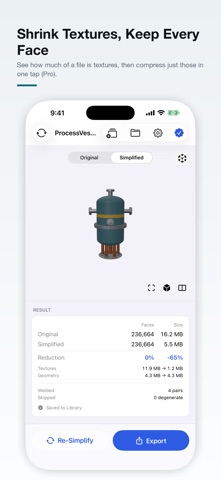
Most 3D files are mostly textures. 3D Simplify shows how much of a file is textures and how much is geometry. When textures make up most of it, Compress Textures Only (Pro) shrinks them in one tap and keeps every face.
WHO IT IS FOR
• 3D scanning users whose LiDAR, photogrammetry or Object Capture results are too heavy to share or open in AR
• AR, RealityKit and visionOS developers who need assets that load quickly in AR Quick Look
• Game developers building LODs and trimming heavy props for real-time engines
• Online stores and web teams shipping 3D product models that have to download fast
• Engineers and designers turning machinery and CAD-style models into something an iPhone can show
HOW IT WORKS
1. Open a model from the Files app, or drag it into the viewer on iPad and Mac.
2. Let Auto pick the reduction, or set a ratio, face count or file size (Pro).
3. Compare Original and Simplified side by side, shaded or in wireframe.
4. Export USDZ, or GLB and OBJ with levels of detail (Pro).
FREE
• Automatic smart reduction that picks the target polygon count for you
• Viewer with shaded, untextured and wireframe views, side-by-side comparison and a frame button; the camera stays put when you switch
• Live face count, file size and texture/geometry split
• Preview in AR Quick Look before you share
• USDZ export at the model's real-world size
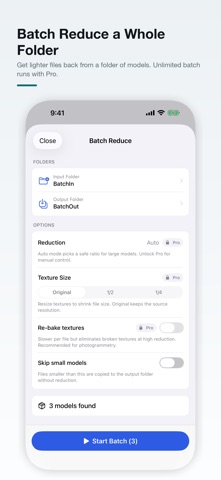
• Batch Reduce for a folder of up to 3 models at a fixed 50% reduction
• Shortcuts action for your own automations
• Interface in 9 languages, including English, Spanish, German, French and Russian
3D SIMPLIFY PRO
• Reduce by ratio in 5% steps, by target face count or by target file size
• Hard-surface mode: removes whole edge loops so cylinders and machinery stay round and evenly spaced instead of turning into slivers
• Texture Size (Original, 1/2, 1/4) and one-tap Compress Textures Only
• Re-bake Textures: re-wraps the textures onto the lighter mesh and keeps normal, roughness, metallic, transparency and glow maps. Up to 8K on Mac and on iPads with 16 GB of memory, 4K on iPads with 8 GB
• Hausdorff quality reading and output validation after a re-bake
• GLB and OBJ export, plus LOD0, LOD1 and LOD2 in one go
• Saved Models Library
• Unlimited files per batch run, with Texture Size and Re-bake
FORMATS
• Open: USDZ, USD, USDA, USDC, OBJ, STL, PLY, GLB, glTF, and ZIP files containing a model
• Export: USDZ (free), GLB and OBJ (Pro)
PRIVACY AND PERFORMANCE
Everything runs on your device and the texture steps are Metal-accelerated. No account, no upload, no cloud - it works in airplane mode.
PLEASE NOTE
3D Simplify makes a model you already have lighter. It is not a 3D scanner or a modelling app, and it does not remesh or repair broken geometry. Reducing a mesh always removes detail, so the side-by-side view is there for you to decide how much is acceptable.
PLATFORMS
iPhone and iPad (iOS/iPadOS 17 or later) and a native Mac app (macOS 14 or later).
SUBSCRIPTION
3D Simplify Pro is an auto-renewing subscription: US$2.99 per month or US$19.99 per year (US pricing; your local price is shown before you confirm). Payment is charged to your Apple Account at confirmation of purchase. It renews automatically unless auto-renew is turned off at least 24 hours before the end of the current period, and renewal is charged within 24 hours before the period ends. Manage or cancel any time in Settings > Apple Account > Subscriptions.
Privacy Policy: https://mapohin.com/3dSimplifier/policy
Terms of Use (EULA): https://www.apple.com/legal/internet-services/itunes/dev/stdeula/
Support: https://mapohin.com/3dSimplifier/support
Safety and technology
Found in the app by AppBrain- Price
- Free
- App size
- 7.38 MB
- Content rating
- Everyone
Technologies used by 3D Simplify: USDZ Optimizer
Releases
Updates seen on the App Store- Version
- 1.0.9
- Launched
- March 2026
No changelog data
Alternatives
Similar apps and more from Po hin MaMore from Po hin Ma


Rankings
App Store top chartsApp Store Rankings for 3D Simplify: USDZ Optimizer
About the app and developer
About 3D Simplify: USDZ Optimizer
3D Simplify: USDZ Optimizer is a graphics & design app developed by Po hin Ma.
User Ratings
The app has no ratings yet.
App Information
3D Simplify: USDZ Optimizer is freely available from the App Store. The app size is 7.38 MB. The latest version available is 1.0.9. The last update was on October 16, 2026.
Technical Requirements
The app has a content rating of Everyone. The app has been available on the App Store since March 2026.
3D Simplify: USDZ Optimizer is made and published by Po hin Ma. AppBrain is an independent app data site and isn't affiliated with Po hin Ma. The app name, icon, screenshots and description belong to Po hin Ma and are shown as published on the App Store.
Developer information for Po hin Ma
Address:
Frequently asked questions about 3D Simplify: USDZ Optimizer
Is 3D Simplify: USDZ Optimizer free?
Yes. 3D Simplify: USDZ Optimizer is free on the App Store.
Is 3D Simplify: USDZ Optimizer still available?
Yes. 3D Simplify: USDZ Optimizer is on the App Store, and the last update we saw was on October 16, 2026.
How large is 3D Simplify: USDZ Optimizer?
3D Simplify: USDZ Optimizer is 7.38 MB.
Is 3D Simplify: USDZ Optimizer suitable for children?
App Store rates the content of 3D Simplify: USDZ Optimizer as suitable for everyone.
Who made 3D Simplify: USDZ Optimizer?
3D Simplify: USDZ Optimizer was developed by Po hin Ma. It is listed in the graphics & design category on the App Store.