





AppBrain's verdict
- Last updated
- September 2, 2026
- Size
- 25.1 MB
User feedback
Ratings and reviews on the App StoreComments on InvoiceGen: Bill & Receipt for iOS
We don't have enough comments to show example comments. Please check back later.
Store listing
By Po hin Ma, from the App StoreDescription by Po hin Ma Written by the developer, not by AppBrain. Click to read.
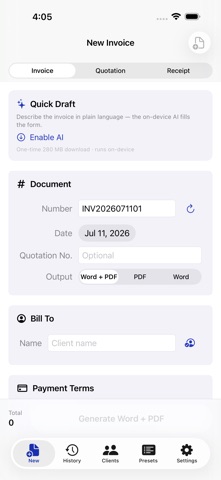
Fill in your company details once, and every document carries your name, address, bank and FPS details, logo and stamp. Start with 5 documents a month at no cost. No ads, no account, no tracking.
INVOICE, QUOTATION, RECEIPT
- Automatic numbering that never reissues a number
- Turn a quotation into an invoice, and an invoice into a receipt, in one tap
- One receipt can settle several unpaid invoices from the same client
- Edit a document you already issued and regenerate it in place: same number, and no monthly document is spent
- Duplicate anything you issued before, or import .docx invoices you made elsewhere
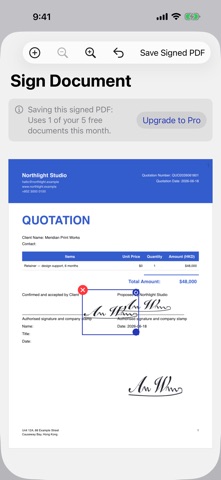
SIGN ANY PDF, INCLUDING ONE THIS APP DID NOT MAKE
- Place your signature, company stamp, an image or a line of text anywhere on any page, then drag, resize or rotate it
- Undo one mark at a time
- Draw a signature with a finger or Apple Pencil, or design one from your typed name in a handwriting style
- Sign from the share sheet in Mail, Files or Safari with "Sign with InvoiceGen", or open a PDF with InvoiceGen from Files and Finder
- Marks are drawn into the page, so a signed file looks the same in every PDF reader
- Signed copies get their own section at the top of your history
SEVEN PDF TEMPLATES, EIGHT ACCENT COLORS
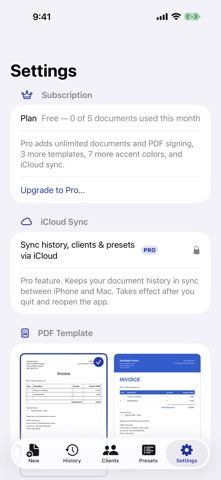
- Classic, Modern, Minimal and Compact are included
- Executive, Sidebar and Elegant require InvoiceGen Pro
- Indigo is included; Ocean, Teal, Emerald, Plum, Crimson, Amber and Graphite require Pro
- Accents tint Modern, Executive, Sidebar and Elegant; the other three stay black and white
- Every template previews as a real PDF with your company name and logo
PDF AND EDITABLE WORD
- Export a PDF, an editable .docx file, or both at once
- The .docx uses the Classic layout, so it edits anywhere; templates and accents style the PDF
QUOTATION INTO INSTALLMENTS
- Split an accepted quotation into installment invoices, by percentage or by line item
- Each installment is issued as a real invoice that references the quotation
QUICK DRAFT, ON-DEVICE AI (OPTIONAL)
- Type a plain sentence like "3 hours consulting at 800" and the form fills itself
- It runs on your device. With Apple Intelligence it uses the system model and downloads nothing; otherwise a compact model downloads once, then works offline
- Every amount is recalculated in the app, never taken from the model
BUILT FOR THE WAY YOU WORK
- Business and Personal workspaces, each with its own profile, clients and history
- Client, item and payment-term presets
- Search by number or client; filter by type, month, client, or awaiting receipt
- Documents are saved to iCloud Drive, visible in Files and Finder
- iPhone, iPad and Mac, as a single Universal Purchase
- iCloud sync of history, clients, presets and installment plans (Pro)
GOOD TO KNOW
- Set the currency code that labels the amount column. Amounts are not converted and carry no symbol, and the payment block suits Hong Kong bank transfer and FPS
- The monthly allowance covers 5 issued documents or signed PDFs, and resets on the 1st
- Quick Draft needs a physical device and is not available in the Simulator
- macOS requires an Apple silicon Mac
INVOICEGEN PRO
Pro removes the monthly limit: unlimited documents and PDF signing, three more templates, seven more accent colors, and iCloud sync across your devices.
- Monthly: US$3.99
- Yearly: US$29.99
- Both include a 7-day free trial
Payment is charged to your Apple Account at confirmation of purchase. A subscription renews automatically unless it is cancelled at least 24 hours before the end of the current period, and your account is charged for renewal within 24 hours before the period ends. Manage or cancel your subscription in your Apple Account settings. Any unused portion of a free trial is forfeited when you subscribe.
Terms of Use: https://mapohin.com/invoicegen/terms
Privacy Policy: https://mapohin.com/invoicegen/privacy
Safety and technology
Found in the app by AppBrain- Price
- Free
- App size
- 25.1 MB
- Content rating
- Everyone
Technologies used by InvoiceGen: Bill & Receipt
Releases
Updates seen on the App Store- Version
- 1.2
- Launched
- July 2026
No changelog data
Alternatives
Similar apps and more from Po hin MaAlternatives to InvoiceGen: Bill & Receipt


More from Po hin Ma


Rankings
App Store top chartsApp Store Rankings for InvoiceGen: Bill & Receipt
About the app and developer
About InvoiceGen: Bill & Receipt
InvoiceGen: Bill & Receipt is a business app developed by Po hin Ma.
What is the rating of InvoiceGen: Bill & Receipt?
InvoiceGen: Bill & Receipt has no ratings yet.
Is InvoiceGen: Bill & Receipt free?
InvoiceGen: Bill & Receipt is free. The app size is 25.14 MB. The latest version available is 1.2. The last update was on September 2, 2026.
What are the requirements for InvoiceGen: Bill & Receipt?
The app has a content rating of Everyone. The app has been available on the App Store since July 2026.
InvoiceGen: Bill & Receipt is made and published by Po hin Ma. AppBrain is an independent app data site and isn't affiliated with Po hin Ma. The app name, icon, screenshots and description belong to Po hin Ma and are shown as published on the App Store.
Developer information for Po hin Ma
Address: