

4:20
4:20 is made and published by Upload Studio Ltd. AppBrain is an independent app data site and isn't affiliated with Upload Studio Ltd. The app name, icon, screenshots and description belong to Upload Studio Ltd. and are shown as published on the App Store.
AppBrain's verdict
- Last updated
- September 4, 2026
Rankings
App Store top chartsApp Store Rankings for 4:20
Competitors
Similar apps and more from Upload Studio Ltd.More from Upload Studio Ltd.

Releases
Updates seen on the App Store- Version
- 1.1.2
- Launched
- August 2026
No changelog data
User feedback
Ratings and reviews on the App StoreComments on 4:20 for iOS
We don't have enough comments to show example comments. Please check back later.
Technology
Found in the app by AppBrain- Price
- $4.99
- App size
- 1.11 MB
- Content rating
- Everyone
Technologies used by 4:20
About the app and developer
About 4:20
4:20 is a photo & video app developed by Upload Studio Ltd.
What is the rating of 4:20?
4:20 has no ratings yet.
Is 4:20 free?
4:20 costs $4.99. The app size is 1.11 MB. The latest version available is 1.1.2. The last update was on September 4, 2026.
What are the requirements for 4:20?
The app has a content rating of Everyone. The app has been available on the App Store since August 2026.
Developer information for Upload Studio Ltd.
Address:
Frequently asked questions about 4:20
Is 4:20 free?
No. 4:20 costs $4.99 on the App Store.
Is 4:20 still available?
Yes. 4:20 is on the App Store, and the last update we saw was on September 4, 2026.
How large is 4:20?
4:20 is 1.11 MB.
Is 4:20 suitable for children?
App Store rates the content of 4:20 as suitable for everyone.
Who made 4:20?
4:20 was developed by Upload Studio Ltd. It is listed in the photo & video category on the App Store.
Store listing
By Upload Studio Ltd., from the App Store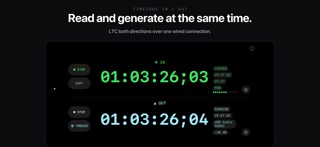
Description by Upload Studio Ltd. Written by the developer, not by AppBrain. Click to read.
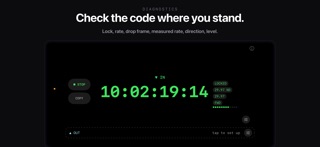
The reader is made for troubleshooting. When a rig will not chase, plug into the line and check the code where you stand: the rate as measured against what the source claims, drop frame or not, which direction it is running, and how hot the line is. Mislabeled rates, code that should have stopped, and low or clipping levels all show up in the first few seconds. Between cues, it works as a confidence monitor on any line you need to trust.
The screen does not sleep while a mode is running, and timecode keeps going when you switch to another app. Checking a message does not stop the code.
READER
• Lock state and a full readout: frame rate with drop frame flag, measured rate, direction, level
• Runs continuously and keeps reading through route changes and interruptions
• Keeps reading in the background while you use another app
• If iOS takes the audio session away, the readout dims and says so instead of holding stale numbers
GENERATOR
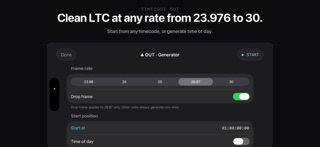
• 23.976, 24, 25, 29.97 drop frame, and 30 fps
• Start from any timecode, or generate time of day
• Output level control, with left, right, or both channel routing
• Anchored to the system clock, so long runs hold their time
• Keeps generating in the background while you use another app
• Runs alongside the reader for loop-through checks
• Warns before sending LTC to a speaker, Bluetooth, or AirPlay, and requires a press-and-hold to override
REQUIREMENTS
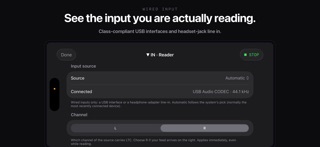
A wired audio connection: a class-compliant USB audio interface, or a headset-jack adapter with a line input. There is no microphone mode. This version reads and generates LTC only; MIDI timecode is not supported.
PRIVACY
No account, no analytics, and no network connection. Nothing leaves the device.
Made for production sound, playback and show control, video engineering, DIT carts, and broadcast maintenance.