

80s Filter: Retro Photo Editor
80s Filter: Retro Photo Editor is made and published by TRY2 APPS. AppBrain is an independent app data site and isn't affiliated with TRY2 APPS. The app name, icon, screenshots and description belong to TRY2 APPS and are shown as published on the App Store.
AppBrain's verdict
- Best rank
- #98
- Top Grossing, Slovakia
- Last updated
- September 14, 2026
Rankings
App Store top charts- Highest rank
- #98
- Chart
- Top Grossing
- Photo & Video
- Country
- Slovakia
App Store Rankings for 80s Filter: Retro Photo Editor
Top rankings
| Rank | Country | Category | List |
|---|---|---|---|
| 98 | Slovakia | Photo & Video | Top Grossing |
Ranking history in Slovakia
Competitors
Similar apps and more from TRY2 APPSMore from TRY2 APPS


Releases
Updates seen on the App Store- Version
- 1.0.11
- Launched
- September 2026
No changelog data
User feedback
Ratings and reviews on the App StoreComments on 80s Filter: Retro Photo Editor for iOS
We don't have enough comments to show example comments. Please check back later.
Technology
Found in the app by AppBrain- Price
- Free
- App size
- 19.3 MB
- Content rating
- Everyone
Technologies used by 80s Filter: Retro Photo Editor
About the app and developer
About 80s Filter: Retro Photo Editor
80s Filter: Retro Photo Editor is a photo & video app developed by TRY2 APPS.
User Ratings
The app has no ratings yet.
App Information
80s Filter: Retro Photo Editor is freely available from the App Store. The app size is 19.34 MB. The latest version available is 1.0.11. The last update was on September 14, 2026.
Technical Requirements
The app has a content rating of Everyone. The app has been available on the App Store since September 2026.
Developer information for TRY2 APPS
Address:
Store listing
By TRY2 APPS, from the App Store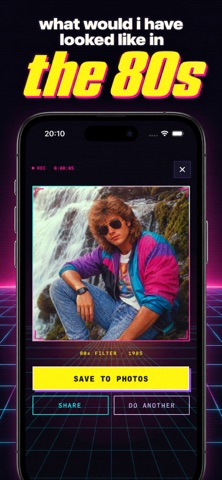


Description by TRY2 APPS Written by the developer, not by AppBrain. Click to read.
Pick a selfie. Tap once. Meet your 80s self.
80s Filter is an AI photo editor built for exactly one thing: sending you back to 1985. It restyles the person in your photo with an authentic late-80s look — permed and teased hair, bold blush, neon and pastel colours, denim and leather, a warm faded-film colour grade, VHS scan-lines, and a period-perfect background like a mall portrait studio or a synthwave grid at sunset. There's even a tiny orange date-stamp in the corner.
No sliders, no presets to fiddle with, no editing skills. One photo in, your retro portrait out in under a minute.
HOW IT WORKS
1. Load any photo from your library — a clear selfie or portrait works best.
2. Tap "Apply 80s."
3. Save your 1980s portrait, send it straight to the group chat, or keep it in your private in-app Vault.
WHAT YOU GET
• Authentic 80s hair, make-up and wardrobe, matched to the person in your photo
• Warm analog film colour, soft grain, VHS texture and light chromatic edges
• Retro backdrops: neon studio, synthwave sunset grid, classic mall portrait
• Full-resolution results with no watermark
• A private Vault that keeps every photo you've made
• Your face stays yours: no face scanning, no face recognition, and your photo is never stored on our servers
GREAT FOR
• Throwback Thursday posts that actually stand out
• 80s-themed party and decade-night invites
• A profile picture with a retro twist
• "Guess who this is" texts to your friends
• Vaporwave, synthwave and vintage aesthetic edits
WHY 80s FILTER
Most retro filters just drop a colour tint on top of your photo. 80s Filter rebuilds the whole scene — the hair, the clothes, the lighting, the background — so it looks like the picture was actually taken decades ago, not filtered today. It's the closest thing to a time machine on your phone.
SUBSCRIPTION
Running the filter requires an 80s Filter PRO subscription:
• Weekly plan — adds 7 photo edits every week
• Yearly plan — adds 10 photo edits every week (best value)
Edits you don't use roll over and never expire for as long as your subscription stays active.
Payment will be charged to your Apple Account at confirmation of purchase. The subscription renews automatically unless it is cancelled at least 24 hours before the end of the current period. Your account is charged for renewal within 24 hours before the current period ends. You can manage or cancel the subscription in your App Store account settings after purchase. Prices are shown in the app in your local currency.
Terms of Use: https://80s-filter-app.try2.app/prompt-ai-terms
Privacy Policy: https://80s-filter-app.try2.app/prompt-ai-privacy
Support: https://80s-filter-app.try2.app/prompt-ai-support