Add Text To Photos: Write Text is made and published by
Kevin Rupareliya.
AppBrain is an independent app data site and isn't affiliated with Kevin Rupareliya.
The app name, icon, screenshots and description belong to Kevin Rupareliya and are shown as
published on the App Store.
About Add Text To Photos: Write Text
Add Text To Photos: Write Text is a photo & video app developed by Kevin Rupareliya.
What is the rating of Add Text To Photos: Write Text?
Add Text To Photos: Write Text has no ratings yet.
Is Add Text To Photos: Write Text free?
Add Text To Photos: Write Text is free. The app size is 30.13 MB. The latest version available is 1.0. The last update was on February 25, 2025.
What are the requirements for Add Text To Photos: Write Text?
The app has a content rating of Everyone. The app has been available on the App Store since February 2025.
Description by Kevin Rupareliya(from the App Store)
Enhance your photos with stylish text and creative captions using Add Text. Choose from a wide range of fonts, colors, and customization options to transform your pictures into stunning visual creations.
TEXT LAYERS : Easily add multiple text layers to your photos. Simply double-tap to create a new text element and move it anywhere on your image with a simple drag.
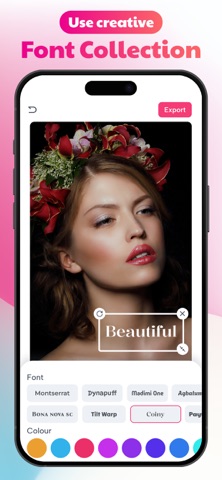
FONTS : Access a vast collection of unique fonts to give your photos a distinctive look. All fonts are available for free.
COLORS : Make your text pop with a carefully curated color palette designed to enhance your images.
TEXT FORMATTING : Adjust letter spacing and line height to achieve the perfect typography style.
PERSPECTIVE EFFECTS : Apply 3D transformations by rotating text in different dimensions for a dynamic appearance.
SHADOW EFFECTS : Add depth to your text by applying shadows and adjusting their opacity for a subtle or bold effect.
How to Use : 1 Select a background image by tapping the "Background" button. 2 Tap the "Add Text" button to insert text onto your photo. 3 Customize the text by adjusting its color, style, font size, and font type. 4 Apply an outline effect to enhance the text’s visibility. 5 Resize, rotate, and position the text freely to achieve the perfect look.
What You Get with Text Art : • Expertly curated font and layout combinations for a professional look. • Unique, visually appealing text designs created instantly. • A wide selection of colors, gradients, and textures to enhance your text. • Access to millions of high-quality, free stock images. • A vast collection of inspirational quotes to use in your designs. • High-resolution export options for crisp and clear results.
Privacy policy : https://addtextonphotopp.blogspot.com Terms of use : https://sites.google.com/view/kr-terms-of-use/home
Each subscription will automatically renew 3 days before the expiration date for
the same time period. Subscriptions can be cancelled at any time before the renewal.