
Adding Machine 10Key Universal
Adding Machine 10Key Universal is made and published by Richard Silverman. AppBrain is an independent app data site and isn't affiliated with Richard Silverman. The app name, icon, screenshots and description belong to Richard Silverman and are shown as published on the App Store.
AppBrain's verdict
EstablishedLoved by users- Rating on App Store
- 4.67
- 136 ratings
- Last updated
- December 27, 2023
Users love it: 4.7 stars from 136 ratings.
Rankings
App Store top chartsApp Store Rankings for Adding Machine 10Key Universal
Competitors
Similar apps and more from Richard SilvermanAlternatives to Adding Machine 10Key Universal








More from Richard Silverman



Releases
Updates seen on the App Store- Version
- 7.10ku
- Launched
- November 2012
No changelog data
User feedback
Ratings and reviews on the App StoreComments on Adding Machine 10Key Universal for iOS
We don't have enough comments to show example comments. Please check back later.
Technology
Found in the app by AppBrain- Price
- $3.99
- App size
- 23.1 MB
- Content rating
- Everyone
Technologies used by Adding Machine 10Key Universal
About the app and developer
About Adding Machine 10Key Universal
Adding Machine 10Key Universal is a finance app developed by Richard Silverman.
User Ratings
Adding Machine 10Key Universal is rated 4.67 out of 5 stars. The rating is based on 140 ratings.
App Information
Adding Machine 10Key Universal costs $3.99. The app size is 23.13 MB. The latest version available is 7.10ku. The last update was on December 27, 2023.
Technical Requirements
The app has a content rating of Everyone. The app has been available on the App Store since November 2012.
Developer information for Richard Silverman
Address:
Store listing
By Richard Silverman, from the App Store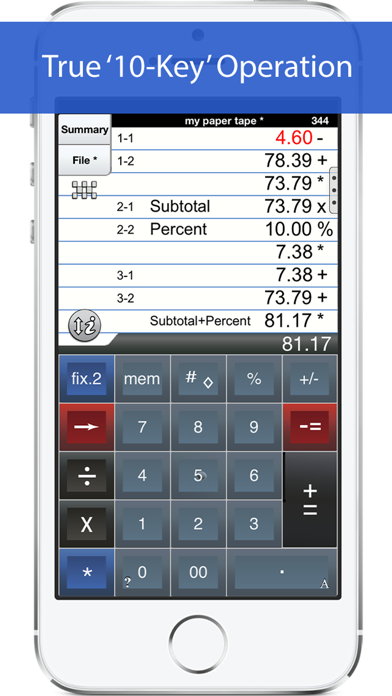


Description by Richard Silverman Written by the developer, not by AppBrain. Click to read.
This universal version works with both iPhone and iPad. The iPad version features a full sized (1:1) keypad with TypeTone, a unique audio aid to help guide your finger back to the center of a key. The total (*) key (iPad or iPhone) can be on either the left or right side (Sharp or Canon style).
Also. Review & edit numbers, add or delete lines. Save & retrieve paper tape files. Export paper tape files to iBooks©, Dropbox©, or your favorite printing utility (see the FAQs).
==== Recent Press =====
Has been featured in iTunes "What's Hot" in the Finance Category.
Strategic Finance (Tools of the Trade): "If you're looking for a professional desk calculator that can give you full 10-key accounting functions with a tape you can name and save, edit, e-mail, or print, check out Interlocken's 10 Key for iPad."
=================
Specifications:
=================
. Behaves the same as a '10 Key' adding machine.
. Export a PDF file to iBooks©, DropBox©, Email, and print with your favorite printing utility.
. Use Apple AirPrint© to print directly.
. TypeTone - a major innovation to aid accurate key entry using audio feedback (iPad version).
. Full size (1:1) keyboard (iPad version).
. Select from a menu of keypad sounds.
. 400 lines of paper tape history.
. 3 display formats: fixed, fix+, float
. Save paper tapes to disk for later use.
. Correct numbers, add comments, add/delete lines
. Two keypads offer the 'total' key on the left or right (Sharp or Canon style)
. Comprehensive set of help screens.
. 3 Orientations: Landscape Left/Right + Portrait (iPad version)
================
FAQ's
Q1. What is the difference between 'Adding Machine 10Key Univ', and 'Accountant Calc' in the App. Store.?
A1. Both calculators are single-column adding machines or calculators with full-size (1:1) keypads and are optimized for the iPad User Interface. '10 Key' behaves the same as a 10 Key Adding Machine with reversed operator entry while ‘Accountant Calc’ supports free chaining of +, -, x, /, %, √, 1/x. It is easier to use if you are not familiar with how a '10-key' works.
Q2. Can I touch-type?
A2. The iPad version comes as close to touch-typing as a touch-screen can be. With ‘TypeTone’, a key will guide your finger back to the center of a key with an audio tone.
Q3. How can I edit an incorrect number or add & delete lines from the paper tape?
A3. Touch any line of the paper tape for edit mode. Touch the side controls: Add Line, Delete Line. You can also edit numbers, split Add/Sub or Mul/Div groups. Press Done to return to Calculator mode.
Q4. Tell me about Email, Printing, and Exporting a Paper Tape.
A4. Email includes a pdf attachment. Print requires an AirPrint capable printer. Open-In will cause a menu of 3rd party Apps to appear. Once exported, print directly to a network reachable printer (even if it is NOT AirPrint capable).
============================
TERMS AND CONDITIONS
Your use of this application is governed by Interlocken Technology's Terms of Use (http://s354819480.onlinehome.us/InterlockenPrivacyPolicy/Interlocken%20Technology%20Privacy%20Policy.pdf) and Privacy Policy (http://s354819480.onlinehome.us/InterlockenPrivacyPolicy/InterlockenTechnologyTermsOfUse.pdf)