Download Android Apps and Games
AppBrain
  • Apps
  • Apps being viewed right now Trending apps today Most popular apps All-time most downloaded apps Top rated apps
  • Intelligence ▾
    Intelligence overview → Track any Android app or your whole market
    Track & analyze
    Keyword Tracker & OptimizerTrack & improve Play rankings App Performance ReportOne-off PDF for any app StatisticsFree Android & Play market stats
    Promote your app
    Featured Apps App Links
  • Intelligence
  • Pricing
  • Dashboard
  • Sign up
  • Log in
Last updated on: 2026-08-07
App Store Apps > Utilities > Paper Calc Office Lite
Paper Calc Office Lite icon

Paper Calc Office Lite

4.02.01
Richard Silverman
3.77
43 reviews
Free

Paper Calc Office Lite Screenshot 1 of 5
Paper Calc Office Lite Screenshot 2 of 5
Paper Calc Office Lite Screenshot 3 of 5
Paper Calc Office Lite Screenshot 4 of 5
Paper Calc Office Lite Screenshot 5 of 5
Download from the App Store

About Paper Calc Office Lite

Paper Calc Office Lite is an overall app developed by Richard Silverman.

Download Statistics

User Ratings

Paper Calc Office Lite is rated 3.77 out of 5 stars. The rating is based on 43 ratings.

App Information

Paper Calc Office Lite is FREE to download. The APK download size is 3.12 MB. The latest version available is 4.02.01. The last update was on April 4, 2025.

Technical Requirements

The app has a content rating of Everyone. The app has been available on Google Play before 2010.

Description
Paper Calc Office Lite -

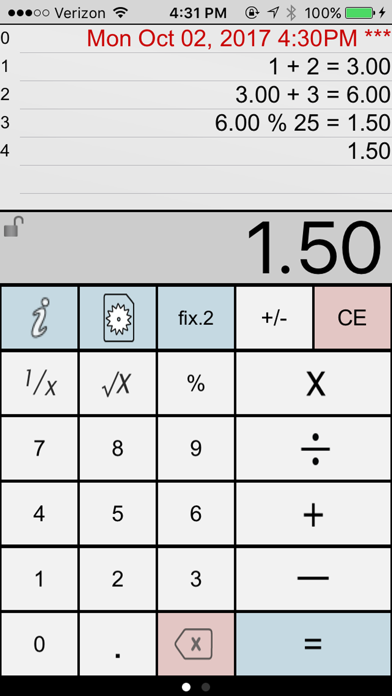
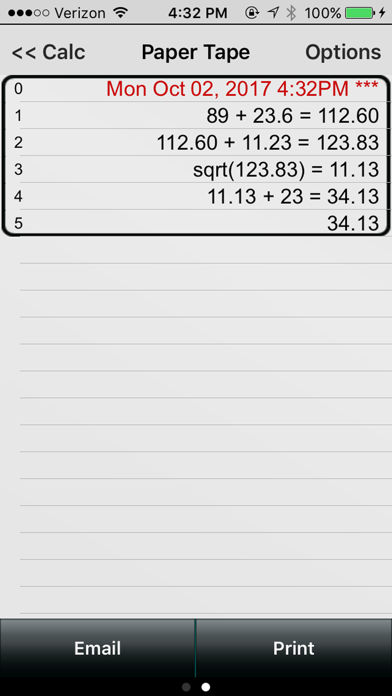
Paper Calc Office is an easy to use, large key, 4-function calculator tailored for the office environment. Use the powerful paper tape to review numbers you've entered, email, timestamp, put comments on any line, or bring a number from higher in the paper tape down into the current calculation.

=================
Selected by MagicSolver for Free App Magic of the day!
Selected by AppTurbo for Free "App of the Day" !
=================

Make the keys larger by sliding the LCD display up, or show more paper tape by moving the LCD display down. Two keyboards are included, or, make & save up to three of your own.

This is a fully functional version of Paper Calc Office, but with the following reduced features:
- 6 lines of paper tape (the full version has 250)

PaperCalc Office Lite Features:

CALCULATOR MODE
=================
> Great general purpose office calculator
> Oversized +, -, x, /, = keys
> 3 display formats
---> fixed Point from 2-8 places
---> float
---> eng (power to the x3)

PAPER TAPE HISTORY
==================
> 6 lines of virtual paper tape (250 in the full version)
> Full-screen view of the paper tape on the right-side scroll page.
> Copy numbers or lines to anthe Apple device clipboard
> Grab numbers from the tape to use in your current calculation
> Add comments to any line

PRINT & EMAIL
=============
> Print (requires iOS4.2 & an AirPrint printer)
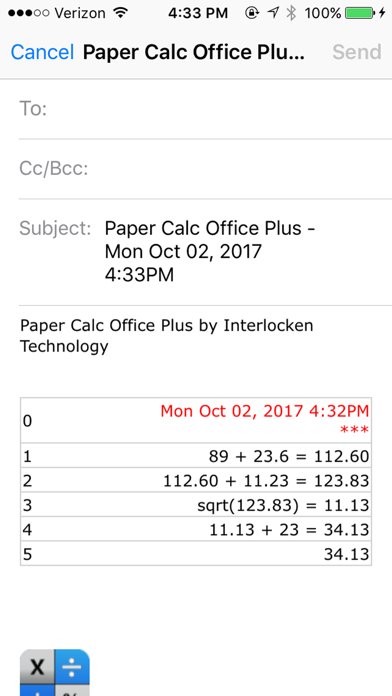
> Email an exact copy of the paper tape

EXTRAS
=======
> Move the calculator LCD display to resize the keyboard.
> Create and save custom keyboard layouts to suit your personal needs.
> Key click sound (on/off)
> Options are easy-to-access in the scroll-to-left view window.

Q & A:
=====
Q1. How does 'Office' differ from the other PaperCalc calculators?
A1. Office has been designed specifically as an easy to use chain calculator with basic math function. The emphasis is on ease-of-use and an easy-to-follow paper trail of calculations performed.

Q2. How do I bring a number from the paper tape into my current calculation?
A2. Touch any line of the paper tape and select the number from the menu.

Q3. How can I quickly clear the paper tape?
A3. Make sure the option to 'Double Tap the LCD to Clear' is ON (see the right-side scroll page). Then just double-tap the LCD display to clear the paper tape (Office Full version only)

Q4. How do I use the '%' key?
A4. There are two ways to use the % key:

1. Obtain the % of a number:

- Press '200 % 5 ='
- Answer will be '10'
- PaperCalc took 5% of 200.

2. The % of a number is used in the operation on the number:

- Press: '200 - 5 % ='
- Answer will be '190'
- PaperCalc subtracted 5% of 200 from 200

Q5. How do I customize the keyboard layout?
A5. Press the large "i" (info) key. Select "Edit Keyboard Layout". Then touch and move keys to change locations. Tap keys to change sizes. Save custom keyboard layouts and rename them for later use.

PURCHASE DETAILS
. This is an evaluation version with a limited number of paper tape history lines.
. Use the links in this version to be directed to the full version of Paper Calc Office in the App Store.

TERMS AND CONDITIONS
Your use of this application is governed by Interlocken Technology's Terms of Use (http://s354819480.onlinehome.us/InterlockenPrivacyPolicy/Interlocken%20Technology%20Privacy%20Policy.pdf) and Privacy Policy (http://s354819480.onlinehome.us/InterlockenPrivacyPolicy/InterlockenTechnologyTermsOfUse.pdf)
Show more Show less

More data about Paper Calc Office Lite

Price Free to download
Rating 3.77 based on 43 ratings
Ranking Not ranked
Version 4.02.01
App download size 3.12 MB
Suitable for Everyone

Alternative downloads for the Paper Calc Office Lite app

BCalc - a daily calculator icon BCalc - a daily calculator
煦 张
4.7
Free
244 ratings
Calculator with History ++ icon Calculator with History ++
贺 黄
4.0
Free
20 ratings
TinyMath Finance Calculator icon TinyMath Finance Calculator
Andrew Morgatov
4.2
Free
13 ratings
Smart Calculator-With History icon Smart Calculator-With History
荣 周
4.8
Free
16 ratings
Calculator Silver Lite icon Calculator Silver Lite
Hannes Sverrisson
4.1
Free
10 ratings
Calculator L + Twin Plus App # icon Calculator L + Twin Plus App #
Satomi Uchida
4.7
Free
22 ratings
Calculator with Notes icon Calculator with Notes
Kevin Ghori
1.0
Free
2 ratings
Calculator PanecalST icon Calculator PanecalST
Noriyasu Kutsuzawa
4.8
Free
93 ratings

More from Richard Silverman

Adding Machine 10Key Univ Lite icon Adding Machine 10Key Univ Lite
Richard Silverman
4.3
Free
192 ratings
Adding Machine 10Key Universal icon Adding Machine 10Key Universal
Richard Silverman
4.7
$3.99
134 ratings
Adding Machine 10Key iPhone icon Adding Machine 10Key iPhone
Richard Silverman
4.6
$2.99
130 ratings
Paper Calc Office icon Paper Calc Office
Richard Silverman
4.5
$0.99
90 ratings
Accountant Calc Pro icon Accountant Calc Pro
Richard Silverman
4.4
Free
39 ratings
Accountant Calculator icon Accountant Calculator
Richard Silverman
4.5
$2.99
39 ratings
Print Calculator icon Print Calculator
Richard Silverman
4.3
Free
33 ratings
Accountant Calc Universal icon Accountant Calc Universal
Richard Silverman
4.8
$4.99
19 ratings

Changelog of Paper Calc Office Lite

No changelog data

Developer information for Richard Silverman

Richard Silverman

Address:

Share Paper Calc Office Lite

Comments on Paper Calc Office Lite for iOS

We don't have enough comments to show example comments. Please check back later.

App Store Rankings for Paper Calc Office Lite

This app is not ranked

Technologies used by Paper Calc Office Lite

BCalc - a daily calculator icon BCalc - a daily calculator
Calculator with History ++ icon Calculator with History ++
TinyMath Finance Calculator icon TinyMath Finance Calculator
Smart Calculator-With History icon Smart Calculator-With History
Calculator Silver Lite icon Calculator Silver Lite
Calculator L + Twin Plus App # icon Calculator L + Twin Plus App #
Calculator with Notes icon Calculator with Notes
Calculator PanecalST icon Calculator PanecalST

Back to top
AppBrain Intelligence premium content

Subscribe now to get full and unlimited access to AppBrain Intelligence. You'll have access to:

  • App Intelligence dashboard (performance timeline, competitor comparison, country rankings, insight cards)
  • Detailed ranking data per app
  • Full timeline per developer
  • Device market shares data per country
  • Unlimited keyword tracking
1 Month

$75/mo
(billed every month)

SAVE 0%
Subscribe
3 Months

$65/mo
($195 billed every 3 months)

SAVE 13%
Subscribe
1 Year

$57.50/mo
($690 billed every year)

SAVE 23%
Subscribe
Each subscription will automatically renew 3 days before the expiration date for the same time period. Subscriptions can be cancelled at any time before the renewal.

AppBrain is a directory focused on discovering great apps and games. We give statistics, rankings and search options that Google Play and the App Store don't have. All trademarks are owned by their respective owners. AppBrain doesn't offer APKs or binaries, and always lets users install the official version from Google Play or the App Store.

More apps

  • Top Android apps being viewed
  • Cast Phone to TV, Chromecast
  • Soccer Referee Simulator 3D
  • PRINCIPIA: Master of Science

Android Statistics

  • Android statistics
  • Google Play Developer stats
  • Trending Android Apps
  • Top popular Apps
  • Buy the best Android phone

About AppBrain

  • Contact
  • Privacy
  • Documentation
  • DMCA takedowns
  • Articles
  • Blog
  • Free webpage for your Android app
© 2010-2026 - AppBrain