

Adjust My Crown: Outfit Maker
Adjust My Crown: Outfit Maker is made and published by Ornamentum, LLC. AppBrain is an independent app data site and isn't affiliated with Ornamentum, LLC. The app name, icon, screenshots and description belong to Ornamentum, LLC and are shown as published on the App Store.
AppBrain's verdict
- Rating on App Store
- 5.00
- 17 ratings
- Last updated
- September 21, 2026
It doesn't have enough ratings yet to judge what users think.
Rankings
App Store top chartsApp Store Rankings for Adjust My Crown: Outfit Maker
Competitors
Similar apps and more from Ornamentum, LLCAlso available on Google Play

Releases
Updates seen on the App Store- Version
- 58 (10.3.2)
- Launched
- December 2023
No changelog data
User feedback
Ratings and reviews on the App StoreComments on Adjust My Crown: Outfit Maker for iOS
We don't have enough comments to show example comments. Please check back later.
Technology
Found in the app by AppBrain- Price
- Free
- App size
- 116.4 MB
- Content rating
- Medium
Technologies used by Adjust My Crown: Outfit Maker
About the app and developer
About Adjust My Crown: Outfit Maker
Adjust My Crown: Outfit Maker is a lifestyle app developed by Ornamentum, LLC.
User Ratings
Adjust My Crown: Outfit Maker is rated 5.00 out of 5 stars. The rating is based on 17 ratings.
App Information
Adjust My Crown: Outfit Maker is freely available from the App Store. The app size is 116.42 MB. The latest version available is 58 (10.3.2). The last update was on September 21, 2026.
Technical Requirements
The app has a content rating of Medium Maturity. The app has been available on the App Store since December 2023.
Developer information for Ornamentum, LLC
Address:
Frequently asked questions about Adjust My Crown: Outfit Maker
Is Adjust My Crown: Outfit Maker free?
Yes. Adjust My Crown: Outfit Maker is free on the App Store.
Is Adjust My Crown: Outfit Maker still available?
Yes. Adjust My Crown: Outfit Maker is on the App Store, and the last update we saw was on September 21, 2026.
How large is Adjust My Crown: Outfit Maker?
Adjust My Crown: Outfit Maker is 116.42 MB.
Is Adjust My Crown: Outfit Maker suitable for children?
App Store gives Adjust My Crown: Outfit Maker a medium maturity rating, so it is not meant for young children.
How do people rate Adjust My Crown: Outfit Maker?
Adjust My Crown: Outfit Maker scores 5.00 out of 5 stars, from 17 ratings on the App Store.
Who made Adjust My Crown: Outfit Maker?
Adjust My Crown: Outfit Maker was developed by Ornamentum, LLC. It is listed in the lifestyle category on the App Store.
Store listing
By Ornamentum, LLC, from the App Store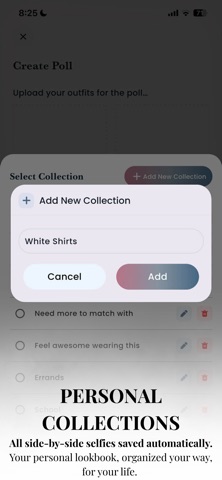




Description by Ornamentum, LLC Written by the developer, not by AppBrain. Click to read.
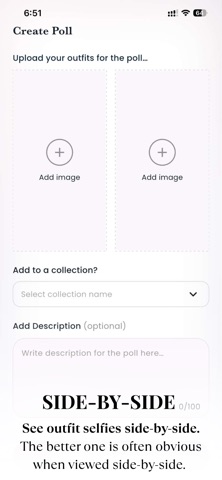
Adjust My Crown is a simple, safe fashion app that helps you choose between outfits by seeing real outfit selfies side-by-side. It also works as an easy way to track what you wear — and it's free to use.
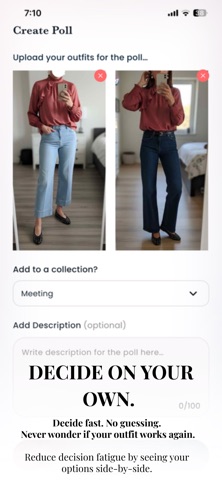
When two looks are next to each other, the better one is often obvious.
HOW IT WORKS
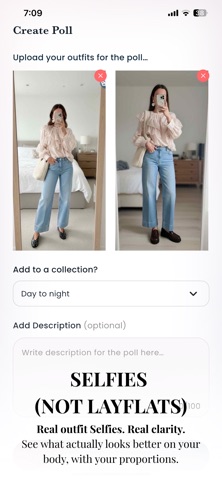
• Take two outfit selfies using clothes from your closet
• See them right next to each other
• Decide which one looks better — quickly. Post as a poll if you can't decide by selecting a future date and time.
Seeing outfits side-by-side removes guesswork and mental juggling. The answer usually becomes clear immediately.
USE SIDE-BY-SIDES FOR OUTFIT TRACKING
You can also use side-by-side comparisons to track outfits and document what actually worked.
Common ways people use it:
• Full look vs. styling variation
• Same outfit, different shoes
• Same outfit, different jacket or purse
• Outfit today vs. outfit last time
Instead of logging clothes in isolation, you see how pieces match, work together, and look on your body — with your proportions. This makes outfit tracking visual, practical, and easy to remember.
Many people use Adjust My Crown as an outfit planner to test style variations and track what works over time.
YOUR OWN COMMENTS TO HELP YOU REMEMBER (Your Personal Notes)
Each side-by-side has a comment section directly under the images where you can:
• Note why one look worked or how you felt in it
• Remember sizing or comfort details
• Track when or where you wore it (or who you were with)
• Capture styling ideas for next time
Your notes stay attached to the comparison, so context is never lost.
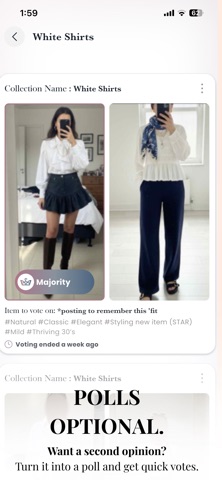
POLLS (Optional Feedback)
If you want a second opinion:
• Turn your side-by-side into a poll
• Set a date and time for the poll to end
• Get simple, anonymous votes from real people
No comments. No pressure.
Polls are optional — you can use Adjust My Crown entirely on your own.
COLLECTIONS
Every side-by-side is saved automatically to Collections, which are fully customizable.
Collections Examples:
• Work outfits/Study outfits
• Everyday go-tos
• Looks that always get compliments
• Seasonal outfits
• Try-again ideas
Over time, your Collections become a personal lookbook — a visual record of outfits that actually worked on your body, with your proportions, organized your way.
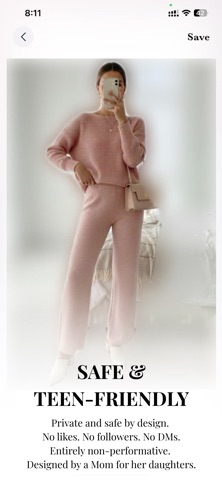
SAFE (Private & Low-Pressure by Design)
• No public profiles
• No follower counts
• No likes — just anonymous votes
• No direct messaging
• Optional face blur
Especially helpful for teens who want a safe way to explore personal style without social pressure (created by a Mom for her teen daughters to have a safe outlet on their phones).
FREE TO USE
Adjust My Crown is free to download and use.
Ads help keep it accessible. A subscription simply removes ads.
SEE IT SIDE-BY-SIDE.
DECIDE WHAT WORKS.
ADJUST MY CROWN.