

AI Email Writer: Smart Reply
AI Email Writer: Smart Reply is made and published by Phuc Pham. AppBrain is an independent app data site and isn't affiliated with Phuc Pham. The app name, icon, screenshots and description belong to Phuc Pham and are shown as published on the App Store.
AppBrain's verdict
- Last updated
- August 20, 2026
Rankings
App Store top chartsApp Store Rankings for AI Email Writer: Smart Reply
Competitors
Similar apps and more from Phuc PhamAlternatives to AI Email Writer: Smart Reply


More from Phuc Pham


Releases
Updates seen on the App Store- Version
- 1.1
- Launched
- July 2026
No changelog data
User feedback
Ratings and reviews on the App StoreComments on AI Email Writer: Smart Reply for iOS
We don't have enough comments to show example comments. Please check back later.
Technology
Found in the app by AppBrain- Price
- Free
- App size
- 6.19 MB
- Content rating
- Everyone
Technologies used by AI Email Writer: Smart Reply
About the app and developer
About AI Email Writer: Smart Reply
AI Email Writer: Smart Reply is a productivity app developed by Phuc Pham.
What is the rating of AI Email Writer: Smart Reply?
AI Email Writer: Smart Reply has no ratings yet.
Is AI Email Writer: Smart Reply free?
AI Email Writer: Smart Reply is free. The app size is 6.19 MB. The latest version available is 1.1. The last update was on August 20, 2026.
What are the requirements for AI Email Writer: Smart Reply?
The app has a content rating of Everyone. The app has been available on the App Store since July 2026.
Developer information for Phuc Pham
Address:
Store listing
By Phuc Pham, from the App Store




Description by Phuc Pham Written by the developer, not by AppBrain. Click to read.
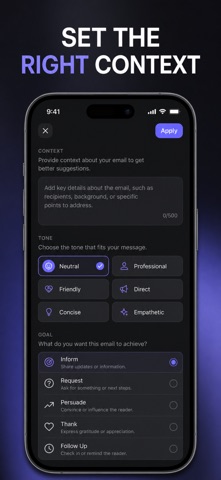
This is not another inbox. It is the writing step that happens before you hit send. You steer the draft with real controls instead of guessing at prompts: seven contexts (work, sales, support, academic, job search, networking, personal), nine goals like follow-up, apology, proposal or reminder, ten tones from formal to empathetic, three lengths, six languages. Change one chip, regenerate, and the whole email shifts with it.
WHAT YOU GET
- A finished, send-ready email from a one-sentence brief — subject line included, no blank page to stare at
- Wording that matches the moment: pick formal, persuasive, apologetic, grateful, urgent or empathetic and the draft changes with it
- A reply to any message you paste in, written in the tone and goal you choose
- Cleaner writing before it goes out: grammar and clarity review, instant rewording, and translation across six languages
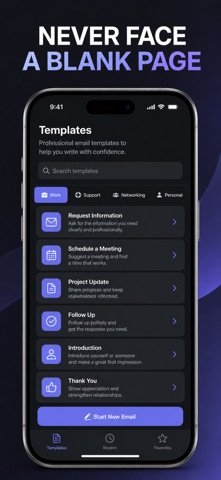
- 22 ready-made templates for meetings, cover letters, refunds, cold outreach and more — plus your own saved ones with reusable name placeholders
- Everything you have written, searchable by keyword and context, exportable as CSV or PDF
PERFECT FOR
- Professionals who write the same awkward emails every week and want them done in a minute
- Job seekers sending cover letters, interview follow-ups and referral requests
- Sales and support teams that need outreach, follow-ups and escalations to land right
- Anyone writing in a second language who wants to sound fluent and appropriate
WHY NOT JUST USE A CHAT APP?
Because you would retype the same setup every time. Here your context, tone, goal, length and language are one-tap controls, your best emails are saved as reusable templates, and your history is right there to search — instead of scrolling back through a chat thread hunting for the version that worked.
PRIVACY
No account, no ads, no tracking. Your drafts, templates and history live in the app on your device. Sending text to the AI is opt-in and you approve it before anything leaves your phone. Voice dictation uses the microphone only while the recording screen is open.
FULL ACCESS
Full access unlocks unlimited email generation, all ten tones, all six languages, smart reply, grammar check, paraphrase and translate, voice dictation, and unlimited history and custom templates. Choose weekly, yearly, or a one-time lifetime purchase. AI drafting connects to OpenAI using an API key you add once in Settings.
Write the email you have been putting off — open the Compose tab, describe it in one line, and send it in the next minute.
Terms of Use (EULA): https://web-levi.web.app/terms
Privacy Policy: https://web-levi.web.app/privacy-policy
Questions? tphuc.work@gmail.com