

AI Note before forgetting
AI Note before forgetting is made and published by Hideshi Otsuru. AppBrain is an independent app data site and isn't affiliated with Hideshi Otsuru. The app name, icon, screenshots and description belong to Hideshi Otsuru and are shown as published on the App Store.
AppBrain's verdict
Established- Rating on App Store
- 4.40
- 10 ratings
- Last updated
- October 29, 2026
It doesn't have enough ratings yet to judge what users think.
Rankings
App Store top chartsApp Store Rankings for AI Note before forgetting
Competitors
Similar apps and more from Hideshi OtsuruAlternatives to AI Note before forgetting


More from Hideshi Otsuru


Releases
Updates seen on the App Store- Version
- 1.0.46
- Launched
- November 2020
No changelog data
User feedback
Ratings and reviews on the App StoreComments on AI Note before forgetting for iOS
We don't have enough comments to show example comments. Please check back later.
Technology
Found in the app by AppBrain- Price
- Free
- App size
- 7.13 MB
- Content rating
- Everyone
Technologies used by AI Note before forgetting
About the app and developer
About AI Note before forgetting
AI Note before forgetting is a lifestyle app developed by Hideshi Otsuru.
User Ratings
AI Note before forgetting is rated 4.40 out of 5 stars. The rating is based on 10 ratings.
App Information
AI Note before forgetting is freely available from the App Store. The app size is 7.13 MB. The latest version available is 1.0.46. The last update was on October 29, 2026.
Technical Requirements
The app has a content rating of Everyone. The app has been available on the App Store since November 2020.
Developer information for Hideshi Otsuru
Address:
Frequently asked questions about AI Note before forgetting
Is AI Note before forgetting free?
Yes. AI Note before forgetting is free on the App Store.
Is AI Note before forgetting still available?
Yes. AI Note before forgetting is on the App Store, and the last update we saw was on October 29, 2026.
How large is AI Note before forgetting?
AI Note before forgetting is 7.13 MB.
Is AI Note before forgetting suitable for children?
App Store rates the content of AI Note before forgetting as suitable for everyone.
How do people rate AI Note before forgetting?
AI Note before forgetting scores 4.40 out of 5 stars, from 10 ratings on the App Store.
Who made AI Note before forgetting?
AI Note before forgetting was developed by Hideshi Otsuru. It is listed in the lifestyle category on the App Store.
What are the best alternatives to AI Note before forgetting?
People looking at AI Note before forgetting also look at these lifestyle apps: kotoca - Your Life Notebooks -, Simplified Diary-Simple app, Moovie - Note your movies -, Simple Short Diary, Simple photo diary app -Nikky-.
Store listing
By Hideshi Otsuru, from the App Store

Description by Hideshi Otsuru Written by the developer, not by AppBrain. Click to read.
In such a case, let's save what you came up with with this app.
Copy your current location information
If you tap the menu button while entering a note
You can copy the following current location information and paste it into a memo.
Date, time, address, weather, temperature, humidity, barometric pressure
With AI, you can generate ideas, summarize, and proofread based on your notes.
Added a function that can reproduce the display position of the note
Add photos and videos
How to use
-Add note
Tap the \"+\" button to enter a new memo.
-See note
Tap the desired memo from the memo list to display the memo. You can also modify or update your notes on this page.
-Current location information
If you tap the menu button while entering a memo, you can copy the following current location information and paste it into the memo.
date, time, address, weather, temperature, humidity, pressure.
-Add folder
Create a folder to save the memo by tapping the \"Add folder\" button.
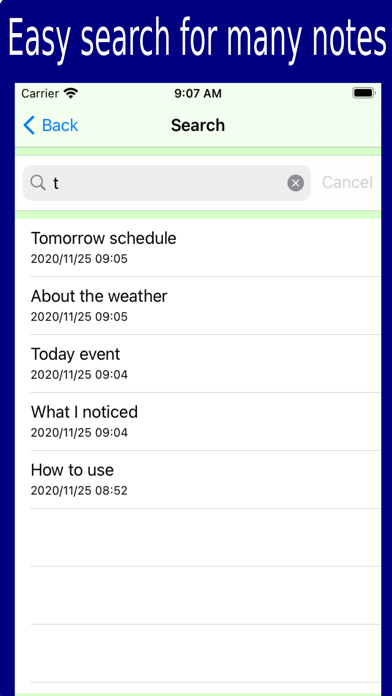
-Search
You can search for memos by character string from all saved memos by tapping the \"Search\" button.
-Edit
When you tap the \"Edit\" button, the \"Delete\" button will appear in the folder list and memo list, and you can delete the desired memo or folder.
-Memo list sort
Tap the \"Sort\" button to change the sort of memo list in the order of creation date/time, update date/time, and character string.
-Share notes
You can share the contents of the memo by e-mail etc. by tapping the action button on the page where the memo is opened.