

Street Viewer plus
Street Viewer plus is made and published by Hideshi Otsuru. AppBrain is an independent app data site and isn't affiliated with Hideshi Otsuru. The app name, icon, screenshots and description belong to Hideshi Otsuru and are shown as published on the App Store.
AppBrain's verdict
EstablishedLoved by users- Rating on App Store
- 4.54
- 596 ratings
- Last updated
- June 29, 2026
- Size
- 21.8 MB
Users love it: 4.5 stars from 596 ratings. Its best ranking is #53 in Top Grossing, Navigation in Japan.
User feedback
Ratings and reviews on the App StoreComments on Street Viewer plus for iOS
We don't have enough comments to show example comments. Please check back later.
Store listing
By Hideshi Otsuru, from the App Store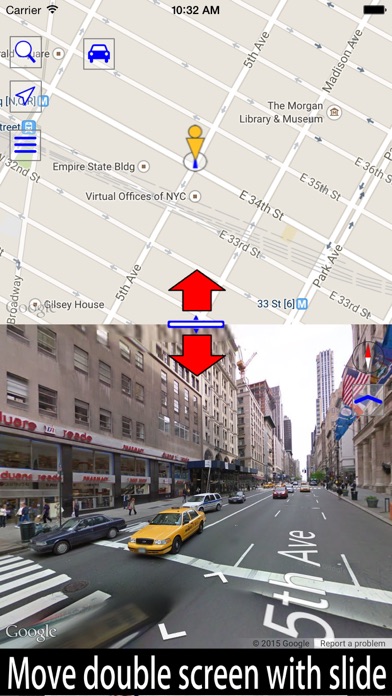


Description by Hideshi Otsuru Written by the developer, not by AppBrain. Click to read.
Lets you use Street View with compass and screen capture functions.
Display the street view by tapping the blue line on the map.
Display famous places and tourist attractions by tapping the blue point on the map.
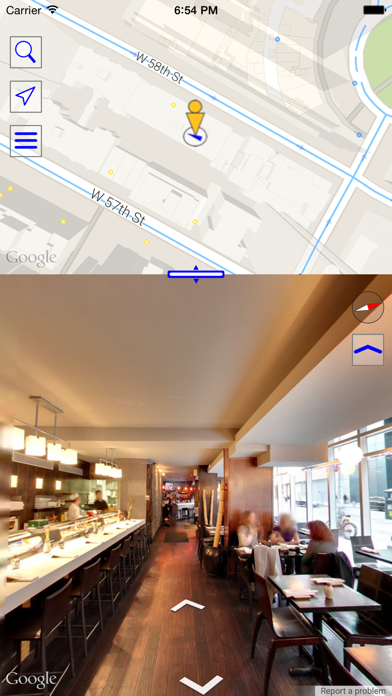
Display the Business View of stores and restaurants by tapping the yellow points on the map.
Display underwater panorama images by tapping the marker on the sea.
Main features
-Double view with both a map and street view
You can change the size of this double view by drag.
-Linking of the map and street view
Street View is shown for the position you tap on the map.
If you move in Street View, the marker on the map also moves.
If you change direction in Street View, the direction of the marker on the map also changes.
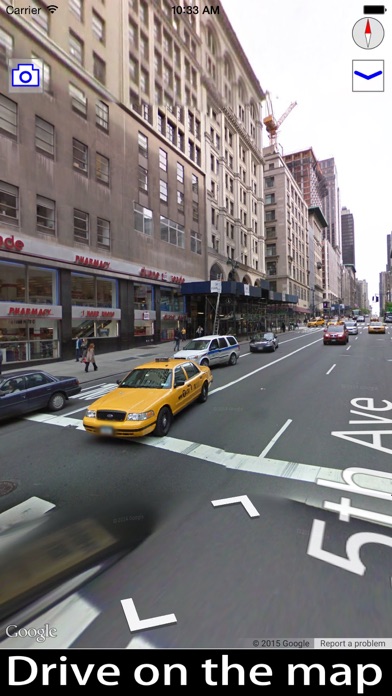
-Fullscreen view
You can view Street View in fullscreen.
-Street View screen capture
-Find out the direction of Street View using a compass
You can check the direction of the Street View using the compass function.
-Search the map using an address or target item.
-You added a bookmark function.
-You can select the map type.
-Street view coverage road map.
-You can view the underwater panoramic image.
■ In-app billing (billing from within the app itself) monthly course
Because the usage fees for Google Street View have increased dramatically, we are providing unlimited displays of Street View.
By purchasing "Unlimited Street View display" any Street View display restrictions will be unlocked.
Furthermore, no advertising will be displayed either.
• This subscription term lasts for a period of one month.
• The fee for this subscription costs $0.99 per month.
• When your purchase is complete, your iTunes account will be billed.
• If the current subscription is not canceled within 24 hours of the end of the subscription term, the subscription will automatically be renewed.
• Billing for automatic renewals will be conducted 24 hours prior to the end of the current subscription term.
• The subscription is to be managed by the customer, and automatic renewal can be suspended in account settings.
• Cancellation/Setup of automatic renewal can be conducted by going to "Settings" in the app, then click on "iTunes & App Store", click on "Apple ID", click on "display Apple ID", and then click on "Registration".
• No cancellations or refunds will be provided for current subscriptions during the valid subscription term.
Terms of Service & Privacy Policy
http://houj.jp/Support/streetviewUnlimiteden.html
Safety and technology
Found in the app by AppBrain- Price
- Free
- App size
- 21.8 MB
- Content rating
- Everyone
Technologies used by Street Viewer plus
Releases
Updates seen on the App Store- Version
- 1.9.68
- Launched
- January 2015
No changelog data
Alternatives
Similar apps and more from Hideshi OtsuruAlternatives to Street Viewer plus





More from Hideshi Otsuru


Rankings
App Store top charts- Highest rank
- #53
- Chart
- Top Grossing
- Navigation
- Country
- Japan
App Store Rankings for Street Viewer plus
Top rankings
| Rank | Country | Category | List |
|---|---|---|---|
| 53 | Japan | Navigation | Top Grossing |
Ranking history in Japan
About the app and developer
About Street Viewer plus
Street Viewer plus is a navigation app developed by Hideshi Otsuru.
User Ratings
Street Viewer plus is rated 4.54 out of 5 stars. The rating is based on 600 ratings.
App Information
Street Viewer plus is freely available from the App Store. The app size is 21.83 MB. The latest version available is 1.9.68. The last update was on June 29, 2026.
Technical Requirements
The app has a content rating of Everyone. The app has been available on the App Store since January 2015.
Developer information for Hideshi Otsuru
Address: