




AppBrain's verdict
- Last updated
- November 16, 2026
- Size
- 116.9 MB
User feedback
Ratings and reviews on the App StoreComments on AI Subtitle Maker & Translator for iOS
We don't have enough comments to show example comments. Please check back later.
Store listing
By HYUNWANG LEE, from the App StoreDescription by HYUNWANG LEE Written by the developer, not by AppBrain. Click to read.
Open a video from Photos or the Files app to turn speech into subtitles and read them in your language.
No ads, no sign-up. Every feature is free.
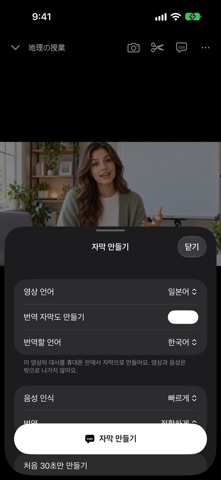
■ Make subtitles automatically
Turn speech in about 100 languages into subtitles right on your iPhone. Lines appear as each part is ready, so you can start watching while the rest finishes. If you stop partway through, it picks up where it left off next time, and a video you started subtitling can finish after you leave the app.
■ Translate videos into your language
Translate subtitles into more than 60 languages and watch foreign videos in your own. Show the original lines and the translation together as dual subtitles, or display just one language.
■ Edit subtitles on the video
Tap Edit subtitles below the video to pause playback and edit the current line right on screen. Fix a word, delete wrong lines, or write new ones where a scene has none. While editing, you can shift a single line or all lines by 0.1 seconds to fix timing.
■ Subtitles for other apps
On iOS 27 or later, sound playing in another app appears as subtitles in a small Picture in Picture window.
■ Offline and private
Speech recognition and translation run on your iPhone, so your videos and dialogue are never sent to a server. You see the file size before downloading a language, and once you have it, you can make and translate subtitles offline, even in airplane mode.
■ Video player
Play videos from Photos and the Files app with controls built around reading subtitles:
• Slide anywhere to seek, double-tap either side to jump 10 seconds, or hold to fast-forward
• Slide up or down to adjust brightness and sound
• Jump to the previous or next line, or replay the current line
• Change playback speed, lock the screen, or watch in Picture in Picture with subtitles
• Keep a video playing small while you pick another one
• Open a playlist while watching, skip to the previous or next video, and choose repeat modes
• Play just the sound in the background, use screen casting, and let tall vertical videos fill the screen
• Open SRT and VTT files and export SRT; a subtitle file with the same name as the video opens with it
■ Subtitle look
Choose subtitle size, position, color, background, and alignment, plus 11 fonts, weight, and italics so lines stay comfortable to read.
■ Keep moments and edit video
Hold the middle of the video to save the scene as a picture in Photos, turn any part of a video into a GIF, or bookmark scenes you want to revisit. You can also trim videos, join several into one, and add music with the picture quality unchanged, then save the result to Photos or replace the original.
■ Learn languages
For language study, read both languages with dual subtitles, replay one line, loop a section with A-B repeat, and listen at a slower speed.
■ Library and favorites
Browse by date and by album, or search by name. Mark favorites with a star, and select several videos to add to an album or delete. Pinch with two fingers to change the size of the tiles.
App screens come in more than 60 languages and follow your iPhone's language.
The first subtitles take a little time. Time and accuracy depend on your iPhone, the language, and the recording. Fast translation shows Google translation attribution. Please use it on videos you have the right to subtitle.
The screenshots show subtitles the app made from sample videos. The scenes in the samples are AI-generated pictures and the speech comes from the FLEURS dataset.
FLEURS · © Google · CC BY 4.0 · https://creativecommons.org/licenses/by/4.0/
Support: barosubplayer@gmail.com
Safety and technology
Found in the app by AppBrain- Price
- Free
- App size
- 116.9 MB
- Content rating
- Everyone
Technologies used by AI Subtitle Maker & Translator
Releases
Updates seen on the App Store- Version
- 1.3.9
- Launched
- November 2026
No changelog data
Alternatives
Similar apps and more from HYUNWANG LEEAlternatives to AI Subtitle Maker & Translator


Also available on Google Play

Rankings
App Store top chartsApp Store Rankings for AI Subtitle Maker & Translator
About the app and developer
About AI Subtitle Maker & Translator
AI Subtitle Maker & Translator is a photo & video app developed by HYUNWANG LEE.
User Ratings
The app has no ratings yet.
App Information
AI Subtitle Maker & Translator is freely available from the App Store. The app size is 116.86 MB. The latest version available is 1.3.9. The last update was on November 16, 2026.
Technical Requirements
The app has a content rating of Everyone. The app has been available on the App Store since November 2026.
AI Subtitle Maker & Translator is made and published by HYUNWANG LEE. AppBrain is an independent app data site and isn't affiliated with HYUNWANG LEE. The app name, icon, screenshots and description belong to HYUNWANG LEE and are shown as published on the App Store.
Developer information for HYUNWANG LEE
Address:
Frequently asked questions about AI Subtitle Maker & Translator
Is AI Subtitle Maker & Translator free?
Yes. AI Subtitle Maker & Translator is free on the App Store.
Is AI Subtitle Maker & Translator still available?
Yes. AI Subtitle Maker & Translator is on the App Store, and the last update we saw was on November 16, 2026.
How large is AI Subtitle Maker & Translator?
AI Subtitle Maker & Translator is 116.86 MB.
Is AI Subtitle Maker & Translator suitable for children?
App Store rates the content of AI Subtitle Maker & Translator as suitable for everyone.
Who made AI Subtitle Maker & Translator?
AI Subtitle Maker & Translator was developed by HYUNWANG LEE. It is listed in the photo & video category on the App Store.
What are the best alternatives to AI Subtitle Maker & Translator?
People looking at AI Subtitle Maker & Translator also look at these photo & video apps: Dublio: AI Video Dubbing, Video Transcriber: Subtitles, CapiCap: Video Captions, AI Video Translator: Captioner, DePlayer.