

AI Video Generator: VIDIOAI
AI Video Generator: VIDIOAI is made and published by Joy Sarkar. AppBrain is an independent app data site and isn't affiliated with Joy Sarkar. The app name, icon, screenshots and description belong to Joy Sarkar and are shown as published on the App Store.
AppBrain's verdict
Well rated- Rating on App Store
- 4.42
- 2,129 ratings
- Last updated
- May 25, 2026
Users rate it well: 4.4 stars from 2,129 ratings.
Rankings
App Store top chartsApp Store Rankings for AI Video Generator: VIDIOAI
Competitors
Similar apps and more from Joy SarkarAlternatives to AI Video Generator: VIDIOAI





More from Joy Sarkar





Releases
Updates seen on the App Store- Version
- 5.6
- Launched
- June 2024
No changelog data
User feedback
Ratings and reviews on the App StoreComments on AI Video Generator: VIDIOAI for iOS
We don't have enough comments to show example comments. Please check back later.
Technology
Found in the app by AppBrain- Price
- Free
- App size
- 189.0 MB
- Content rating
- Medium
Technologies used by AI Video Generator: VIDIOAI
About the app and developer
About AI Video Generator: VIDIOAI
AI Video Generator: VIDIOAI is a graphics & design app developed by Joy Sarkar.
User Ratings
AI Video Generator: VIDIOAI is rated 4.42 out of 5 stars. The rating is based on 2.1 thousand ratings.
App Information
AI Video Generator: VIDIOAI is freely available from the App Store. The app size is 188.97 MB. The latest version available is 5.6. The last update was on May 25, 2026.
Technical Requirements
The app has a content rating of Medium Maturity. The app has been available on the App Store since June 2024.
Developer information for Joy Sarkar
Address:
Frequently asked questions about AI Video Generator: VIDIOAI
Is AI Video Generator: VIDIOAI free?
Yes. AI Video Generator: VIDIOAI is free on the App Store.
Is AI Video Generator: VIDIOAI still available?
Yes. AI Video Generator: VIDIOAI is on the App Store, and the last update we saw was on May 25, 2026.
How large is AI Video Generator: VIDIOAI?
AI Video Generator: VIDIOAI is 188.97 MB.
Is AI Video Generator: VIDIOAI suitable for children?
App Store gives AI Video Generator: VIDIOAI a medium maturity rating, so it is not meant for young children.
How do people rate AI Video Generator: VIDIOAI?
AI Video Generator: VIDIOAI scores 4.42 out of 5 stars, from 2,129 ratings on the App Store.
Who made AI Video Generator: VIDIOAI?
AI Video Generator: VIDIOAI was developed by Joy Sarkar. It is listed in the graphics & design category on the App Store.
What are the best alternatives to AI Video Generator: VIDIOAI?
People looking at AI Video Generator: VIDIOAI also look at these graphics & design apps: Muse - AI Photo Generator, 4K Wallpaper and Backgrounds, Phoice - Text to Speech, Recam: AI Captions, AI Video Generator - Vids App.
Store listing
By Joy Sarkar, from the App Store




Description by Joy Sarkar Written by the developer, not by AppBrain. Click to read.
Create AI Videos, Clips & Reels from Photos or Text
Turn any idea or image into a stunning cinematic video in seconds. No editing skills required.
VIDIOAI transforms a simple prompt or photo into a fully animated, cinematic clip — great for TikTok trends, Instagram Reels, YouTube Shorts, UGC ads, product demos, promo clips, AI video art, and viral social content.
Powered by Industry-Leading AI Models
Built on Kling AI, Seedance 2.0, Veo 3, Sora 2, VIDU, Wan 2.7 — giving you access to the most advanced video generation engines available on mobile.
Not affiliated, sponsored, or endorsed by Google, OpenAI, or ByteDance.
What You Can Make
• Text-to-Video: Describe a scene → get a cinematic animated clip
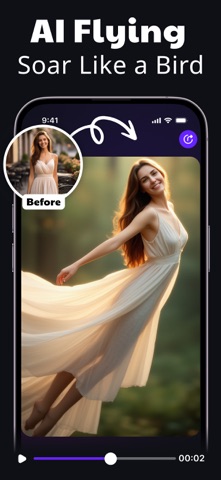
• Image-to-Video: Upload any photo → bring it to life with realistic motion
• AI Effects: Apply trending effects — dance, lip sync, style transfer, and more
• Animate Faces: Create expressive avatar animations from a single image
• Aspect Ratios: 9:16 vertical, 16:9 landscape — ready for every platform
• Quality & Export: Up to 1080p, no watermark
How It Works
1. Pick your AI model (Kling AI/ Veo Fast/Pro, Sora Fast/Pro, Seedance 2.0)
2. Enter a prompt or upload a photo
3. Preview settings — length, aspect ratio, style
4. Generate and export your clip
Credits & Subscription Plans:
Credit cost is shown upfront before every generation — no surprises.
One-Time Credit Packs:
• 1000 Credits — $9.99
• 3100 Credits — $29.99
• 10400 Credits — $99.99
Subscriptions:
• Weekly — $9.99/week (ViDiAI Pro: AI Video Creator)
• Annual — $59.99/year (ViDiAI Pro: AI Video Creator)
Auto-renewal: Subscriptions renew automatically unless cancelled at least 24 hours before the renewal date. Your iTunes account will be charged at purchase and within 24 hours before each renewal.
Rollover: Unused credits carry over while your subscription remains active.
Refunds: Managed by Apple under Apple's standard policies.
Legal & Disclaimers:
VIDIOAI connects to third-party AI models including Kling AI, Seedance 2.0 Veo 3, Sora 2, VIDU and Wan 2.7 via our servers. This is not an official product of Google, OpenAI, or ByteDance, and is not affiliated with, sponsored by, or endorsed by any of these companies.
Support
Questions or feedback? help.kingappsstudio@gmail.com
Privacy Policy: https://sites.google.com/view/kinggamesstudio/privacy-tos/vidio-ai-privacy
Terms of Use: https://sites.google.com/view/kinggamesstudio/privacy-tos/vidio-ai-tos
Apple EULA: https://www.apple.com/legal/internet-services/itunes/dev/stdeula/