

Air Transfer-File Sharing is made and published by 意 田. AppBrain is an independent app data site and isn't affiliated with 意 田. The app name, icon, screenshots and description belong to 意 田 and are shown as published on the App Store.
AppBrain's verdict
Established- Rating on App Store
- 5.00
- 1 ratings
- Last updated
- August 30, 2026
It doesn't have enough ratings yet to judge what users think.
Rankings
App Store top chartsApp Store Rankings for Air Transfer-File Sharing
Competitors
Similar apps and more from 意 田Alternatives to Air Transfer-File Sharing






More from 意 田




Releases
Updates seen on the App Store- Version
- 2.5
- Launched
- July 2021
No changelog data
User feedback
Ratings and reviews on the App StoreComments on Air Transfer-File Sharing for iOS
We don't have enough comments to show example comments. Please check back later.
Technology
Found in the app by AppBrain- Price
- Free
- App size
- 47.7 MB
- Content rating
- Everyone
Technologies used by Air Transfer-File Sharing
About the app and developer
About Air Transfer-File Sharing
Air Transfer-File Sharing is an utilities app developed by 意 田.
User Ratings
Air Transfer-File Sharing is rated 5.00 out of 5 stars. The rating is based on one rating ratings.
App Information
Air Transfer-File Sharing is freely available from the App Store. The app size is 47.73 MB. The latest version available is 2.5. The last update was on August 30, 2026.
Technical Requirements
The app has a content rating of Everyone. The app has been available on the App Store since July 2021.
Developer information for 意 田
Address:
Store listing
By 意 田, from the App Store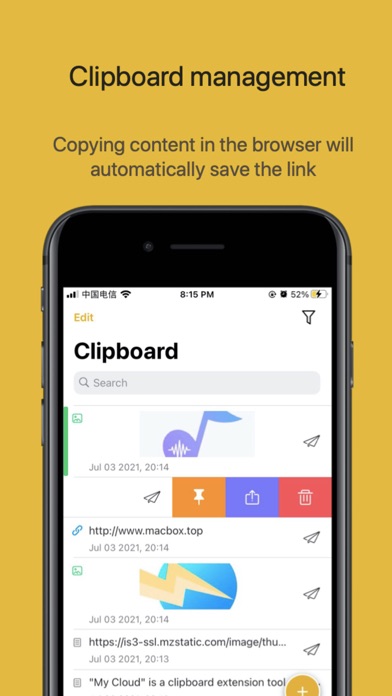


Description by 意 田 Written by the developer, not by AppBrain. Click to read.
'Air Transfer' for Mac can be searched and downloaded in the app store. You can browse and manage files on your computer directly on your phone, without downloading them, and without taking up storage space on your iOS device.
Special Feature
1. Clipboard
• No need to open the App, just swipe to the negative screen to automatically save the latest clipboard
• The content copied in the browser will automatically save the current web page link
• Send the clipboard to the phone on the Mac, and display it in the form of a system notification. Pull down the notification directly and click to copy to use, no need to open the App
• Click on the negative screen to send the clipboard to the computer without opening the app
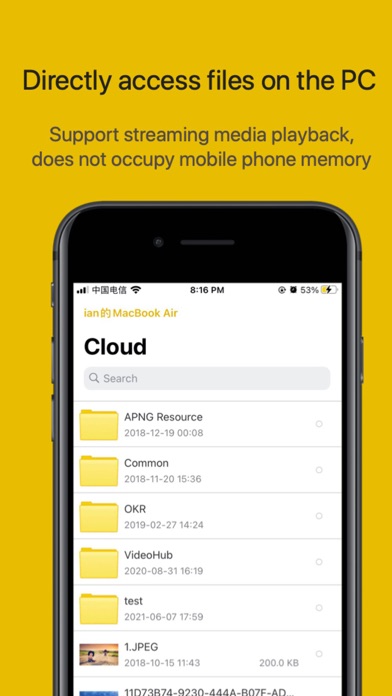
2. Manage computer files
• After setting up shared folders in MyCloud on Mac. All visible content in this folder can be directly accessed on the phone. Support online preview. The video and music will be played in streaming mode, which does not occupy the phone memory
• Support search function, quickly locate the specified file on the mobile phone
• Support downloading files on the computer to the local for easy offline viewing. At the same time, you can also upload local files to your computer
• Support almost all file formats. Including full format picture browsing, audio, video, code (highlighted display), markdown, word, excel, ppt, etc.
Three, open network interface
All the above functions are accomplished through HTTP POST/GET requests. All interface information can be viewed on the Mac side.
If you are a programmer, you will be able to access and operate files on your computer through the interface on any platform
If you are a novice who is just starting to learn programming, this will be a good tool for you to learn network programming