

iTrunSo - Simple & Easy to Use
iTrunSo - Simple & Easy to Use is made and published by 可兵 毛. AppBrain is an independent app data site and isn't affiliated with 可兵 毛. The app name, icon, screenshots and description belong to 可兵 毛 and are shown as published on the App Store.
AppBrain's verdict
Established- Rating on App Store
- 4.25
- 12 ratings
- Last updated
- July 22, 2026
It doesn't have enough ratings yet to judge what users think.
Rankings
App Store top chartsApp Store Rankings for iTrunSo - Simple & Easy to Use
Competitors
Similar apps and more from 可兵 毛Alternatives to iTrunSo - Simple & Easy to Use







More from 可兵 毛


Releases
Updates seen on the App Store- Version
- 5.10.1
- Launched
- March 2017
No changelog data
User feedback
Ratings and reviews on the App StoreComments on iTrunSo - Simple & Easy to Use for iOS
We don't have enough comments to show example comments. Please check back later.
Technology
Found in the app by AppBrain- Price
- $1.99
- App size
- 55.2 MB
- Content rating
- Everyone
Technologies used by iTrunSo - Simple & Easy to Use
About the app and developer
About iTrunSo - Simple & Easy to Use
iTrunSo - Simple & Easy to Use is an utilities app developed by 可兵 毛.
User Ratings
iTrunSo - Simple & Easy to Use is rated 4.25 out of 5 stars. The rating is based on 12 ratings.
App Information
iTrunSo - Simple & Easy to Use costs $1.99. The app size is 55.17 MB. The latest version available is 5.10.1. The last update was on July 22, 2026.
Technical Requirements
The app has a content rating of Everyone. The app has been available on the App Store since March 2017.
Developer information for 可兵 毛
Address:
Frequently asked questions about iTrunSo - Simple & Easy to Use
Is iTrunSo - Simple & Easy to Use free?
No. iTrunSo - Simple & Easy to Use costs $1.99 on the App Store.
Is iTrunSo - Simple & Easy to Use still available?
Yes. iTrunSo - Simple & Easy to Use is on the App Store, and the last update we saw was on July 22, 2026.
How large is iTrunSo - Simple & Easy to Use?
iTrunSo - Simple & Easy to Use is 55.17 MB.
Is iTrunSo - Simple & Easy to Use suitable for children?
App Store rates the content of iTrunSo - Simple & Easy to Use as suitable for everyone.
How do people rate iTrunSo - Simple & Easy to Use?
iTrunSo - Simple & Easy to Use scores 4.25 out of 5 stars, from 12 ratings on the App Store.
Who made iTrunSo - Simple & Easy to Use?
iTrunSo - Simple & Easy to Use was developed by 可兵 毛. It is listed in the utilities category on the App Store.
What are the best alternatives to iTrunSo - Simple & Easy to Use?
People looking at iTrunSo - Simple & Easy to Use also look at these utilities apps: Magic PiP, Countdown! Reminders and Timer, PassKeyboard - password manage, Dukto Pro, 叮叮猫 - 关心数据变化.
Store listing
By 可兵 毛, from the App Store


Description by 可兵 毛 Written by the developer, not by AppBrain. Click to read.
* recommend
- Thanks for the official recommendation of "Minority" and "Price Tag"
* File transfer
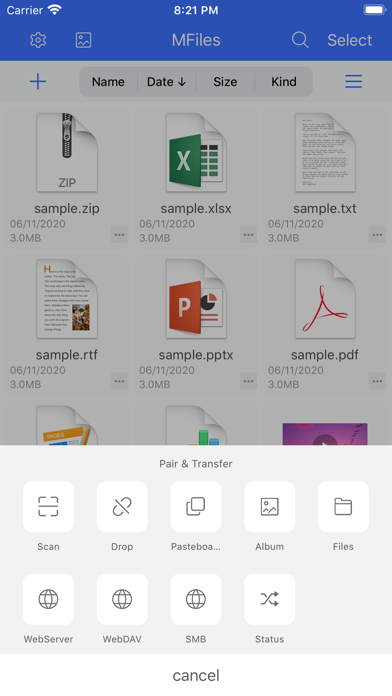
- Method 1 (recommended) Install "iTrunSo" on the computer (support osx and windows) and pair under the same local area network to transfer photos, files, directories, and clipboards (copy text on one side and send directly on the other side), super convenient!
- Method 2. The mobile phone is connected to the same local area network as the computer or the mobile phone is connected to the hotspot computer, and the WiFi is turned on to transfer files, which can be directly accessed on the computer browser
- Method 3. The mobile phone is connected to the same local area network as the computer or the mobile phone is connected to the hotspot computer, and the WebDAV is turned on to transfer files, and Mac Finder or other WebDAV clients can access
- Method 4. The mobile phone is connected to the same LAN as the computer or the mobile phone is connected to the hotspot computer, and the FTP file is turned on, which can be accessed by Mac Finder or other FTP clients
* File management
- Open, copy, move, delete, search and other methods to manipulate files
- Arrange files by name, date, size, type
- Support for creating and editing text files
- Password access to protect privacy
- zip, rar, 7z file compression and decompression
- heic to jpeg
* remote access
- Support SMB 2.0/3.0
- Support WebDAV
- Support FTP/FTPS/SFTP
- Support AList V3
* Album management
- View, copy, move, delete, compress, share, transfer, etc. the pictures and videos in the album
* Send clipboard
- Manually send clipboard contents
- Automatically sync clipboard contents
* Supported file format
- Documents: pdf, word, excel, ppt, pages, numbers, keynote, txt, etc.
- Picture: jpg, png, gif, webp, tiff, heif, psd, etc.
- Audio: mp3, aac, wav, ape, flac, m4a, ogg, etc.
- Video: mov, mp4, mkv, rmvb, m4v, avi, ts, flv, wmv, etc.
- Video subtitles: ass, srt, etc.
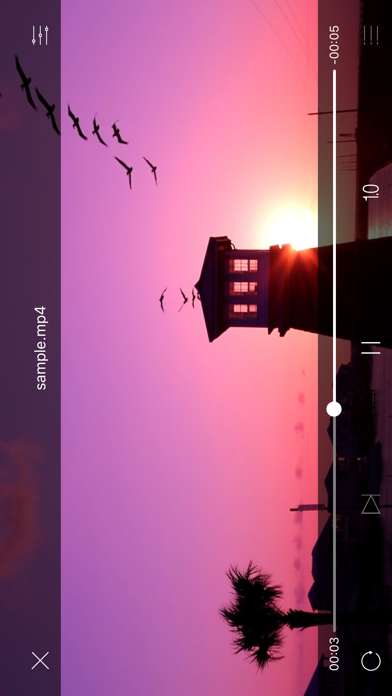
* Minimalist video player
- Play record function
- List function
- Channel switching function
- Support external subtitle files in srt format
* Minimalist TXT e- book reader
- Multiple themes, free to switch
- Voice reading function, you can listen to books
- You can import ttf fonts and change them as you like
* Minimalist music player
- Play record function
- List function
- Timing off function
* Code file preview function
- Supports syntax highlighting in java, c/c++, python, js and other languages
----------------------Contact information-----------------------
- Website: http://mfiles.maokebing.com
- Email: kebing1011@163.com
- QQ Group: 478948960
- Weibo: @kebing1011
- Twitter: @kebing1011
- Telegram: @kebing1011