

PassKeyboard - password manage
PassKeyboard - password manage is made and published by 庆桐 马. AppBrain is an independent app data site and isn't affiliated with 庆桐 马. The app name, icon, screenshots and description belong to 庆桐 马 and are shown as published on the App Store.
AppBrain's verdict
Established- Rating on App Store
- 4.25
- 4 ratings
- Last updated
- July 21, 2026
It doesn't have enough ratings yet to judge what users think.
Rankings
App Store top chartsApp Store Rankings for PassKeyboard - password manage
Competitors
Similar apps and more from 庆桐 马Alternatives to PassKeyboard - password manage









Releases
Updates seen on the App Store- Version
- 5.3.8
- Launched
- August 2018
No changelog data
User feedback
Ratings and reviews on the App StoreComments on PassKeyboard - password manage for iOS
We don't have enough comments to show example comments. Please check back later.
Technology
Found in the app by AppBrain- Price
- Free
- App size
- 17.1 MB
- Content rating
- Everyone
Technologies used by PassKeyboard - password manage
About the app and developer
About PassKeyboard - password manage
PassKeyboard - password manage is an utilities app developed by 庆桐 马.
User Ratings
PassKeyboard - password manage is rated 4.25 out of 5 stars. The rating is based on 4 ratings.
App Information
PassKeyboard - password manage is freely available from the App Store. The app size is 17.10 MB. The latest version available is 5.3.8. The last update was on July 21, 2026.
Technical Requirements
The app has a content rating of Everyone. The app has been available on the App Store since August 2018.
Developer information for 庆桐 马
Address:
Store listing
By 庆桐 马, from the App Store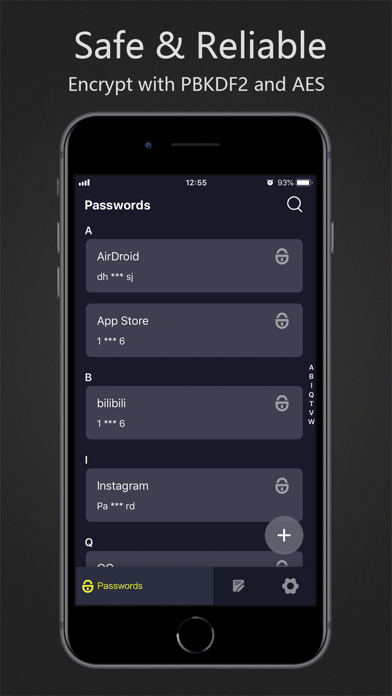




Description by 庆桐 马 Written by the developer, not by AppBrain. Click to read.
Help you remember, help you fill in~
• Support iOS 12 AutoFill Passwords
• No ads, no push, no privacy permissions
• Encrypted cloud sync and local offline, two ways to meet different requirements and eliminate all concerns
• Help you remembera lot of account password, protected information
• Touch ID and Face ID ensures access security
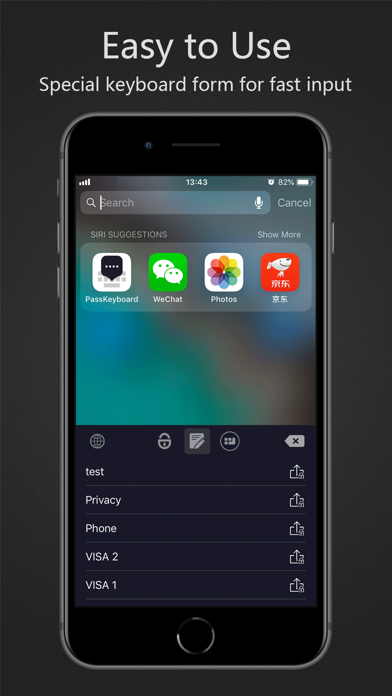
• Original patented keyboard form, can be used in software and web pages, automatically input after verifying fingerprints
• Military-grade PBKDF2 and AES encryption algorithms. Data is always kept secret, even for us
• Only if you use the master password, can decrypt and access data locally on the device
• Support multiple devices, cross-platform
• Support automatic generation of 6 ~ 30 digit strong password
• Support Simplified Chinese, Traditional Chinese, English
Now, say goodbye to enter the error password several times before remembering the correct password, also don't have to use the same password in order to facilitate memory.
Product reputation is our trust endorsement and quality assurance, and is loved by millions of users.