AIR TYMR is made and published by
Digilog Corporation.
AppBrain is an independent app data site and isn't affiliated with Digilog Corporation.
The app name, icon, screenshots and description belong to Digilog Corporation and are shown as
published on the App Store.
About AIR TYMR
AIR TYMR is a navigation app developed by Digilog Corporation.
User Ratings
The app has no ratings yet.
App Information
AIR TYMR costs $4.99. The app size is 5.90 MB. The latest version available is V5.11. The last update was on December 29, 2025.
Technical Requirements
The app has a content rating of Everyone. The app has been available on the App Store since February 2015.
Description by Digilog Corporation(from the App Store)
This APP has a built-in Guide with full instructions on how to use its features. Here is a brief summary below.
This AIR TYMR APP has two primary components to it.
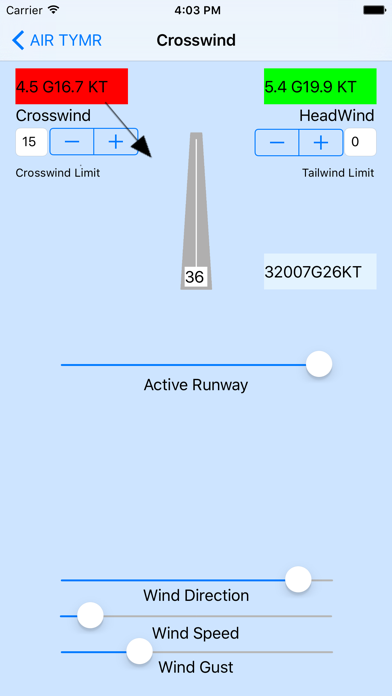
1) The first component is a crosswind calculator that allows the user to set the runway and current wind speed, gust and direction. It calculates the crosswind and headwind/tailwind components then compares these values to preset limits which can be set by the user. It now has a new major dead reckoning capability for course drift, heading corrections and ground speed feature to automatically calculate these values so you no longer need to use the E6B calculator. It also has an added density altitude calculator which uses pressure altitude and outside air temperature, also previously done on your E6B calculator.
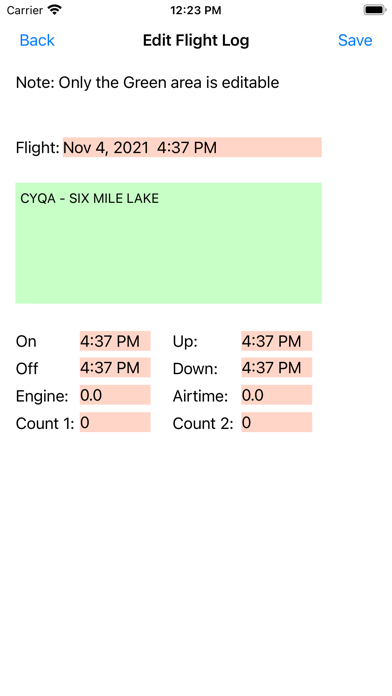
2) The second component is a flight timer to track, calculate and record your flight's engine start time, stop time, run time, takeoff time, landing time and air time to the nearest 0.1 hour. It also provides a flight log for retaining these flight details.
The crosswind calculator has a central graphic presentation of the approaching runway and a wind vector arrow that aligns to represent the relative wind direction for the chosen runway orientation. Both the runway orientation (e.g. magnetic orientation) and the wind speed, wind gust and wind direction are set to current values by the user by adjusting the sliders. The runway selection will appear in the runway graphic window. The wind data is also displayed in “metar” format for the pilot.
Note: A wind gust value must exceed the average wind speed value by 15 knots to be a valid gust so pilots should be aware that winds in excess of the average wind speed may exist but not be reported until the 15 knot criterion is met. This is particularly important if the average wind speed is approaching the crosswind limit.
The crosswind and headwind components are automatically calculated and displayed in the middle text windows. These values are compared to preset crosswind and tailwind limits for the aircraft. The appropriate windows will turn red if these limits are exceeded. These limits are preset when the app starts with the crosswind limit being set to 15 knots and the tailwind limit preset to 0 knots. The user can adjust these limits to suit the specific aircraft by tapping the + or – buttons. When the headwind becomes less than 0 knots (e.g. negative value) the label will change to Tailwind rather than Headwind.
***************************
The Flight Timer is a convenient tool for the pilot to track and record each flight. Simply enter the start and destination locations into the yellow Flight Information window. At the appropriate time, press the ENGINE ON button when the engine is started. This will record and display this flight's current date and time as well as the engine's start time.
Taxi to an appropriate location, do your engine runup and taxi to the runway (with the right clearances). Takeoff when ready. Once airborne , press the TAKEOFF button and enjoy your flight.
When you land at your destination simply press the LAND button. Taxi to your final location and shut down your engine when ready, then press the ENGINE OFF button. The engine start time, stop time, run time, takeoff time, landing time and air time are all calculated and displayed.
Simply press the SAVE button and this flight will be added to your Flight Log. The log information is calculated to the nearest 0.1 hour for log entry purposes. The Log is also editable so entries can be moved or deleted to suit your needs.
To clear the display for a new flight press the upper left AIR TYMR button to return to the initial selection. Press the Flight Timer button to clear the program for a new flight.
Note: It is important to enter the flight information in the upper window first so the flight has the starting and ending destination location in the log.
Each subscription will automatically renew 3 days before the expiration date for
the same time period. Subscriptions can be cancelled at any time before the renewal.