AppBrain
AppBrain
  • Apps
  • Apps being viewed right now Trending apps today Most popular apps All-time most installed apps Top rated apps iPhone and iPad apps
  • Intelligence ▾
    Intelligence overview → Track any Android app or your whole market
    Track & analyze
    Keyword Tracker & OptimizerTrack & improve Play rankings App Performance ReportOne-off PDF for any app StatisticsFree Android & Play market stats
    Promote your app
    Featured Apps App Links
  • Intelligence
  • Pricing
  • Dashboard
  • Sign up
  • Log in
App Store Apps > Navigation > Airborne Flight Instrument
Airborne Flight Instrument icon

Airborne Flight Instrument

9.0
Henri van Bommel
0.00
0 reviews
$2.99

Airborne Flight Instrument Screenshot 1 of 6
Airborne Flight Instrument Screenshot 2 of 6
Airborne Flight Instrument Screenshot 3 of 6
Airborne Flight Instrument Screenshot 4 of 6
Airborne Flight Instrument Screenshot 5 of 6
Airborne Flight Instrument Screenshot 6 of 6
Screenshots by Henri van Bommel, from the the App Store listing
View on the App Store

AppBrain's verdict

Last updated
April 13, 2024
Size
8.41 MB
Official page on the App Store

User feedback

Ratings and reviews on the App Store

Comments on Airborne Flight Instrument for iOS

We don't have enough comments to show example comments. Please check back later.

Store listing

By Henri van Bommel, from the App Store
Description by Henri van Bommel Written by the developer, not by AppBrain. Click to read.
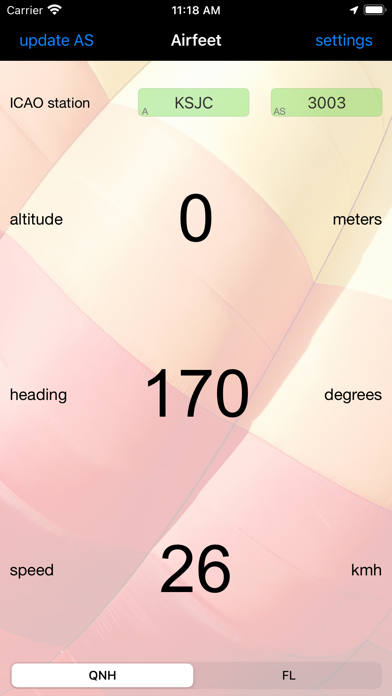
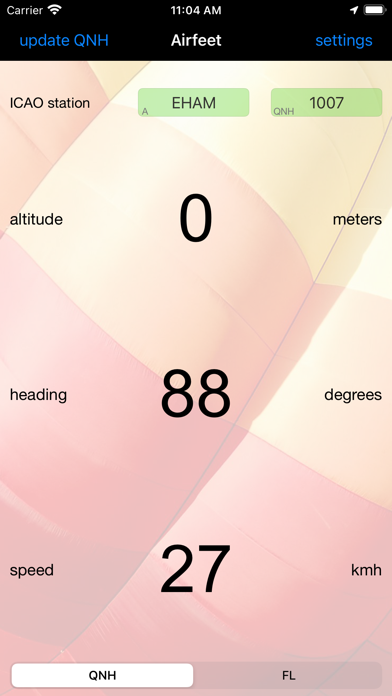
This app is an intelligent flight instrument that reads altitude. It is designed for devices that contain a barometer. This includes iPhone6, iPhone6s, iPhone6 Plus and iPhone6s Plus models running IOS 8.0 or later. For altitude reading it automatically retrieves the QNH or AS Altimeter Setting from the web and uses it in combination with the pressure sensor (barometer) to determine the actual altitude. You can either select an ICAO METAR station, like EHAM or KJFK for Schiphol and JFK airports, or enter the QNH directly in the app. It is ideal for a number of air sports to be used as a backup. Besides altitude and flight level this instrument also displays true heading and speed. The indicated values are displayed using a large font so they can easily be read from a distance. When backgrounded, this app is inactive to save power.

Device requirements:
- GPS (required)
- Barometer (strongly recommended)

Altimeter details

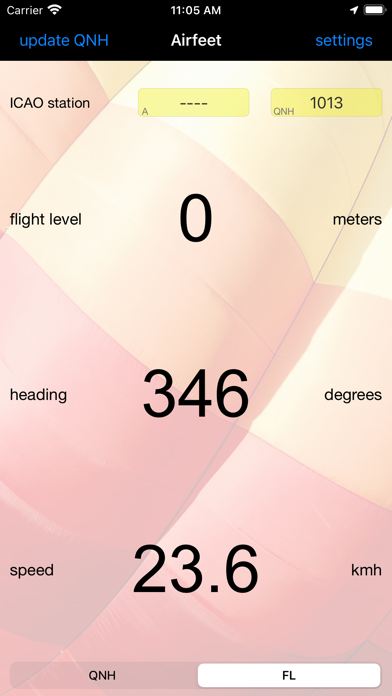
The altimeter is using the barometric pressure sensor of the iPhone when available. For devices that do not contain a barometer altitude is measured in the conventional way using a GPS. Pilots who fly airplanes, gliders, hotairballoons or other airframes are familiar with altimeter settings. This setting is retrieved by looking up a METAR report for a given area, most often an airport, and locate the QNH or AS value in it. This value is then used to setup the aircraft altimeter. This device automates this process by retrieving it from the web and then automatically use it to setup the airfeet instrument. It is possible to override the automatic retrieved value by entering the QNH or AS value manually. When the field is touched the keyboard will popup and the value that could be manually entered. Same is true for the ICAO station identifier like EBBL or KBOS. Next to the ICAO station field the activity indicator will show up when network access is in progress. This will only happen at app startup or when the manual “update QNH” or “update AS” for USA key is selected. Selecting “flight level mode” by using the “QNH-FL” switch on the bottom of the main screen, 1013.25 millibar or 29.92 inches of mercury reference pressure is used. In this mode the “altitude” label will change to “flight level” and the indicated value will be the level in feet or meters. This mode is only available for devices that contain a barometer and will be disabled on other devices.

Heading details

The GPS is used to determine the heading. The indicated true heading in displayed in degrees. Magnetic heading is not available. To work reliably an adequate GPS signal is required.

Speed details

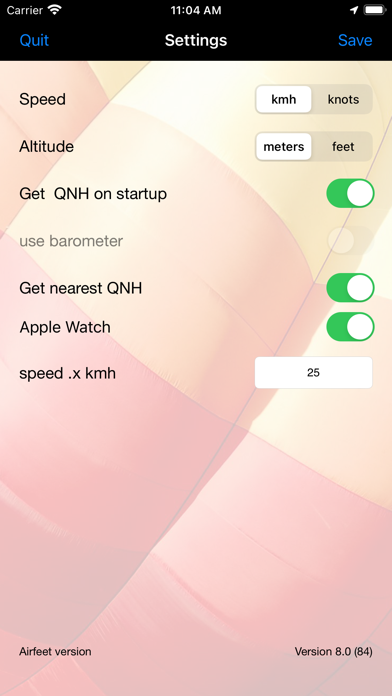
For speed measurements the GPS needs to be operational. The speed can be set to knots or kilometers per hour. For this the “speed .x knots” or “speed .x kmh” settings are available. The set value determines at what speed a digit after the comma is displayed. When this setting is for example, set to 25, the speed below 25 is displayed as 24.2, and 25 and above is displayed without extra digit to make it more readable.

Version 3.0 Enhanced manual QNH settings when no network is available to automatically retrieve this.

Version 2.0 new feature, automatically locate nearby airport option is now available. The station/airport field contains a small A or M indicator in the left bottom to indicate Automatic or Manual mode.

Version 2.1 new feature, the QNH is now automatically updated when the app is started and "Get AS at startup" option is selected.

Version 4.4 Update airports for QNH retrieval.

Safety and technology

Found in the app by AppBrain
Price
$2.99
App size
8.41 MB
Content rating
Everyone

Technologies used by Airborne Flight Instrument

Releases

Updates seen on the App Store
Version
9.0
Launched
January 2016

No changelog data

Alternatives

Similar apps and more from Henri van Bommel

Alternatives to Airborne Flight Instrument

xcNav icon xcNav
Caleb Johnson
4.0
Free
4 ratings
LakeLevels icon LakeLevels
Chaos Software Group, Inc.
3.0
Free
20 ratings
Colorado Guide icon Colorado Guide
Miles Partnership, LLLP
2.0
Free
8 ratings
Direct-To Pilot GPS - VFR, IFR icon Direct-To Pilot GPS - VFR, IFR
Flygo-Aviation Ltd
4.6
Free
685 ratings
AeroChart icon AeroChart
DataAppz Tecnologia Ltda
4.4
Free
56 ratings
Flying Calmly icon Flying Calmly
Carlos Aviles Software
4.8
Free
829 ratings
iFly EFB icon iFly EFB
Adventure Pilot, LLC
4.7
Free
365 ratings
OpConnect icon OpConnect
OpConnect, LLC
3.5
Free
260 ratings

More from Henri van Bommel

iNearHere icon iNearHere
Henri van Bommel
3.0
Free
2 ratings
iFlyHotair - Hotairballoon app icon iFlyHotair - Hotairballoon app
Henri van Bommel
0.0
$2.99
iFollow the Leader icon iFollow the Leader
Henri van Bommel
0.0
$2.99
Hotairballoon Navigation icon Hotairballoon Navigation
Henri van Bommel
0.0
$1.99

Rankings

App Store top charts

App Store Rankings for Airborne Flight Instrument

This app is not ranked

About the app and developer

About Airborne Flight Instrument

Airborne Flight Instrument is a navigation app developed by Henri van Bommel.

User Ratings

The app has no ratings yet.

App Information

Airborne Flight Instrument costs $2.99. The app size is 8.41 MB. The latest version available is 9.0. The last update was on April 13, 2024.

Technical Requirements

The app has a content rating of Everyone. The app has been available on the App Store since January 2016.

Airborne Flight Instrument is made and published by Henri van Bommel. AppBrain is an independent app data site and isn't affiliated with Henri van Bommel. The app name, icon, screenshots and description belong to Henri van Bommel and are shown as published on the App Store.

Developer information for Henri van Bommel

Henri van Bommel

Address:

Share Airborne Flight Instrument

Price drops on Google Play Top new apps Apps other people are watching Today's trending apps Popular Navigation Apps
xcNav icon xcNav
LakeLevels icon LakeLevels
Colorado Guide icon Colorado Guide
Direct-To Pilot GPS - VFR, IFR icon Direct-To Pilot GPS - VFR, IFR
AeroChart icon AeroChart
Flying Calmly icon Flying Calmly
iFly EFB icon iFly EFB
OpConnect icon OpConnect
Overview Alternatives Reviews Rankings Technology
AppBrain Intelligence premium content

Subscribe now to get full and unlimited access to AppBrain Intelligence. You'll have access to:

  • App Intelligence dashboard (performance timeline, competitor comparison, country rankings, insight cards)
  • Detailed ranking data per app
  • Full timeline per developer
  • Device market shares data per country
  • Unlimited keyword tracking
1 Month

$75/mo
(billed every month)

SAVE 0%
Subscribe
3 Months

$65/mo
($195 billed every 3 months)

SAVE 13%
Subscribe
1 Year

$57.50/mo
($690 billed every year)

SAVE 23%
Subscribe
Each subscription will automatically renew 3 days before the expiration date for the same time period. Subscriptions can be cancelled at any time before the renewal.

AppBrain is an app data site, we track rankings, ratings, installs for all apps and games on Google Play and the App Store. AppBrain doesn't host app files or APKs, all install links go directly to the official store. All trademarks are owned by their respective owners.

More apps

  • Top Android apps being viewed
  • Repair System -Software Update
  • Eppika: Read & Learn Languages
  • MyQuest for Patients

App statistics

  • Android statistics
  • Google Play Developer stats
  • Trending Android Apps
  • Trending iOS apps
  • Top popular Apps
  • Buy the best Android phone
  • Buy & sell app businesses

About AppBrain

  • Contact
  • Privacy
  • Documentation
  • DMCA takedowns
  • Blog
  • The best curated Android app categories
© 2010-2026 - AppBrain