

AireTrac
AireTrac is made and published by Poker Games Interactive. AppBrain is an independent app data site and isn't affiliated with Poker Games Interactive. The app name, icon, screenshots and description belong to Poker Games Interactive and are shown as published on the App Store.
AppBrain's verdict
- Last updated
- October 14, 2026
Rankings
App Store top chartsApp Store Rankings for AireTrac
Competitors
Similar apps and more from Poker Games InteractiveMore from Poker Games Interactive


Releases
Updates seen on the App Store- Version
- 1.4.2
- Launched
- May 2026
No changelog data
User feedback
Ratings and reviews on the App StoreComments on AireTrac for iOS
We don't have enough comments to show example comments. Please check back later.
Technology
Found in the app by AppBrain- Price
- Free
- App size
- 56.9 MB
- Content rating
- Everyone
Technologies used by AireTrac
About the app and developer
About AireTrac
AireTrac is a productivity app developed by Poker Games Interactive.
User Ratings
The app has no ratings yet.
App Information
AireTrac is freely available from the App Store. The app size is 56.86 MB. The latest version available is 1.4.2. The last update was on October 14, 2026.
Technical Requirements
The app has a content rating of Everyone. The app has been available on the App Store since May 2026.
Developer information for Poker Games Interactive
Address:
Frequently asked questions about AireTrac
Is AireTrac free?
Yes. AireTrac is free on the App Store.
Is AireTrac still available?
Yes. AireTrac is on the App Store, and the last update we saw was on October 14, 2026.
How large is AireTrac?
AireTrac is 56.86 MB.
Is AireTrac suitable for children?
App Store rates the content of AireTrac as suitable for everyone.
Who made AireTrac?
AireTrac was developed by Poker Games Interactive. It is listed in the productivity category on the App Store.
Store listing
By Poker Games Interactive, from the App Store


Description by Poker Games Interactive Written by the developer, not by AppBrain. Click to read.
CONNECT ONCE, STAY CONNECTED
Your service provider can send a pairing code or secure link to connect your account. Enter it once and AireTrac links you to the business servicing your home or vehicle. You can also sign in with an existing account.
FOLLOW SERVICE FROM START TO FINISH
Depending on the service, you can:
• Request service
• Follow job or work-order status
• See when a technician is assigned
• Track progress through completion
• View technician arrival information when available
• Review estimates and approvals
• View invoices and payment status
• Keep notes, photos, and service details together
AUTOMOTIVE SERVICE
When your repair shop uses AireTrac Automotive, you may be able to:
• Follow your vehicle through the repair process
• Review estimates and approve or decline work
• Track completed and deferred services
• View vehicle and service history
• Pay invoices securely
• Use eligible financing or pay-over-time options when offered
Available features depend on your shop’s configuration.
YOUR GARAGE, YOUR VEHICLE HISTORY
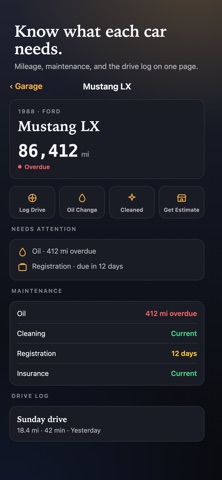
AireTrac includes a personal Garage for your own vehicles. Organize vehicle details, photos, documents, mileage, notes, reminders, and history in one place.
Garage features may include:
• Vehicle profiles and odometer tracking
• Photos and documents
• Maintenance notes and history
• Collector vehicle information
• Drive history and mileage records
• Vehicle health information when supported
Your Garage is separate from a shop’s internal work-order system.
RECORD YOUR DRIVES
For supported Garage vehicles, Drive Log can record:
• GPS route and distance traveled
• Drive duration and moving/stopped time
• Maximum recorded speed
• Starting and ending odometer readings
• Drive notes and purpose
Use your iPhone camera to help read the vehicle’s physical odometer, then confirm the reading before it is saved. Manual mileage entry is always available. Optional OBD-II and wearable features may be enabled separately.
YOUR HISTORY, IN YOUR POCKET
Quickly review what was done, when it was done, what vehicle or property it involved, and what you were charged. Keep useful records for warranties, maintenance planning, collector vehicles, repeat service, and resale.
ESTIMATES, APPROVALS & PAYMENTS
When supported by your provider, review estimates, approve work, view invoices, and pay from your phone. Available payment methods may include cards and eligible pay-over-time options.
BUILT FOR EVERYDAY USE
• Clear, readable screens
• Large tap targets
• Simple status information
• Dark-mode-friendly design
• Face ID / Touch ID protection when enabled
• Background location only when needed for features such as Drive Log
WORKS WITH AIRETRAC-POWERED BUSINESSES
Service features become available when your HVAC, plumbing, automotive, or other service provider uses AireTrac and connects you to their business.
PRIVACY IN PLAIN ENGLISH
AireTrac uses information needed to provide the features you choose, including account information, service history, vehicle information, photos, notes, payments, and location for map or Drive Log features. Odometer photos used for recognition are not intended to be retained unless a feature specifically tells you otherwise. We do not sell your personal data to advertisers.
REQUIREMENTS
• iOS 17 or later
• AireTrac account or pairing code for connected service features
• Location permission for map or Drive Log features
• Camera permission for odometer-reading and photo features
• Some automotive, payment, OBD-II, wearable, and advanced Garage features require supported hardware or provider configuration
SUPPORT
support@airetrac.com
airetrac.com/help
Privacy Policy: airetrac.com/privacy
Terms of Service: airetrac.com/terms