

AirHorizon: Attitude Indicator
AirHorizon: Attitude Indicator is made and published by Valerii Nikolaev. AppBrain is an independent app data site and isn't affiliated with Valerii Nikolaev. The app name, icon, screenshots and description belong to Valerii Nikolaev and are shown as published on the App Store.
AppBrain's verdict
Established- Rating on App Store
- 4.70
- 10 ratings
- Last updated
- September 8, 2026
It doesn't have enough ratings yet to judge what users think.
Rankings
App Store top chartsApp Store Rankings for AirHorizon: Attitude Indicator
Competitors
Similar apps and more from Valerii NikolaevAlternatives to AirHorizon: Attitude Indicator




More from Valerii Nikolaev


Releases
Updates seen on the App Store- Version
- 1.9.0
- Launched
- December 2020
No changelog data
User feedback
Ratings and reviews on the App StoreComments on AirHorizon: Attitude Indicator for iOS
We don't have enough comments to show example comments. Please check back later.
Technology
Found in the app by AppBrain- Price
- Free
- App size
- 2.08 MB
- Content rating
- Everyone
Technologies used by AirHorizon: Attitude Indicator
About the app and developer
About AirHorizon: Attitude Indicator
AirHorizon: Attitude Indicator is a navigation app developed by Valerii Nikolaev.
User Ratings
AirHorizon: Attitude Indicator is rated 4.70 out of 5 stars. The rating is based on 10 ratings.
App Information
AirHorizon: Attitude Indicator is freely available from the App Store. The app size is 2.08 MB. The latest version available is 1.9.0. The last update was on September 8, 2026.
Technical Requirements
The app has a content rating of Everyone. The app has been available on the App Store since December 2020.
Developer information for Valerii Nikolaev
Address:
Frequently asked questions about AirHorizon: Attitude Indicator
Is AirHorizon: Attitude Indicator free?
Yes. AirHorizon: Attitude Indicator is free on the App Store.
Is AirHorizon: Attitude Indicator still available?
Yes. AirHorizon: Attitude Indicator is on the App Store, and the last update we saw was on September 8, 2026.
How large is AirHorizon: Attitude Indicator?
AirHorizon: Attitude Indicator is 2.08 MB.
Is AirHorizon: Attitude Indicator suitable for children?
App Store rates the content of AirHorizon: Attitude Indicator as suitable for everyone.
How do people rate AirHorizon: Attitude Indicator?
AirHorizon: Attitude Indicator scores 4.70 out of 5 stars, from 10 ratings on the App Store.
Who made AirHorizon: Attitude Indicator?
AirHorizon: Attitude Indicator was developed by Valerii Nikolaev. It is listed in the navigation category on the App Store.
What are the best alternatives to AirHorizon: Attitude Indicator?
People looking at AirHorizon: Attitude Indicator also look at these navigation apps: WingCalc, uAvionix skyBeacon Installer, NemoScoutApp, PA28 Performance, Baron Performance.
Store listing
By Valerii Nikolaev, from the App Store


Description by Valerii Nikolaev Written by the developer, not by AppBrain. Click to read.
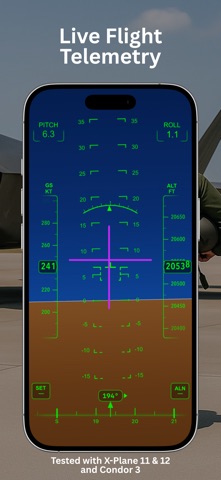
Designed for pilots, student pilots, and aviation enthusiasts, it helps you visualize pitch and roll, monitor climb and descent, explore cockpit-style HUD layouts, and better understand aircraft attitude using your device or compatible external telemetry.
Features:
- Artificial horizon in portrait and landscape modes with smooth, responsive pitch and roll movement
- Speed and altitude tapes
- Heading tape with marker
- Variometer with visual indication and audio cues for climb and descent
- Variometer operation in the background or with the screen locked when sound is enabled
- Variometer input from device sensors or a supported external data source
- Adjustable variometer units, with sensitivity and response settings for device sensor input
- Modern pitch and roll boxes
- Night Vision HUD mode
- External flight telemetry over UDP
- Director Mode indication when using a supported external data source
- Adjustable instrument layout and display tuning
- Aircraft symbol overlay
- System status indicators
- One-tap calibration for pitch and roll alignment
External telemetry and compatibility:
External telemetry was tested on iOS and iPadOS with X-Plane 11 and X-Plane 12, and on iOS with Condor 3. All simulators ran on macOS; Condor 3 ran through CrossOver.
AirHorizon is an independent app. Neither AirHorizon nor its developer is affiliated with the developers of X-Plane, Condor, or CrossOver.
X-Plane and Condor 3 are used here as setup examples. Other applications may also work if they transmit flight data over UDP in a message format supported by AirHorizon. Using UDP alone does not guarantee compatibility.
Available readings and features depend on the data provided by the external source. The guide in Settings > External Source explains network configuration, supported telemetry, and variometer setup.
Important for iPad:
Enable Orientation Lock to prevent the instrument screen from rotating while moving the device.
Disclaimer:
AirHorizon is designed for simulation and familiarization purposes. It is not a certified aviation instrument and should not be used as a primary flight reference. Use at your own risk.
Terms of Use (Apple Standard EULA): https://www.apple.com/legal/internet-services/itunes/dev/stdeula/
Terms of Service: https://valnikodeveloper.github.io/airhorizon-legal/terms-of-service.html
Privacy Policy: https://valnikodeveloper.github.io/airhorizon-legal/privacy.html