

Alarm Clock: Wake Up Missions
Alarm Clock: Wake Up Missions is made and published by Phuc Pham. AppBrain is an independent app data site and isn't affiliated with Phuc Pham. The app name, icon, screenshots and description belong to Phuc Pham and are shown as published on the App Store.
AppBrain's verdict
- Last updated
- August 29, 2026
- Size
- 5.86 MB
User feedback
Ratings and reviews on the App StoreComments on Alarm Clock: Wake Up Missions for iOS
We don't have enough comments to show example comments. Please check back later.
Store listing
By Phuc Pham, from the App Store



Description by Phuc Pham Written by the developer, not by AppBrain. Click to read.
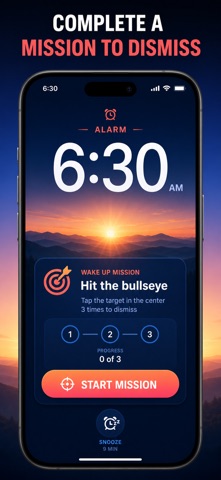
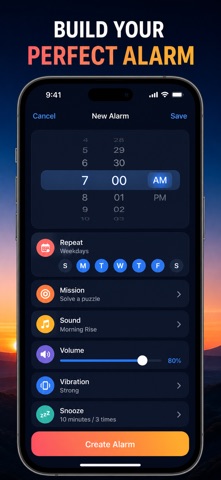
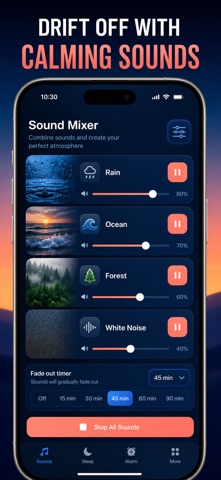
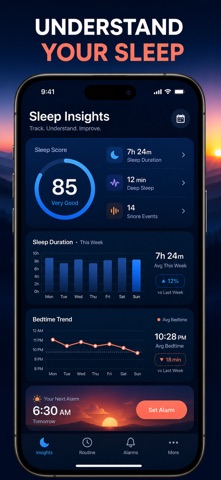
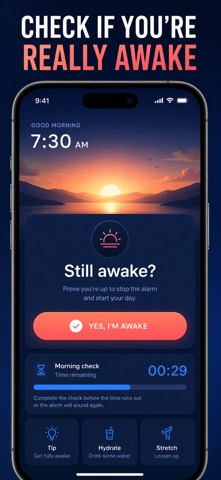
Most alarm apps end at a bigger snooze button. This one is built around eight missions you can assign per alarm: solve math, match a photo you registered, shake the phone, repeat a memory pattern, type a phrase, do counted squats, scan a barcode across the room, or hit a moving bullseye. Then it stays with you at night — a 4-track sleep sound mixer to fall asleep to, and a sleep session tracker that listens for snoring and scores the night. One app for the whole bedtime-to-morning loop, and none of it leaves your iPhone.
WHAT YOU GET
- Wake up on the first alarm because the sound will not stop until a mission is done
- Eight mission types, chosen per alarm, so you can match the difficulty to the day
- A bedtime you actually keep, with reminders before lights out and a follow-up check after the alarm
- Fall asleep faster by layering up to 4 ambient sounds and setting a fade-out timer
- See whether you snored and how the night scored, on weekly and monthly charts
- Take your sleep history anywhere with a one-tap CSV export
PERFECT FOR
- Heavy sleepers who sleep straight through a normal alarm
- Shift workers and students who cannot afford one missed morning
- Light sleepers who need rain, ocean, or white noise to drop off
- Anyone curious whether snoring is behind their tired mornings
WHY NOT JUST USE THE BUILT-IN CLOCK APP
Because the built-in clock only asks for a tap, and a half-asleep tap is free. A mission costs effort, and effort is what actually wakes you. The stock app also has no sound mixer, no snore detection, and no record of how you slept — so you never find out why the mornings feel so hard.
PRIVACY
No account, no sign-up, no cloud sync, no tracking SDK. Alarms, sleep sessions, snore counts, and saved mixes stay in local storage on your iPhone. The microphone is used only during a sleep session you start yourself, and the camera only inside a photo or barcode mission.
FULL ACCESS
The free version includes up to 3 alarms, the math mission, 5 sleep sounds, and 7 days of sleep history. Full access unlocks all eight mission types, unlimited alarms, the complete 20-sound library with the 4-track mixer, snore detection and sleep scoring, unlimited history with CSV export, plus bedtime reminders and wake-up checks. Available as a weekly or yearly subscription, or a one-time lifetime purchase.
Set tonight's alarm, pick the mission you would hate to fail, and see what tomorrow morning looks like.
Terms of Use (EULA): https://web-levi.web.app/terms
Privacy Policy: https://web-levi.web.app/privacy-policy
Questions? Reach us anytime through the support link on our App Store page.
Safety and technology
Found in the app by AppBrain- Price
- Free
- App size
- 5.86 MB
- Content rating
- Everyone
Technologies used by Alarm Clock: Wake Up Missions
Releases
Updates seen on the App Store- Version
- 1.2.0
- Launched
- July 2026
No changelog data
Alternatives
Similar apps and more from Phuc PhamAlternatives to Alarm Clock: Wake Up Missions


 UpAlarm: Mission Alarm Clock


More from Phuc Pham


Rankings
App Store top chartsApp Store Rankings for Alarm Clock: Wake Up Missions
About the app and developer
About Alarm Clock: Wake Up Missions
Alarm Clock: Wake Up Missions is an utilities app developed by Phuc Pham.
What is the rating of Alarm Clock: Wake Up Missions?
Alarm Clock: Wake Up Missions has no ratings yet.
Is Alarm Clock: Wake Up Missions free?
Alarm Clock: Wake Up Missions is free. The app size is 5.86 MB. The latest version available is 1.2.0. The last update was on August 29, 2026.
What are the requirements for Alarm Clock: Wake Up Missions?
The app has a content rating of Everyone. The app has been available on the App Store since July 2026.
Developer information for Phuc Pham
Address:
Frequently asked questions about Alarm Clock: Wake Up Missions
Is Alarm Clock: Wake Up Missions free?
Yes. Alarm Clock: Wake Up Missions is free on the App Store.
Is Alarm Clock: Wake Up Missions still available?
Yes. Alarm Clock: Wake Up Missions is on the App Store, and the last update we saw was on August 29, 2026.
How large is Alarm Clock: Wake Up Missions?
Alarm Clock: Wake Up Missions is 5.86 MB.
Is Alarm Clock: Wake Up Missions suitable for children?
App Store rates the content of Alarm Clock: Wake Up Missions as suitable for everyone.
Who made Alarm Clock: Wake Up Missions?
Alarm Clock: Wake Up Missions was developed by Phuc Pham. It is listed in the utilities category on the App Store.
What are the best alternatives to Alarm Clock: Wake Up Missions?
People looking at Alarm Clock: Wake Up Missions also look at these utilities apps: AlarmX - Mission & Sleep Alarm, Loud Alarm Clock: Awaken, Alarm Clock: Mission Alarm, Rouse: Alarm Clock & Missions, ZzZlapp: Alarm Clock Missions.