

All Done: To-Do & Checklist
All Done: To-Do & Checklist is made and published by Minkyu Kim. AppBrain is an independent app data site and isn't affiliated with Minkyu Kim. The app name, icon, screenshots and description belong to Minkyu Kim and are shown as published on the App Store.
AppBrain's verdict
- Last updated
- October 30, 2026
Rankings
App Store top chartsApp Store Rankings for All Done: To-Do & Checklist
Competitors
Similar apps and more from Minkyu KimAlternatives to All Done: To-Do & Checklist


Releases
Updates seen on the App Store- Version
- 1.0.14
- Launched
- September 2026
No changelog data
User feedback
Ratings and reviews on the App StoreComments on All Done: To-Do & Checklist for iOS
We don't have enough comments to show example comments. Please check back later.
Technology
Found in the app by AppBrain- Price
- Free
- App size
- 11.0 MB
- Content rating
- Everyone
Technologies used by All Done: To-Do & Checklist
About the app and developer
About All Done: To-Do & Checklist
All Done: To-Do & Checklist is a productivity app developed by Minkyu Kim.
User Ratings
The app has no ratings yet.
App Information
All Done: To-Do & Checklist is freely available from the App Store. The app size is 11.01 MB. The latest version available is 1.0.14. The last update was on October 30, 2026.
Technical Requirements
The app has a content rating of Everyone. The app has been available on the App Store since September 2026.
Developer information for Minkyu Kim
Address:
Frequently asked questions about All Done: To-Do & Checklist
Is All Done: To-Do & Checklist free?
Yes. All Done: To-Do & Checklist is free on the App Store.
Is All Done: To-Do & Checklist still available?
Yes. All Done: To-Do & Checklist is on the App Store, and the last update we saw was on October 30, 2026.
How large is All Done: To-Do & Checklist?
All Done: To-Do & Checklist is 11.01 MB.
Is All Done: To-Do & Checklist suitable for children?
App Store rates the content of All Done: To-Do & Checklist as suitable for everyone.
Who made All Done: To-Do & Checklist?
All Done: To-Do & Checklist was developed by Minkyu Kim. It is listed in the productivity category on the App Store.
What are the best alternatives to All Done: To-Do & Checklist?
People looking at All Done: To-Do & Checklist also look at these productivity apps: Burnlist — Tasks & Boards, Tratto - Handwritten todo list, Margin Calculator - Profit, All.Done, ToDoCal: To-Do List Calendar.
Store listing
By Minkyu Kim, from the App Store


Description by Minkyu Kim Written by the developer, not by AppBrain. Click to read.
Ever opened a to-do app and felt buried by the backlog? All Done doesn't nag. It helps you keep only what you can do today, and cross it off one at a time. Write by hand, say it out loud, and decorate it like a journal.
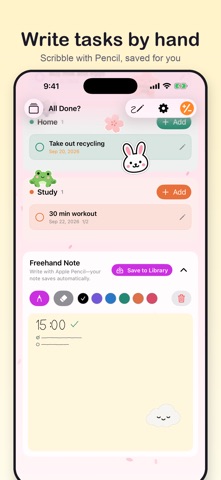
■ Tasks you write by hand
On iPad, just scribble with your Apple Pencil. The doodles from your meeting stay in the library as doodles; the tasks become tasks. There's also a free-writing pad that saves itself without you tapping save.
■ Tasks you say out loud
Driving, or hands full? Tap the mic and say it. What you say becomes the task. It works from Siri too, so you can get it down before you forget.
■ Decorate it like a journal
· 14 background themes: cream notebook, grid, cherry blossom, autumn leaves, rainy day, ocean, night sky…
· Animated backgrounds: snow that piles up on your cards, drifting petals, twinkling stars
· Your own color, or your own photo as the background
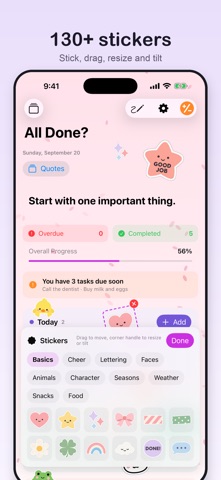
· Over 130 stickers: basics, cheer, lettering, faces, animals, seasons, weather, snacks. Stick, drag, resize and tilt
· A character peeks over each category, and cheers when you finish everything in it
■ Visible without opening
Today's tasks sit right on your Home Screen and Lock Screen widgets.
■ Built to keep today small
· Today's tasks and progress, grouped into your own categories
· Break big ones into subtasks, with a badge when they're all checked
· Repeat daily, on weekdays, weekly or monthly
· Due dates, with one reminder on the morning they're due
· Postpone to tomorrow straight from the reminder
· Undo a task you completed by mistake
· Built-in calculator
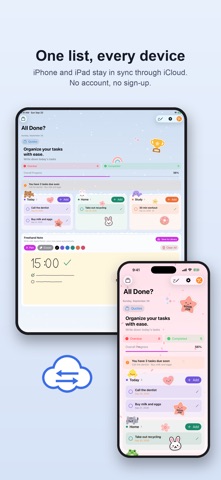
■ Your devices stay in step
Turn on iCloud and your iPhone and iPad see the same list. Your theme, characters and stickers follow you too.
■ Nothing is taken from you
There is no developer server. No account, no login, no ads, no analytics. What you write stays on your device and in your own iCloud.
■ Five languages
한국어 · English · 日本語 · 简体中文 · Tiếng Việt
■ What you get for free
· Two categories and five saved handwritten notes
· No limit on how many tasks you keep
· Five background themes and category characters
· For the first 7 days, every feature is open with no limits
■ Lifetime Unlock ($3.99)
Pay once and keep as many categories and handwritten notes as you like, plus every background theme, photo backgrounds and stickers. It is a one-time purchase, not a subscription. Anything you already made stays exactly where it is.
Go slowly, but keep going.