



AppBrain's verdict
Poorly rated- Rating on App Store
- 2.95
- 408 ratings
- Last updated
- June 19, 2026
- Size
- 6.35 MB
Users are critical: 3.0 stars from 408 ratings.
User feedback
Ratings and reviews on the App StoreComments on AllShare Cast ™ for iOS
We don't have enough comments to show example comments. Please check back later.
Store listing
By Min Seo Lee, from the App StoreDescription by Min Seo Lee Written by the developer, not by AppBrain. Click to read.
Key Features:
Instant Screen Mirroring:
Mirror your phone’s screen to your TV in real-time. With ultra-low latency, you can enjoy gaming, video calls, presentations, and more on a larger screen without interruptions. Screen mirroring is perfect for family gatherings, work meetings, or online learning—whatever you want to display, show it clearly and in high resolution.
Photo & Video Casting:
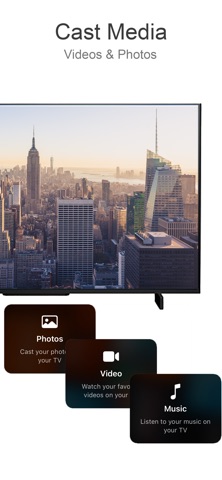
Bring your memories to life by casting your phone’s photos and videos directly to your TV. Relive family vacations, birthdays, and special events with vibrant clarity. With just a tap, share those moments with everyone in the room, no cables required.
Stream Online Content:
Take your favorite online videos and websites directly from your phone to the big screen. Browse through YouTube, Vimeo, and other video streaming platforms on your phone, and play content on your TV for an immersive experience. No need for separate apps or confusing setups—just select the content, cast, and enjoy.
Audio & Music Playback:
Fill the room with your favorite playlists by casting music from your phone to the TV. Connect to high-quality speakers for an immersive sound experience. Whether it’s for a workout, a family gathering, or relaxing alone, bring your music to life on larger speakers and experience every beat.
Easy Remote Control:
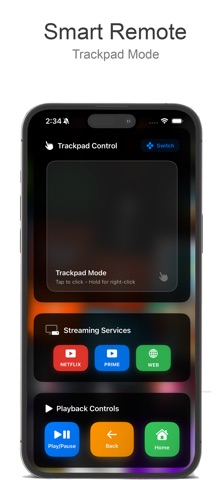
Use your phone as a remote to control your TV’s settings, such as adjusting volume, navigating apps, and more. This feature eliminates the need for additional remotes and keeps everything accessible from your phone, making it simpler to find what you want and enjoy your content uninterrupted.
Seamless Connectivity with Multiple Devices:
Our app supports various devices and TV brands, including Samsung, Roku, LG, Sony, Chromecast, and more. Connect with ease and switch between devices as you need. With universal compatibility, our app ensures you can use it with any major TV brand without hassles.
Web Content Projection:
Enjoy the convenience of browsing the internet from your phone and displaying it on the TV. Read news articles, view recipes while cooking, watch tutorials, or explore websites with family and friends. The bigger screen means everyone can see and enjoy the content at the same time.
How It Works:
Connect to the Same Wi-Fi Network:
Ensure both your phone and TV are connected to the same Wi-Fi network to enable fast and secure connectivity.
Select Your Media:
Choose photos, videos, music, or online content from your phone to cast.
Cast with a Single Tap:
Tap the cast icon, select your TV, and enjoy your content on the big screen instantly.
Ideal For:
Family Gatherings:
Share photos and videos with everyone in the room, bringing family memories to life on the big screen.
Gaming Enthusiasts:
Get a bigger view for mobile gaming, with minimal lag and better visuals, so you can immerse yourself in the gameplay.
Business & Education:
Use the screen mirroring function for presentations, educational content, or virtual meetings, making it easy to collaborate with others and share visual aids.
Movie Nights & Streaming Enthusiasts:
Turn any night into movie night by streaming your favorite films, series, and videos from your phone to the TV, creating a cinematic experience right at home.
Terms of Use: https://byvn.net/Kw6q
Privacy Policy: https://byvn.net/64yQ
Safety and technology
Found in the app by AppBrain- Price
- Free
- App size
- 6.35 MB
- Content rating
- Everyone
Technologies used by AllShare Cast ™
Releases
Updates seen on the App Store- Version
- 2.2
- Launched
- October 2024
No changelog data
Alternatives
Similar apps and more from Min Seo LeeAlternatives to AllShare Cast ™





Rankings
App Store top chartsApp Store Rankings for AllShare Cast ™
About the app and developer
About AllShare Cast ™
AllShare Cast ™ is an entertainment app developed by Min Seo Lee.
What is the rating of AllShare Cast ™?
AllShare Cast ™ is rated 2.95 out of 5 stars, based on 410 ratings.
Is AllShare Cast ™ free?
AllShare Cast ™ is free. The app size is 6.35 MB. The latest version available is 2.2. The last update was on June 19, 2026.
What are the requirements for AllShare Cast ™?
The app has a content rating of Everyone. The app has been available on the App Store since October 2024.
AllShare Cast ™ is made and published by Min Seo Lee. AppBrain is an independent app data site and isn't affiliated with Min Seo Lee. The app name, icon, screenshots and description belong to Min Seo Lee and are shown as published on the App Store.
Developer information for Min Seo Lee
Address:
Frequently asked questions about AllShare Cast ™
Is AllShare Cast ™ free?
Yes. AllShare Cast ™ is free on the App Store.
Is AllShare Cast ™ still available?
Yes. AllShare Cast ™ is on the App Store, and the last update we saw was on June 19, 2026.
How large is AllShare Cast ™?
AllShare Cast ™ is 6.35 MB.
Is AllShare Cast ™ suitable for children?
App Store rates the content of AllShare Cast ™ as suitable for everyone.
How do people rate AllShare Cast ™?
AllShare Cast ™ scores 2.95 out of 5 stars, from 408 ratings on the App Store.
Who made AllShare Cast ™?
AllShare Cast ™ was developed by Min Seo Lee. It is listed in the entertainment category on the App Store.
What are the best alternatives to AllShare Cast ™?
People looking at AllShare Cast ™ also look at these entertainment apps: N Controller, Play Games on TV, Air Mirror: Smart TV & Console, Screen Mirroring - TV Cast, KMPlayer, A View From My Seat.