

Always On Top - PDF/Web/Images
Always On Top - PDF/Web/Images is made and published by Kunliang Wu. AppBrain is an independent app data site and isn't affiliated with Kunliang Wu. The app name, icon, screenshots and description belong to Kunliang Wu and are shown as published on the App Store.
AppBrain's verdict
- Last updated
- September 15, 2025
Rankings
App Store top chartsApp Store Rankings for Always On Top - PDF/Web/Images
Competitors
Similar apps and more from Kunliang WuMore from Kunliang Wu




Releases
Updates seen on the App Store- Version
- 2025-09-13
- Launched
- June 2025
No changelog data
User feedback
Ratings and reviews on the App StoreComments on Always On Top - PDF/Web/Images for iOS
We don't have enough comments to show example comments. Please check back later.
Technology
Found in the app by AppBrain- Price
- Free
- App size
- 2.29 MB
- Content rating
- Everyone
Technologies used by Always On Top - PDF/Web/Images
About the app and developer
About Always On Top - PDF/Web/Images
Always On Top - PDF/Web/Images is a lifestyle app developed by Kunliang Wu.
What is the rating of Always On Top - PDF/Web/Images?
Always On Top - PDF/Web/Images has no ratings yet.
Is Always On Top - PDF/Web/Images free?
Always On Top - PDF/Web/Images is free. The app size is 2.29 MB. The latest version available is 2025-09-13. The last update was on September 15, 2025.
What are the requirements for Always On Top - PDF/Web/Images?
The app has a content rating of Everyone. The app has been available on the App Store since June 2025.
Developer information for Kunliang Wu
Address:
Frequently asked questions about Always On Top - PDF/Web/Images
Is Always On Top - PDF/Web/Images free?
Yes. Always On Top - PDF/Web/Images is free on the App Store.
Is Always On Top - PDF/Web/Images still available?
Yes. Always On Top - PDF/Web/Images is on the App Store, and the last update we saw was on September 15, 2025.
How large is Always On Top - PDF/Web/Images?
Always On Top - PDF/Web/Images is 2.29 MB.
Is Always On Top - PDF/Web/Images suitable for children?
App Store rates the content of Always On Top - PDF/Web/Images as suitable for everyone.
Who made Always On Top - PDF/Web/Images?
Always On Top - PDF/Web/Images was developed by Kunliang Wu. It is listed in the lifestyle category on the App Store.
Store listing
By Kunliang Wu, from the App Store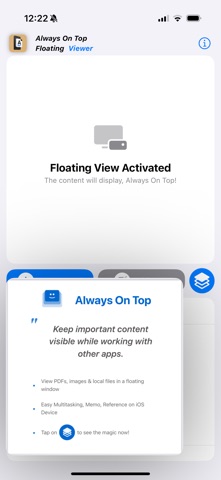


Description by Kunliang Wu Written by the developer, not by AppBrain. Click to read.
- Are you constantly switching between apps on your iPhone or iPad, just to reference an important PDF, image, or web page?
- Always On Top - PDF/Web/Images redefines multitasking for iOS, allowing you to keep essential content visible in a floating, resizable window, no matter what other app you're using.
- Get the true Always On Top iPhone and Always On Top iPad experience!
▣ Seamless Multitasking with Picture-in-Picture:
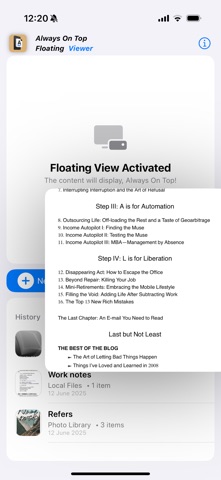
- Float Your Content: Simply tap the "Always On Top" button to instantly put your selected PDF, image, web page, or even local video into a convenient picture-in-picture style floating window.
- Work Uninterrupted: Whether you're typing an email, browsing the web, creating a document, or working in any other app, your reference material stays visible, ensuring you never lose your flow.
- Any Content, Anywhere: View crucial study notes, reference photos, important document details, or even follow a guide from a webpage – all without the frustration of constant app switching.
▣ Key Features:
- Versatile Content Support: Easily add and view PDFs, various image formats, web content, and local videos in your floating window.
- Effortless Content Addition:
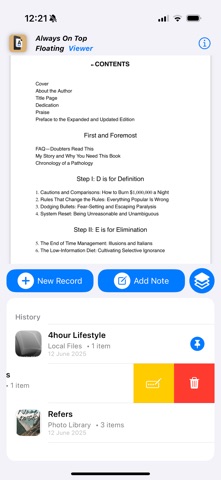
- New Record: Quickly import files from your device's local storage or directly from your Photo Library.
- Web Viewer: Input URLs to browse and reference web pages seamlessly within the app.
- Intuitive Floating Window Controls: Freely resize and reposition your floating content window to fit your workflow and screen perfectly.
- Organized History: All your recently viewed and added content is saved in a convenient history section on the main screen. Easily tap to reopen, swipe left to rename, or delete records.
- Boost Your Productivity: Ideal for students, professionals, creatives, or anyone who needs quick, continuous access to information while working on other tasks.
Always On Top - PDF/Web/Images is designed to make your iOS experience more efficient and productive. Stop juggling apps and start truly multitasking!
Download Always On Top today and transform the way you work!
▣ The Perfect "Always On Top for iOS" Tool For Everyone:
- For Students & Researchers: Keep your research papers, PDF textbooks, and lecture notes perpetually visible while you write your essay in another app. Always On Top for iOS is your ultimate study partner.
- For Professionals & Analysts: Cross-reference spreadsheets, reports, and live web data without ever leaving your primary work app. Make informed decisions faster and with greater accuracy.
- For Artists & Designers: Keep your mood board, reference images, or color palettes floating above your favorite design application. Fuel your creativity without ever breaking your artistic flow.
- For Developers & Coders: View crucial documentation, API guides, or forum solutions on a webpage while you write code in your preferred editor.
▣ Try it Free now!
Always On Top - PDF/Web/Images is designed to make your iOS experience more efficient and productive. Stop juggling apps and start truly multitasking with Always On Top for iPhone and iPad!
Download Always On Top today and transform the way you work on iOS!