Angle Finder: Inclinometer is an utilities app developed by LEAN ASIA CO., LTD.
User Ratings
The app has no ratings yet.
App Information
Angle Finder: Inclinometer is freely available from the App Store. The app size is 3.27 MB. The latest version available is 1.1. The last update was on September 3, 2026.
Technical Requirements
The app has a content rating of Everyone. The app has been available on the App Store since May 2026.
Description by LEAN ASIA CO., LTD(from the App Store)
Is the shelf actually level? Set your phone on it and know in two seconds. Angle Finder turns the motion sensor into a spirit level, inclinometer and plumb tool: a round bubble for surfaces, a plumb readout for walls and posts, and slope in degrees, percent or millimetres per metre.
It reads gravity through CoreMotion's fusion filter — not raw accelerometer noise — so the number settles fast and stays put. Lay the phone flat and you get the bubble; stand it on an edge against a door frame and it switches to plumb mode on its own, because those are two different measurements and the app knows which one you need.
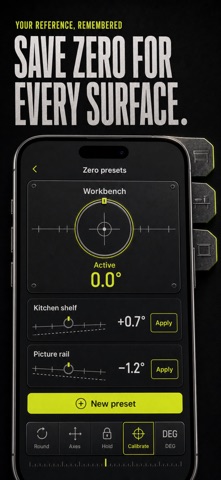
WHAT YOU GET • Set the phone on the shelf and watch the bubble drift to the high corner — nudge the shim until it sits dead centre • Stand the phone against a stud, post or picture frame and read exactly how many degrees to rotate to plumb • Read slope your way: 1.2°, 2.1% or 21 mm/m — the fall your drain or ramp needs, straight off the dial • Tap Hold with the phone pressed under a joist, pull it out, and read the frozen number in the light • Zero against a surface you trust, so a slightly tilted bench stops polluting every reading after it • A haptic tick the instant you hit level, so your eyes stay on the picture wire, not the screen
PERFECT FOR • Renters hanging pictures, mirrors and floating shelves without a second pair of hands • DIY TV mounting — check the bracket is level before you drill, plumb after • Carpenters and site work: pitch and roll at once, ratio rise, mm-per-m fall • RV and trailer campers levelling the rig before the fridge complains
WHY NOT JUST THE BUILT-IN MEASURE APP? Apple's level shows one view in one unit. It has no slope percent, no mm/m, no hold button, no zero calibration, no haptic level alert and no target fall. The moment you need "2% towards the drain" instead of "roughly flat", it is out of its depth.
PRIVATE BY DEFAULT Every reading comes from the motion sensor, on the device. No account, no location, no tracking, no data leaving your phone.
FULL ACCESS Full Access unlocks the repeat-work tools: saved zero presets (zero against a bench, a jig, a van floor — and switch between them without re-zeroing) and target angle mode, which shows your distance from a chosen fall like 2% for a drain instead of distance from level. Choose a weekly or yearly auto-renewing subscription, or a one-time lifetime purchase.
Put your phone on the surface and find out what "level" really looks like.
Terms of Use: https://leanstudio.asia/terms-of-use Privacy Policy: https://leanstudio.asia/privacy-policy Support: support@leanstudio.asia
Each subscription will automatically renew 3 days before the expiration date for
the same time period. Subscriptions can be cancelled at any time before the renewal.