Download Android Apps and Games
AppBrain
  • Apps
  • Apps being viewed right now Trending apps today Most popular apps All-time most downloaded apps Top rated apps
  • Intelligence ▾
    Intelligence overview → Track any Android app or your whole market
    Track & analyze
    Keyword Tracker & OptimizerTrack & improve Play rankings App Performance ReportOne-off PDF for any app StatisticsFree Android & Play market stats
    Promote your app
    Featured Apps App Links
  • Intelligence
  • Pricing
  • Dashboard
  • Sign up
  • Log in
Last updated on: 2026-06-26
App Store Apps > Productivity > Annotate: Screenshot Markup
Annotate: Screenshot Markup icon

Annotate: Screenshot Markup

1.6
Timo Josten
5.00
1 reviews
Free

Annotate: Screenshot Markup Screenshot 1 of 8
Annotate: Screenshot Markup Screenshot 2 of 8
Annotate: Screenshot Markup Screenshot 3 of 8
Annotate: Screenshot Markup Screenshot 4 of 8
Annotate: Screenshot Markup Screenshot 5 of 8
Annotate: Screenshot Markup Screenshot 6 of 8
Annotate: Screenshot Markup Screenshot 7 of 8
Annotate: Screenshot Markup Screenshot 8 of 8
Download from the App Store

About Annotate: Screenshot Markup

Annotate: Screenshot Markup is an overall app developed by Timo Josten.

Download Statistics

User Ratings

Annotate: Screenshot Markup is rated 5.00 out of 5 stars. The rating is based on one rating ratings.

App Information

Annotate: Screenshot Markup is FREE to download. The APK download size is 34.05 MB. The latest version available is 1.6. The last update was on June 22, 2026.

Technical Requirements

The app has a content rating of Everyone. The app has been available on Google Play 6 weeks ago.

Description
Annotate helps you quickly mark up screenshots and images with clean, readable shapes and text - built for fast, polished results on iPhone and iPad.

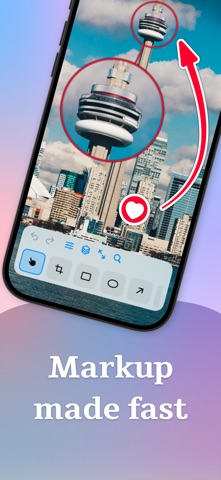
• 16 tools: Crop, Blur, Pixelate, Text, Number, Stamp, Rect, Oval, Arrow, Pen, Marker, Highlight, Loupe, Backdrop, Image, Watermark
• Clean shapes and highlights, plus freehand pen and marker
• Text with font, size, alignment, and optional background
• Number badges and SF Symbols stamps (with search)
• Blur or pixelate areas, and use a loupe to magnify details
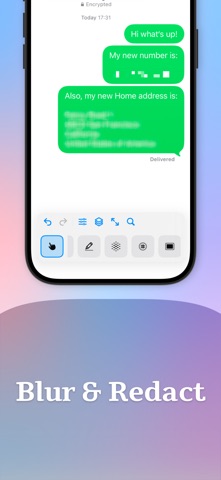
• Auto-Redact: detect and hide sensitive info in one tap - credit cards, phone numbers, emails, license plates, and faces
• Full control over style: stroke width, fill, outlines, shadow, opacity, configurable arrowheads, and more
• ∞ Layers: one layer per annotation - select, reorder, and delete
• Helpful extras: snapping for neat alignment, undo/redo, zoom to fit/100%
• Apple Pencil ready - palm rejection kicks in automatically so the Pencil draws while your fingers still pan and pinch
• Grow the canvas - add space on any edge to make room for callouts and shapes
• Backdrop styles - frame your screenshot with gradients or solid colors, and choose whether the backdrop pads the canvas or fits inside it
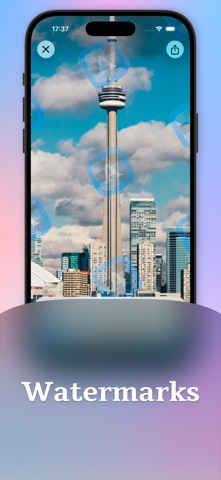
• Watermark - add text or a logo across the whole image (tiled) or in a corner to brand and protect your work
• Templates - save a set of annotations, backdrop, and watermark, then reapply them to any image; positions adapt to the new aspect ratio
• Start from Photos, Files, clipboard, or a blank canvas - or pick an iOS device preset (iPhone 17, iPad Pro, etc.)
• Export and share fast (PNG, JPEG, or HEIC)
• Shortcuts - run Auto-Redact and Framing from the Shortcuts app, Spotlight, and Siri

Test free for the first 5 annotated images.

Annotate is brought to you by the developer of Dropshare - the file sharing app for macOS and iOS.
Show more Show less

More data about Annotate: Screenshot Markup

Price Free to download
Rating 5.00 based on a single rating
Ranking Not ranked
Version 1.6
App download size 34.0 MB
Suitable for Everyone

More from Timo Josten

Dropshare - File Sharing Tool icon Dropshare - File Sharing Tool
Timo Josten
4.1
Free
64 ratings
Shortshare icon Shortshare
Timo Josten
4.3
$6.99
9 ratings
Pretty Screenshots icon Pretty Screenshots
Timo Josten
4.5
$0.99
4 ratings

Changelog of Annotate: Screenshot Markup

No changelog data

Developer information for Timo Josten

Timo Josten

Address:

Share Annotate: Screenshot Markup

Comments on Annotate: Screenshot Markup for iOS

We don't have enough comments to show example comments. Please check back later.

App Store Rankings for Annotate: Screenshot Markup

This app is not ranked

Technologies used by Annotate: Screenshot Markup

Apps other people are watching Apps on sale Today's trending apps Top new apps Popular Overall
More hot apps 🔥

Back to top
AppBrain Intelligence premium content

Subscribe now to get full and unlimited access to AppBrain Intelligence. You'll have access to:

  • App Intelligence dashboard (performance timeline, competitor comparison, country rankings, insight cards)
  • Detailed ranking data per app
  • Full timeline per developer
  • Device market shares data per country
1 Month

$75/mo
(billed every month)

SAVE 0%
Subscribe
3 Months

$65/mo
($195 billed every 3 months)

SAVE 13%
Subscribe
1 Year

$57.50/mo
($690 billed every year)

SAVE 23%
Subscribe
Each subscription will automatically renew 3 days before the expiration date for the same time period. Subscriptions can be cancelled at any time before the renewal.

AppBrain is a directory focused on discovering great apps and games. We give statistics, rankings and search options that Google Play and the App Store don't have. All trademarks are owned by their respective owners. AppBrain doesn't offer APKs or binaries, and always lets users install the official version from Google Play or the App Store.

More apps

  • Top Android apps being viewed
  • DecodeChess: Analyze & Explain
  • Learn Sicilian
  • Hive: Companion for Fallout 4

Android Statistics

  • Android statistics
  • Google Play Developer stats
  • Trending Android Apps
  • Top popular Apps
  • Buy the best Android phone

About AppBrain

  • Contact
  • Privacy
  • Documentation
  • DMCA takedowns
  • Articles
  • Blog
  • How to improve the earnings of your ad units
© 2010-2026 - AppBrain