

AnyMP4 DVD Ripper Pro
AnyMP4 DVD Ripper Pro is made and published by iColorfulsoft. AppBrain is an independent app data site and isn't affiliated with iColorfulsoft. The app name, icon, screenshots and description belong to iColorfulsoft and are shown as published on the App Store.
AppBrain's verdict
- Last updated
- September 11, 2026
Rankings
App Store top chartsApp Store Rankings for AnyMP4 DVD Ripper Pro
Competitors
Similar apps and more from iColorfulsoftMore from iColorfulsoft




Releases
Updates seen on the App Store- Version
- 6.3.33
- Launched
- August 2013
No changelog data
User feedback
Ratings and reviews on the App StoreComments on AnyMP4 DVD Ripper Pro for iOS
We don't have enough comments to show example comments. Please check back later.
Technology
Found in the app by AppBrain- Price
- $24.99
- App size
- 141.8 MB
- Content rating
- Everyone
Technologies used by AnyMP4 DVD Ripper Pro
About the app and developer
About AnyMP4 DVD Ripper Pro
AnyMP4 DVD Ripper Pro is a photo & video app developed by iColorfulsoft.
User Ratings
The app has no ratings yet.
App Information
AnyMP4 DVD Ripper Pro costs $24.99. The app size is 141.77 MB. The latest version available is 6.3.33. The last update was on September 11, 2026.
Technical Requirements
The app has a content rating of Everyone. The app has been available on the App Store since August 2013.
Developer information for iColorfulsoft
Address:
Frequently asked questions about AnyMP4 DVD Ripper Pro
Is AnyMP4 DVD Ripper Pro free?
No. AnyMP4 DVD Ripper Pro costs $24.99 on the App Store.
Is AnyMP4 DVD Ripper Pro still available?
Yes. AnyMP4 DVD Ripper Pro is on the App Store, and the last update we saw was on September 11, 2026.
How large is AnyMP4 DVD Ripper Pro?
AnyMP4 DVD Ripper Pro is 141.77 MB.
Is AnyMP4 DVD Ripper Pro suitable for children?
App Store rates the content of AnyMP4 DVD Ripper Pro as suitable for everyone.
Who made AnyMP4 DVD Ripper Pro?
AnyMP4 DVD Ripper Pro was developed by iColorfulsoft. It is listed in the photo & video category on the App Store.
Store listing
By iColorfulsoft, from the App Store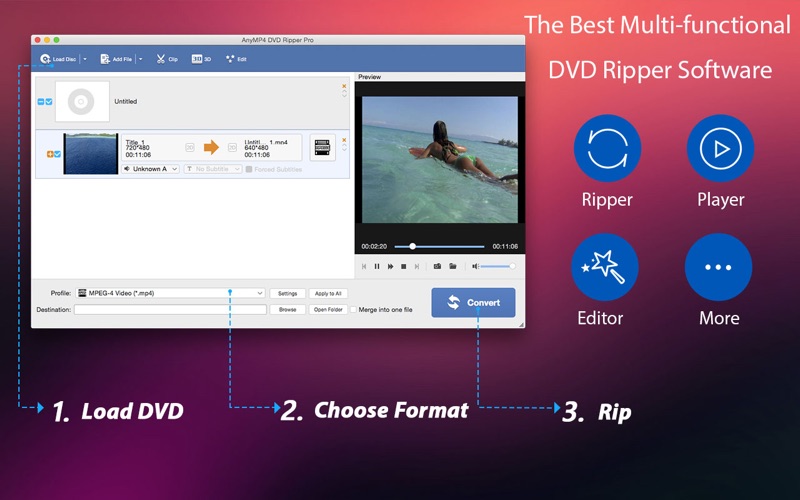


Description by iColorfulsoft Written by the developer, not by AppBrain. Click to read.
Want you to rip home DVD and convert videos simultaneously? Want you to convert home DVD and videos in batch? Want you get different formats at the same time? If so, AnyMP4 DVD Ripper Pro can help you do all. With the powerful DVD Converting App, you can not only extract video files from a home DVD disc, but also convert the DVD movie to any popular video/audio formats like MP4, MOV, M4V, MKV, AVI, WMV, FLV, MP3, etc. After ripping, you can enjoy the DVD movies on any video/music players.
Of course, don't ignore the excellent editing features of this App. This fabulous DVD Ripping software owns multiple creative editing functions including Effect, Trim, Crop, Merge and Watermark to perfect the video. In addition, you are able to customize the video and audio settings to get the perfect audio visual effect. With the newest converting technology, the whole converting process would be completed just in quiet short time. The following is the detailed introduction of this professional DVD Ripper.
1. Rip home DVD and convert video to MP4/MOV/MKV/FLV/M4V, etc.
* Rip home DVD to any format video/audio
The fantastic DVD Converter owns the powerful function to convert home DVDs to MP4, MOV, AVI, WMV, MKV, FLV, M4V and HD video like HD MP4, HD AVI, HD MKV, HD WMV, etc. with unmatchable speed and incredible quality. Also, users can take out the audio files from the home DVD and convert to AAC, AIFF, ALAC, MP3, M4A, and WAV according to their needs.
* Support various digital devices
The converted DVDs can play on various digital devices for your enjoyment.
2. Edit your DVD movie before ripping it
* Provide you multiple video editing features
This DVD Ripping Software is equipped with many creative and practical editing features for you to customize the output video. It will help you adjust the video effect, trim the video length, join several video clips into a new file and add text/image watermark to the video as you like.
* Set output parameters
In the “Profile Settings” window, this powerful DVD Convert App enables you to adjust the video and audio settings. The video settings like video resolution, video bitrate, frame rate, video encoder and aspect ratio are adjustable to meet your needs. Also, you can modify the audio settings, including channels, sample rate, encoder and bitrate at will.
3. User-friendly and easy-to-use
* Preview and snapshot
With a built-in player, this DVD Ripping software shows you the obvious difference between the source and output video effect. When previewing, click the “Snapshot” button to capture your favorite video images and save them on your hard drive for later use.
* Batch conversion
With the help of this DVD Ripper, it’s so easy to get multiple video formats at one conversion. Also, the remarkably initial and user-friendly interface makes the conversion process effortless.
Please note: Apps sold on App Store are not allowed to rip copyright protected DVDs.
*** It works with OS X 10.7 or later! ***
Need help? Please contact us via https://www.anymp4.com/app-store/contact.html and you will receive a reply within 24 hours.
If you love this app, do not hesitate to leave a review.