

App Locker – Limit & Protect
App Locker – Limit & Protect is made and published by 恒盛 程. AppBrain is an independent app data site and isn't affiliated with 恒盛 程. The app name, icon, screenshots and description belong to 恒盛 程 and are shown as published on the App Store.
AppBrain's verdict
- Rating on App Store
- 5.00
- 2 ratings
- Last updated
- April 10, 2026
It doesn't have enough ratings yet to judge what users think.
Rankings
App Store top chartsApp Store Rankings for App Locker – Limit & Protect
Competitors
Similar apps and more from 恒盛 程More from 恒盛 程





Releases
Updates seen on the App Store- Version
- 1.3.8
- Launched
- September 2025
No changelog data
User feedback
Ratings and reviews on the App StoreComments on App Locker – Limit & Protect for iOS
We don't have enough comments to show example comments. Please check back later.
Technology
Found in the app by AppBrain- Price
- Free
- App size
- 18.1 MB
- Content rating
- Everyone
Technologies used by App Locker – Limit & Protect
About the app and developer
About App Locker – Limit & Protect
App Locker – Limit & Protect is an utilities app developed by 恒盛 程.
What is the rating of App Locker – Limit & Protect?
App Locker – Limit & Protect is rated 5.00 out of 5 stars, based on 2 ratings.
Is App Locker – Limit & Protect free?
App Locker – Limit & Protect is free. The app size is 18.11 MB. The latest version available is 1.3.8. The last update was on April 10, 2026.
What are the requirements for App Locker – Limit & Protect?
The app has a content rating of Everyone. The app has been available on the App Store since September 2025.
Developer information for 恒盛 程
Address:
Store listing
By 恒盛 程, from the App Store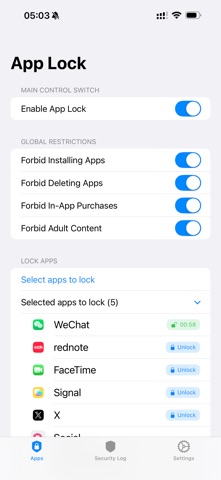

Description by 恒盛 程 Written by the developer, not by AppBrain. Click to read.
【App Lock】provides convenient and secure privacy protection for your device, adding an extra layer of access protection to your frequently used apps.
Key Features:
- App Locking & Access Protection
- Set independent passwords for chats, galleries, messages, and other frequently used apps.
- Customize protection scope to allow authorized access only.
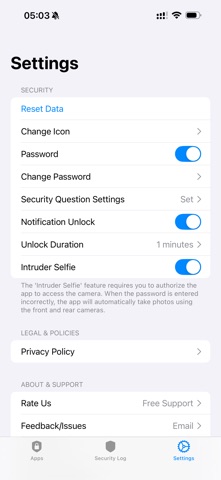
- Security Protection Mechanisms
- Intruder Photo Capture: Records unauthorized unlock attempts when incorrect passwords are entered consecutively.
- Password Protection: Supports security questions for safe password recovery.
- Parental Control Mode
- Helps manage children's app usage time and scope.
- Reduces accidental operations and unnecessary app access.
- Local Privacy Data Storage
- All settings and records are saved locally on your device.
- No personal privacy content is uploaded, protecting your data security.
Perfect For:
- Protecting chat history and private photos
- Adding extra protection for payment apps
- Managing children's device usage habits
- Safeguarding work-related content
Experience 【App Lock】today and make privacy protection simple.