

Applimaths CP
Applimaths CP is made and published by Éditions JOCATOP. AppBrain is an independent app data site and isn't affiliated with Éditions JOCATOP. The app name, icon, screenshots and description belong to Éditions JOCATOP and are shown as published on the App Store.
AppBrain's verdict
Established- Rating on App Store
- 1.00
- 1 ratings
- Last updated
- April 30, 2026
It doesn't have enough ratings yet to judge what users think.
Rankings
App Store top chartsApp Store Rankings for Applimaths CP
Competitors
Similar apps and more from Éditions JOCATOPAlternatives to Applimaths CP








More from Éditions JOCATOP


Releases
Updates seen on the App Store- Version
- 1.3.5
- Launched
- October 2021
No changelog data
User feedback
Ratings and reviews on the App StoreComments on Applimaths CP for iOS
We don't have enough comments to show example comments. Please check back later.
Technology
Found in the app by AppBrain- Price
- Free
- App size
- 142.0 MB
- Content rating
- Everyone
Technologies used by Applimaths CP
About the app and developer
About Applimaths CP
Applimaths CP is an education app developed by Éditions JOCATOP.
What is the rating of Applimaths CP?
Applimaths CP is rated 1.00 out of 5 stars, based on one rating ratings.
Is Applimaths CP free?
Applimaths CP is free. The app size is 141.98 MB. The latest version available is 1.3.5. The last update was on April 30, 2026.
What are the requirements for Applimaths CP?
The app has a content rating of Everyone. The app has been available on the App Store since October 2021.
Developer information for Éditions JOCATOP
Address:
Frequently asked questions about Applimaths CP
Is Applimaths CP free?
Yes. Applimaths CP is free on the App Store.
Is Applimaths CP still available?
Yes. Applimaths CP is on the App Store, and the last update we saw was on April 30, 2026.
How large is Applimaths CP?
Applimaths CP is 141.98 MB.
Is Applimaths CP suitable for children?
App Store rates the content of Applimaths CP as suitable for everyone.
How do people rate Applimaths CP?
Applimaths CP has one rating of 1.00 stars on the App Store.
Who made Applimaths CP?
Applimaths CP was developed by Éditions JOCATOP. It is listed in the education category on the App Store.
What are the best alternatives to Applimaths CP?
People looking at Applimaths CP also look at these education apps: Maths Primaire Primval, iEducatif, Les Petits Bilingues, Mots outils pour CP et CE1, EduKids Ecole Primaire.
Store listing
By Éditions JOCATOP, from the App Store


Description by Éditions JOCATOP Written by the developer, not by AppBrain. Click to read.
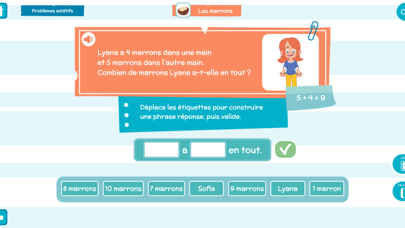
Cette application a pour vocation de faire comprendre aux élèves de CP les 6 grandes étapes pour résoudre un problème :
- la reformulation du problème avec ses propres mots ;
- la compréhension de l’énoncé ;
- la manipulation ;
- l’opération à poser ;
- le calcul du résultat ;
- la phrase réponse.
Pour cela, elle propose 40 « problèmes pas à pas » à résoudre en passant par ces 6 étapes (10 situations-problèmes par grands types d’opérations : addition, soustraction, multiplication et partage).
Ces 40 problèmes sont ensuite déclinés avec de nouvelles données dans une rubrique « Problèmes d’entrainement » afin de permettre aux élèves de s’entrainer au raisonnement et au calcul sur des énoncés familiers.
Contenu
Applimaths niveau CP propose une banque de 440 problèmes progressifs :
- 110 problèmes additifs (10 problèmes de base + 10 versions déclinées de chacun) ;
- 110 problèmes soustractifs (10 problèmes de base + 10 versions déclinées de chacun) ;
- 110 problèmes multiplicatifs (10 problèmes de base + 10 versions déclinées de chacun) ;
- 110 problèmes de partage (10 problèmes de base + 10 versions déclinées de chacun).
Utilisation
2 modes d’utilisation sont proposés :
• Mode libre : pour permettre à l’élève de s’exercer librement.
• Mode élève : les résultats sont enregistrés et peuvent être analysés par l’enseignant.
Menu enseignant
Le menu enseignant permet de modifier les paramètres de l’application :
- sélection du type de problème (additif, soustractif, multiplicatif ou de partage) ;
- sélection des étapes à résoudre.
Les paramètres sonores (lecture des consignes, des problèmes, des phrases réponse) peuvent aussi être modifiés.
Le menu enseignant permet également de gérer les résultats des élèves : création de groupe, accès aux bilans individuels pour chaque exercice, étape par étape.